We previously learned how to run operations with Polyaxonfiles hosted on GitHub using the --url argument.
During rapid development, users may want to iterate on their code and submit operations with those changes.
In this section, we will learn how to initialize a local folder and integrate it with a public repository or a private repository through a Git connection.
Note: To integrate your local code with the CLI, please check the previous section of this guide.
Open Polyaxon quick-start
If you completed the previous guide, continue from the polyaxon-quick-start repository root.
Starting here directly? Clone the quick-start repository outside the polyaxon-basics directory, enter its root, and initialize that directory with the quick-start project:
git clone https://github.com/polyaxon/polyaxon-quick-start.git
cd polyaxon-quick-start
polyaxon init -p quick-start --polyaxonignore
There is one Polyaxonfile under scheduling/git-integration. It is the same as the simple.yaml file used earlier under scheduling; the only difference is that this version does not include an init section.
version: 1.1
kind: component
name: experiment-with-git
description: Example with git integration
tags: [examples]
run:
  kind: job
  container:
    image: polyaxon/polyaxon-quick-start
    workingDir: "{{ globals.artifacts_path }}/polyaxon-quick-start/scheduling"
    command: [python3, model.py]
Add a Git preset
Instead of hard-coding an init section as in the previous sections of this quick-start tutorial, initialize this local path with a Git integration that the CLI can apply automatically to our Polyaxonfiles.
The init command accepts both --git-connection and --git-url. A private repository requires a configured Git connection.
With a private repository, pass a valid
--git-connection. You can also override that connection's default repository with--git-url.
This tutorial uses a public GitHub repository that does not require a Git connection. Add its URL to the existing repository-root configuration:
polyaxon init --git-url=https://github.com/polyaxon/polyaxon-quick-startThis creates polyaxongit.yaml in the current directory:
git:
  url: https://github.com/polyaxon/polyaxon-quick-start
The command does not replace the project context in .polyaxon/.project. It adds the Git preset used by --git-preset. Delete polyaxongit.yaml when you no longer want this directory to provide that preset.
Schedule the current Git revision
The Git preset detects the current revision of the repository and adds it to the operation. When using your own repository, commit and push your changes before submitting the operation so the Agent (compute cluster) can pull that revision.
polyaxon run -f scheduling/git-integration/simple.yaml --git-presetEach time you commit and push a new revision, the next run with --git-preset uses that revision. Pass --git-revision to select a specific commit, branch, tag, or other tree-ish instead.
Inspect the Git lineage
Open the run in the UI and select Lineage > Artifacts. The code reference records the repository URL and exact commit injected by --git-preset:
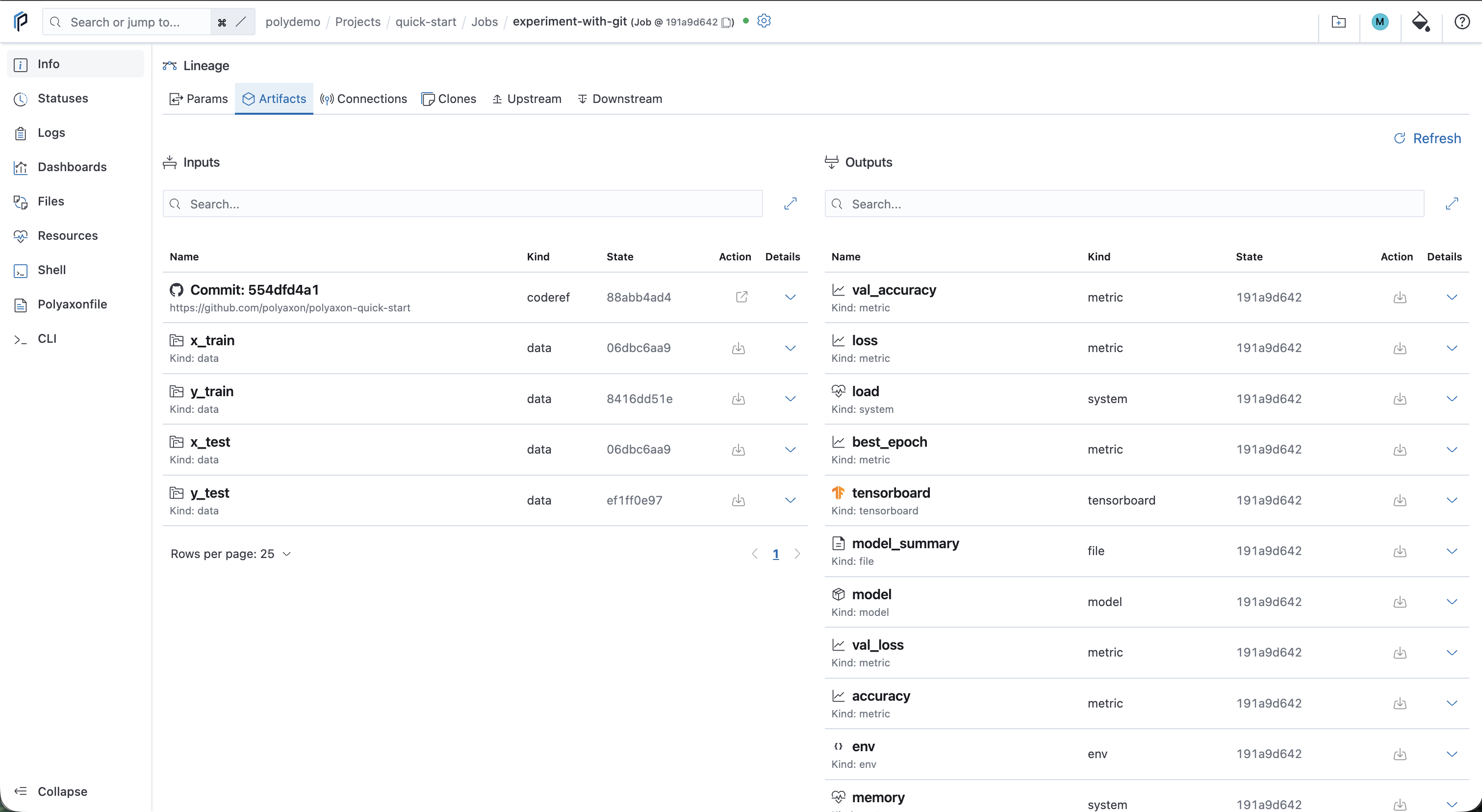
Unlike the local-code run, this run records a Git commit instead of an uploaded directory.
Scheduling experiments with specific commits or branches
We can also schedule experiments with a specific git commit, a specific branch, or a valid tree-ish with --git-revision:
polyaxon run -f scheduling/git-integration/simple.yaml --git-preset --git-revision="dev"