ML Experiment Tracking: What to Log and How to Compare Runs
Learn what to record for each ML experiment, how to compare runs fairly, and how to log parameters, metrics, datasets, and model artifacts with Polyaxon.
Machine learning experiment tracking records the inputs, configuration, results, and artifacts of each run. It lets you answer three practical questions: what changed, whether the result improved, and which model file produced that result.
For example, two training runs may report different validation scores because you changed the learning rate, the dataset, or the evaluation code. Recording only the score cannot distinguish those explanations. This guide provides a tracking checklist, a Polyaxon logging example, and a workflow for comparing runs on the same basis.
What is experiment tracking?
An experiment tests an idea, such as whether a different preprocessing step improves a classifier. A run is one execution of the training or evaluation program. Several runs can belong to the same experiment, including different hyperparameters, repeated random seeds, and failed attempts.
Tracking connects each run's configuration to its measurements and saved outputs. Experiment management adds the surrounding work: organizing runs, searching their metadata, comparing candidates, and handing a selected model to the next stage.
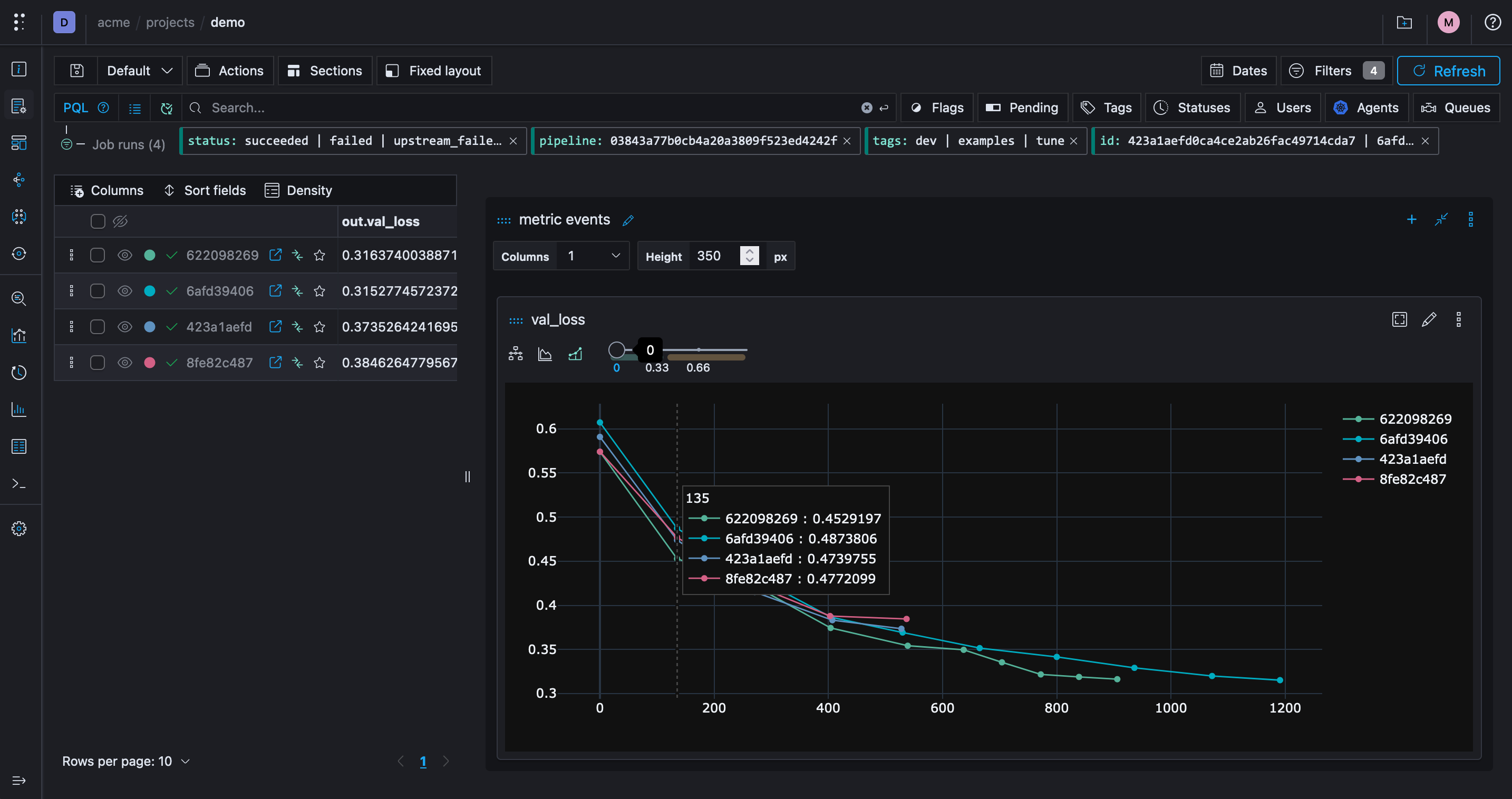
What should you log for each ML experiment?
Start with the information needed to explain a result and rerun its recipe. The exact fields depend on your model and evaluation task.
| Record | What to capture | Why it matters |
|---|---|---|
| Run identity and outcome | Run ID, experiment label, timestamps, status, and failure details | Keeps successful, failed, and interrupted attempts distinguishable |
| Code and environment | Source revision, dependency versions, container image digest, and relevant hardware | Identifies the program and runtime that produced the result |
| Dataset and split | Retained dataset revision or manifest, preprocessing revision, and train/validation split identity | Prevents comparisons across silently changed inputs |
| Parameters | Model settings, learning rate, batch size, random seed, and training budget | Records what you deliberately varied and what stayed fixed |
| Metrics and evaluation | Metric name, value, step, evaluation revision, and relevant slice-level results | Makes learning curves and final results interpretable |
| Artifacts | Model checkpoints, preprocessing assets, evaluation reports, and example predictions | Connects a score to the files a teammate can inspect or use |
A seed and a source revision alone do not guarantee identical results across different hardware or library versions. Keep enough context to identify those differences, and use repeated runs when assessing whether a hyperparameter improvement survives different seeds.
What is a machine learning metadata store?
A metadata store retains the records and relationships behind your experiments: which dataset a run consumed, which settings it used, and which model it produced. The model and dataset bytes may live in a separate artifact or object store. A model registry then provides named versions for selected models; it serves a different purpose from logging every training attempt.
The ML metadata store guide explains those relationships in more detail. Here, the focus is how to capture one run and compare it with another.
Using Polyaxon as a metadata store
Polyaxon's tracking module records metrics, parameters, artifacts, charts, and lineage from local code, notebooks, and in-cluster jobs. Each run has an execution record and artifact location. Your code explicitly logs task-specific information such as dataset identities, model parameters, and evaluation results.
Use the runs dashboard to inspect the records and compare candidates. A README or report can explain the experiment's hypothesis and link to the supporting runs, charts, and artifacts so teammates can review the decision.
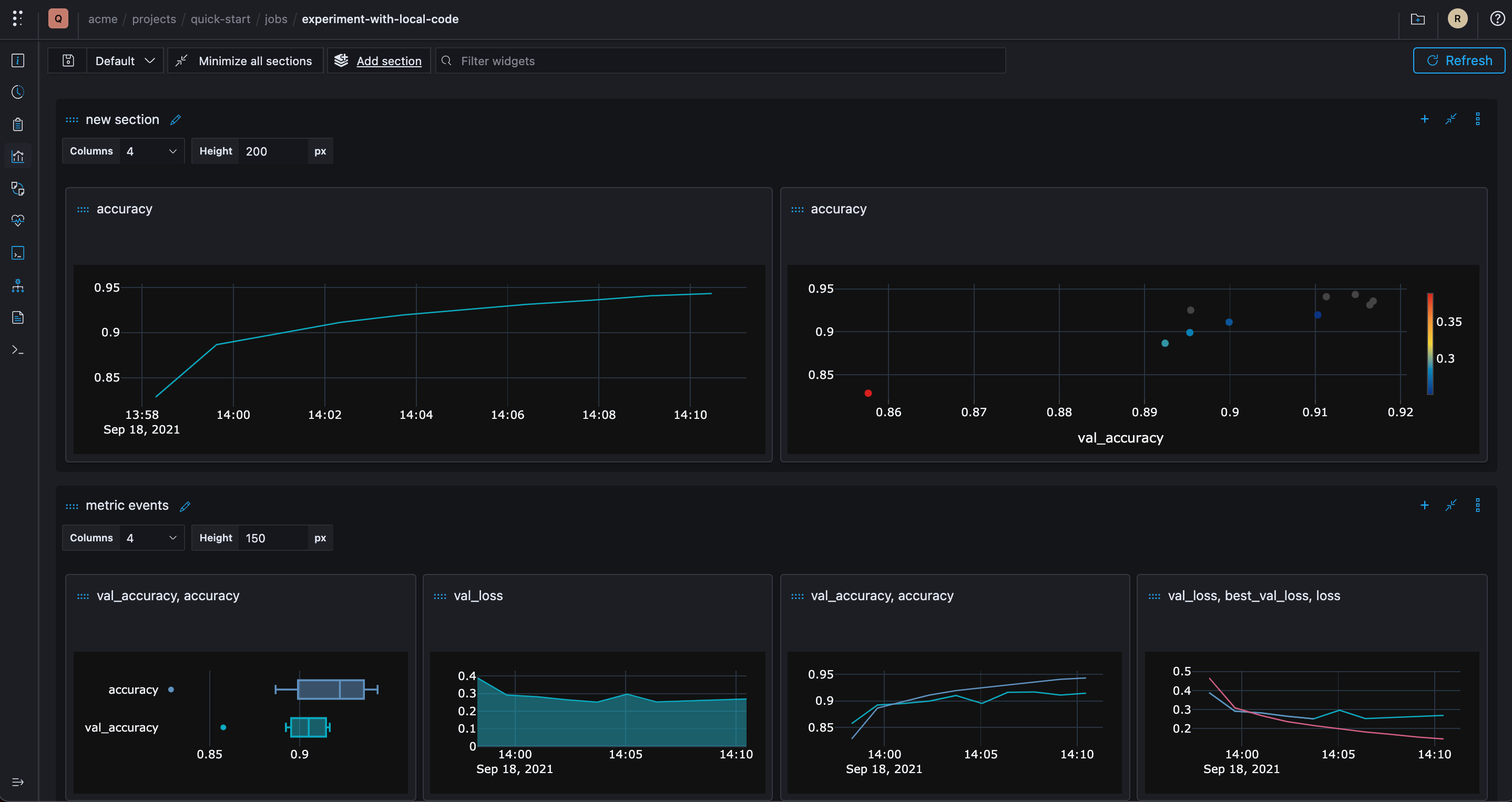
Tracking experiments with Polyaxon
You can add Polyaxon to new or existing ML projects through the tracking module or its client interfaces. Logging creates the experiment record; registering a selected model or artifact creates a reusable named version.
tracking.log_inputs, tracking.log_outputs, tracking.log_metrics, ...
Use log_inputs for the run's input parameters, log_outputs for final scalar results or metadata, and log_metrics for measurements, including step-wise values. Separate methods handle tables, images, and Markdown/HTML content. Keep metric names and units consistent across runs so the comparison is meaningful.
tracking.log_model
This method accepts the path of a model file or directory that your training code has already saved. It records the artifact and its lineage; it does not wrap or execute the training function. Supplying a step lets you retain checkpoints from different points in the same run. Use model registration or promotion separately when a selected model should have a named registry version.
tracking.log_data_ref, tracking.log_artifact
Reference methods record lineage about an asset; your code remains responsible for saving the referenced bytes. Artifact logging can save files with the run. A dataset URI, retained object version, digest, and transformation revision make the input identifiable, while artifact registry versions provide a named interface for reuse.
Record the outputs of one training run
The following code runs after your training program has created model.pkl, evaluation.json, and dataset-manifest.json. It assumes the Polyaxon SDK is installed and tracking is configured for the current run. The evaluation report contains measured validation_accuracy and validation_macro_f1 values; the dataset manifest identifies the retained snapshot and split used by training.
import json
from pathlib import Path

from polyaxon import tracking
from polyaxon.schemas import V1ArtifactKind

evaluation = json.loads(Path("evaluation.json").read_text(encoding="utf-8"))
manifest = json.loads(Path("dataset-manifest.json").read_text(encoding="utf-8"))

tracking.init()
tracking.log_inputs(
    dataset_revision=manifest["dataset_revision"],
    split_revision=manifest["split_revision"],
)
tracking.log_metrics(
    validation_accuracy=evaluation["validation_accuracy"],
    validation_macro_f1=evaluation["validation_macro_f1"],
)
tracking.log_model(path="model.pkl", name="model", framework="scikit-learn")
tracking.log_artifact(
    path="evaluation.json", name="evaluation-report", kind=V1ArtifactKind.FILE
)
tracking.log_artifact(
    path="dataset-manifest.json", name="dataset-manifest", kind=V1ArtifactKind.FILE
)
tracking.end()
This example records existing training outputs; it is not a model trainer or a source of benchmark results. Also log the actual training parameters and source/environment versions for your workflow. The artifact logging guide explains when to save assets versus record references.
Compare this run with a baseline on the same validation split. Inspect class-level errors as well as aggregate metrics, then register the chosen model with its supporting artifacts. Registration does not itself establish that the model is approved for production.
What belongs in a model artifact record?
A filename such as model.pkl is not enough to identify a model after the training process exits. Retain its producing run, durable artifact location, serialization format, file size, and checksum when your workflow records one. The original source path is useful for diagnosis, but a worker's local path is not necessarily accessible to the next run.
If you create your own artifact manifest, distinguish these fields:
- Source path: where the training program wrote the file before logging it.
- Artifact location: where the retained file can be retrieved with the required storage permissions.
- Format and runtime: how to load the file, including the framework, relevant library versions, and preprocessing dependencies.
- Size and checksum: values calculated from the actual saved file, not copied from a previous checkpoint. Size alone does not establish identity.
- Producing run and inputs: the run ID and dataset/code revisions that connect the file to its measured results.
This is a checklist for your application's record, not a prescribed Polyaxon API schema. Use the documented artifact logging methods to save or reference files, and log any additional manifest as an artifact. A metadata reference does not make an external file immutable or guarantee that it will remain available.
How to compare experiment runs fairly
- Select comparable runs. Check the task, dataset revision, validation split, evaluation code, and compute budget before sorting by a metric.
- Inspect the complete outcome. Keep failed and interrupted candidates visible. A missing result is not a score of zero or evidence that the candidate was worse.
- Compare more than the final score. Review learning curves, class-level errors, training time, and inference requirements relevant to your application. Confirm whether higher or lower values are better for each metric.
- Check repeatability. Repeat promising configurations across the seeds or data splits your evaluation protocol requires. Keep final held-out test data separate from routine model selection.
- Retain the selected package. Link the chosen model to its evaluation report, preprocessing assets, dataset identity, and runtime requirements before registering a version.
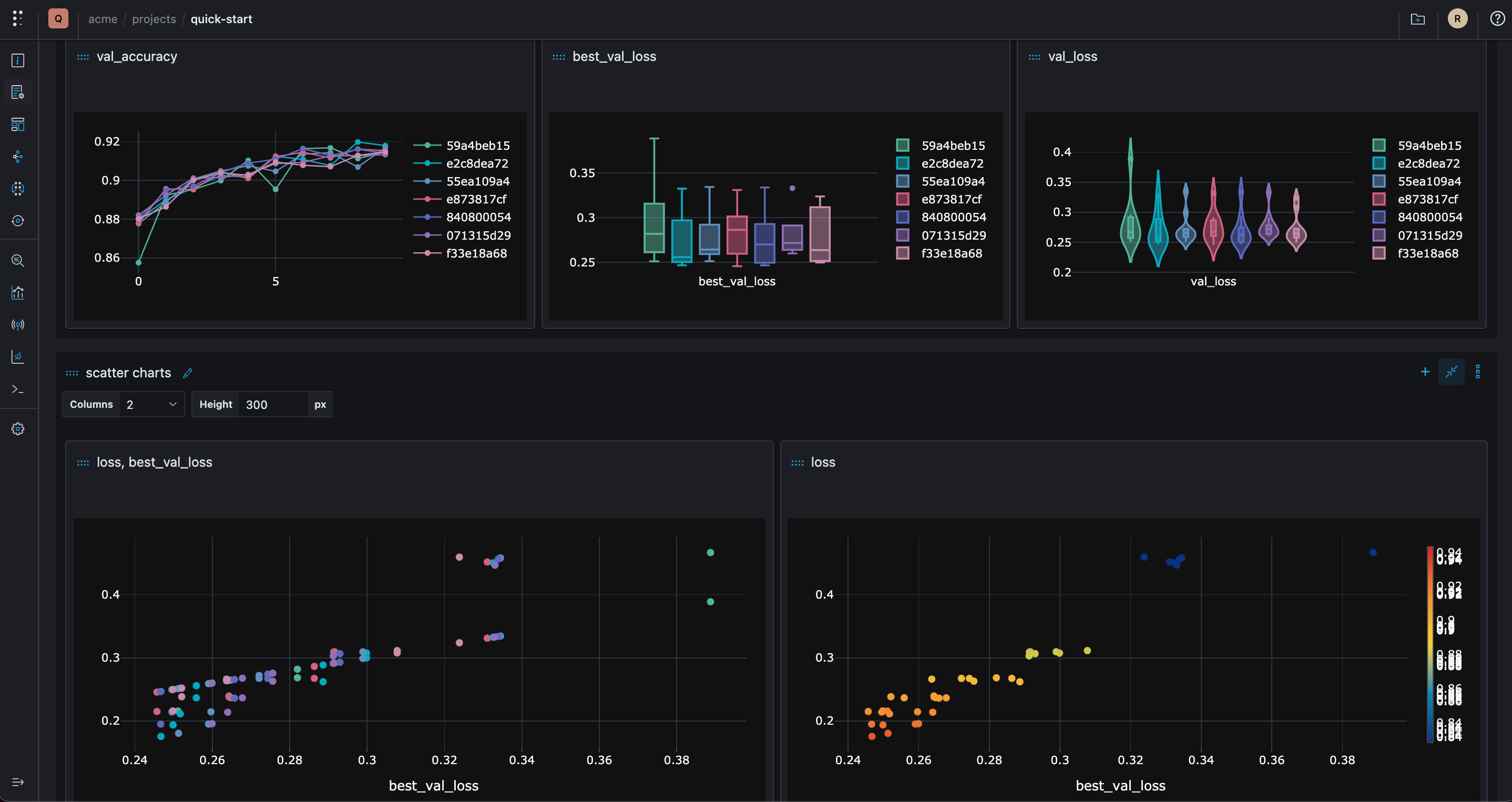
For multi-step workflows, keep failed candidates visible in pipeline reports rather than comparing only whichever runs happened to finish.
Choosing an experiment-tracking workflow
A small local study can start with a structured run manifest and saved artifacts. As the number of runs or collaborators grows, evaluate tools against the workflow you need:
- Can you record the same fields from a notebook, a local script, and a remote job?
- Can a teammate search and compare runs without reconstructing filenames or copying metrics between spreadsheets?
- Are artifacts retained, retrievable, and connected to the run that produced them?
- Can you control storage access and distinguish a logged attempt from a registered model version?
- Can you export or retrieve the records through an API or CLI for further analysis?
Tracking captures the evidence. Scheduling, storage retention, model evaluation, and release approval still need explicit configuration and ownership.
Tracking and executing operations and pipelines
When an experiment outgrows a notebook or local machine, keep the tracking fields consistent as you move execution to a cluster. Polyaxon can schedule the training and evaluation operations, while your application continues to record their inputs and results.
That transition requires a runnable component, dependencies, data access, artifact storage, and appropriate compute configuration. Follow from notebooks to repeatable ML jobs for that workflow rather than assuming logging a run also schedules it.
Start with one reproducible comparison
Instrument one baseline run, retain its input identities and outputs, then change one part of the recipe and compare the results under the same evaluation protocol. Start with the tracking overview and metadata logging guide, then use the MLOps learning path for the surrounding execution and artifact workflows.