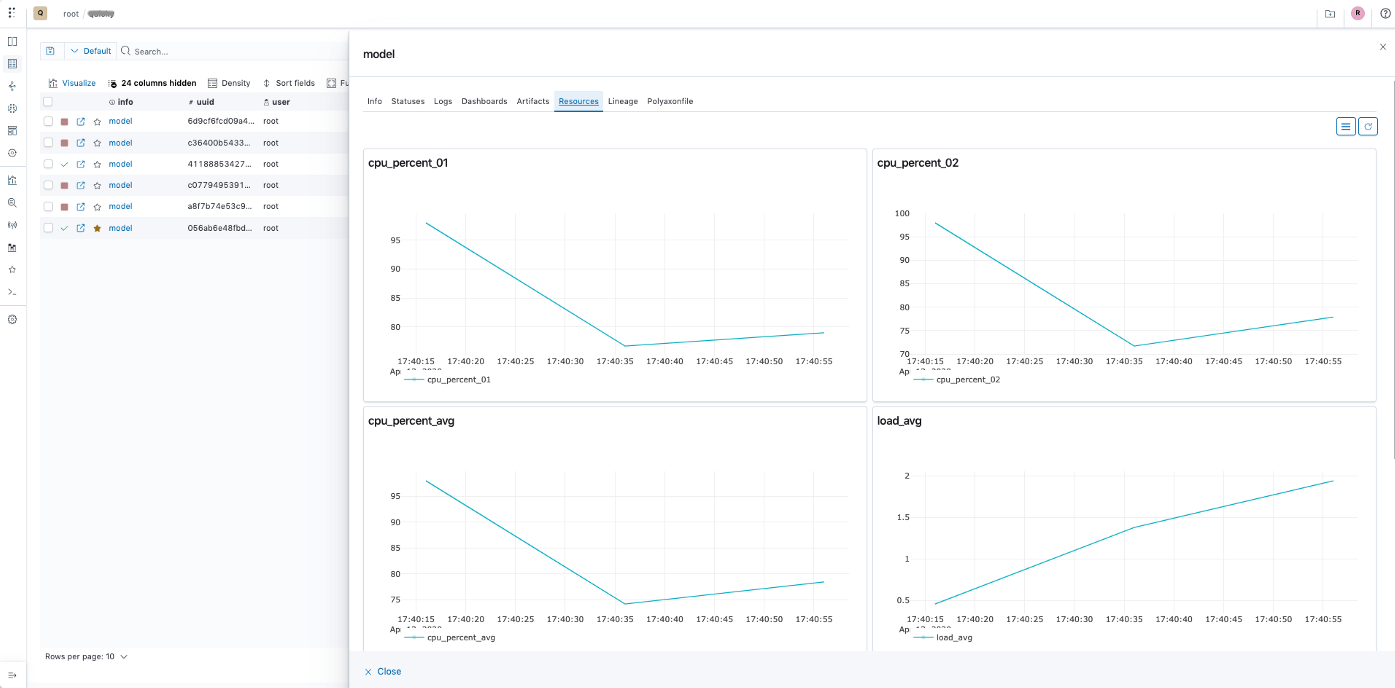
Inspect accelerator and host usage
Move between GPU, TPU, and host resource views. Inspect the recorded measurements over time, then use the run's logs and configuration to investigate changes.
Read monitoring docsGPU metrics
Inspect recorded GPU utilization, memory, temperature, and power alongside host memory and elapsed time in a run dashboard.
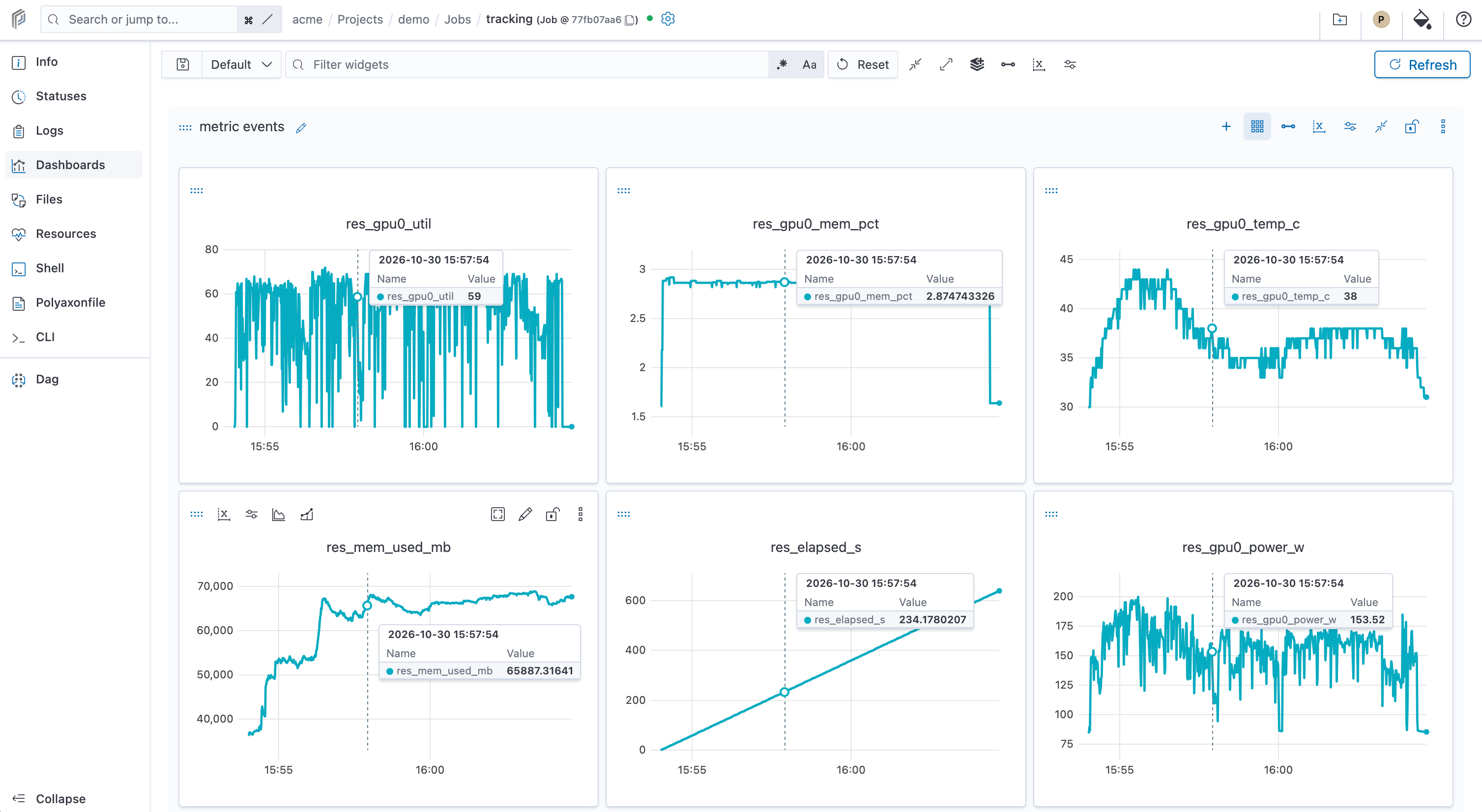
The GPU and TPU dashboards show recorded metric events; the CPU and memory example uses the Resources view. Available metrics depend on collection and runtime support. Open an image to inspect the details.
See usage, not just requested capacity
A GPU request tells Kubernetes what a workload needs. Resource history helps you inspect how compute was used while the workload ran. Read those measurements with the run's configuration and progress before changing its resource budget.
| Resource | What to inspect | Collection requirements |
|---|---|---|
| GPUs | Collected GPU resource usage during the run. | Python resource collection and a compatible GPU runtime. |
| TPUs | TPU resource measurements collected with the run. | Polyaxon 2.20 and its optional TPU monitoring support. |
| CPU and memory | CPU, load, and memory history alongside accelerator work. | Python resource collection. |
| Other accelerators, storage, and networking | Application measurements and infrastructure telemetry relevant to the workload. | Explicit instrumentation or the appropriate cluster and vendor collectors. |
Available measurements depend on the collector, runtime, and devices exposed to the workload. A device- or host-level measurement is not necessarily attributable to one process on a shared node.
Run resource monitoring · TPU integration · Polyaxon 2.20 release notes
Collect resources with your Python workload
For managed runs using the Python client, resource collection is enabled by default through plugins.collectResources. Initialize tracking before your training or inference code; you can also make collection explicit:
from polyaxon import tracking

tracking.init(collect_resources=True)
Inside a managed run, the client resolves the run context from Polyaxon. For an external script or notebook, configure deployment access and pass the existing project to tracking.init. The application must use the tracking client; allocating a GPU alone does not initialize resource collection.
The collectResources setting controls collection, not hardware allocation. Keep the workload's CPU, memory, and accelerator requests in its resource configuration or scheduling preset. TPU monitoring additionally needs the optional support introduced in 2.20 and a compatible TPU environment.
Tracking initialization · Collection settings · Resource requests
Follow a slowdown or failure back to the run
Use the same run to move between resource history, status transitions, logs, and the submitted Polyaxonfile. Start with the question you need to answer:
- Is work waiting to start? Inspect its status, events, and pod conditions, then check queue limits and compatible cluster capacity.
- Did a running workload slow down? Compare resource history with log timestamps and the recorded configuration. Check whether the slowdown coincides with data loading, compute, or checkpoint writes.
- Did the workload fail? Read the recorded reason and the affected container's logs. Filter logs by container, pod, or node to narrow the investigation.
The dashboard provides evidence for that investigation. Confirm the cause with application logs or a framework profiler before changing batch sizes, worker counts, or resource limits.
Statuses and pod conditions · Search and filter logs · Queue controls
Connect resource usage to application progress
Log step duration, examples processed per second, or input-wait time as application metrics alongside loss, accuracy, or evaluation results. Your code measures these values; Polyaxon records them with the run so you can inspect resource usage in the context of useful work.
Keep the batch size, data configuration, code revision, and runtime settings with the same record. When comparing two runs, check that their inputs and execution conditions are comparable. A higher utilization value alone does not show that training or inference became faster.
Keep run monitoring connected to cluster operations
Use run-level monitoring to investigate a workload and your infrastructure monitoring stack to inspect the nodes and services supporting it. Storage latency, network traffic, device health, and capacity across a cluster need the collectors appropriate to that infrastructure.
For self-hosted deployments, use your existing Prometheus and Grafana, Datadog, or cloud monitoring setup alongside Polyaxon. This also covers the Polyaxon control plane and compute-cluster components, rather than only the workloads they manage.
Platform observability and monitoring integrations · Connect compute clusters