See it in code
Define the space. Submit the trials.
Add a matrix to a training operation. Save a tab as tuning.yaml, then submit it with polyaxon run -f tuning.yaml.
version: 1.1
kind: operation
hubRef: acme/train-model:v1
matrix:
  kind: grid
  concurrency: 2
  params:
    learning_rate:
      kind: choice
      value: [0.0001, 0.001, 0.01]
    dropout:
      kind: choice
      value: [0.1, 0.2, 0.3, 0.4]
Replace acme/train-model:v1 with your registered component and its inputs. The controls example stops the group when a trial's logged val_loss meets the threshold; choose a target for your workload.
Compare more than a final score
Keep each trial's inputs, metrics, and artifacts together. Move from a table of runs to metric histories and visual outputs to understand what changed and choose a candidate to validate.
Explore run comparisonMetric charts
Compare metric histories to inspect convergence, training and validation behavior, and the steps behind a final score.
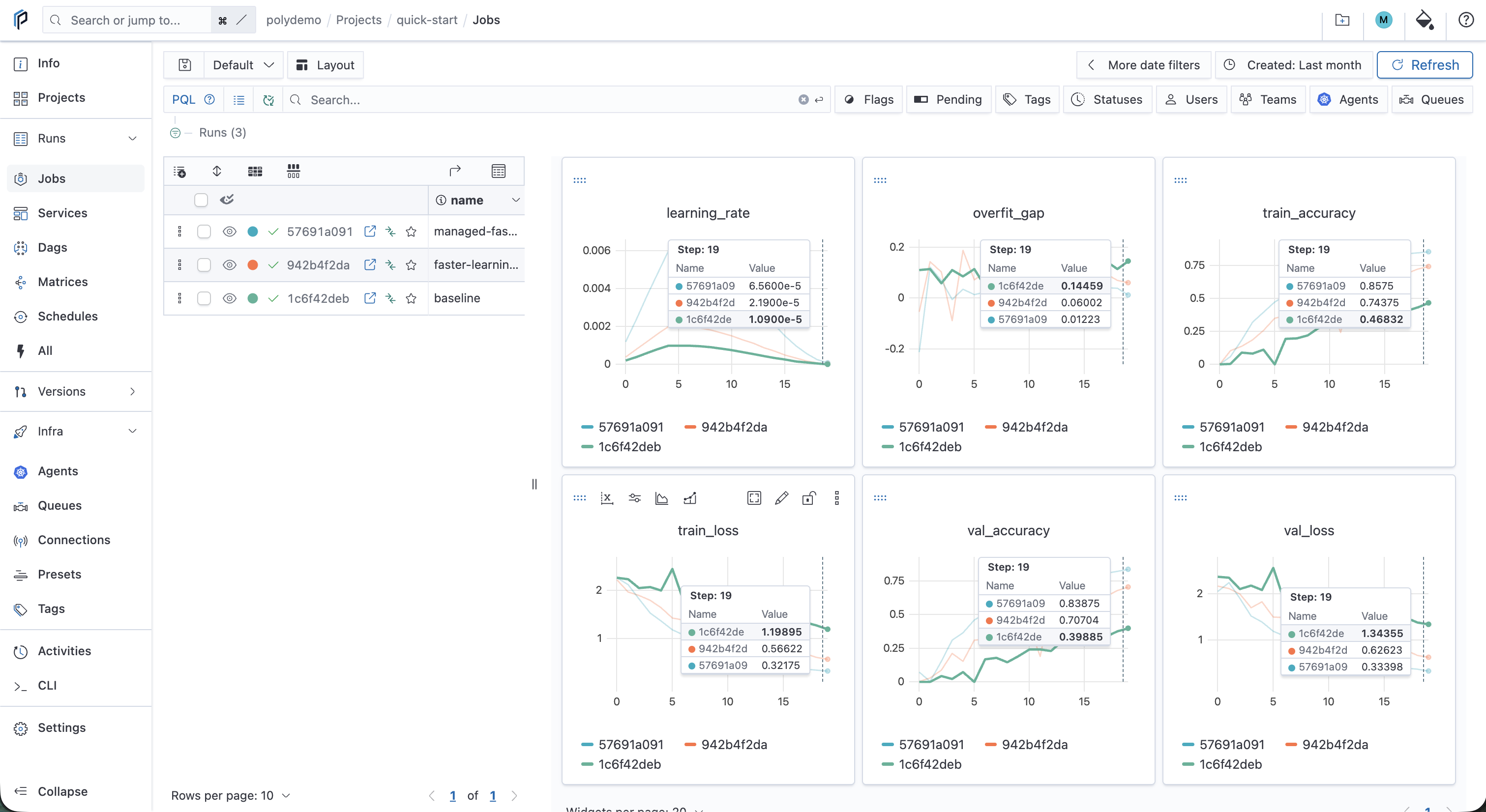
These documentation screenshots use a training simulator to demonstrate the comparison views. Follow the tracking quick start. Open an image to inspect the details.
Choose a search that fits your experiment
Use grid search to evaluate combinations in a discrete search space. The grid example above defines 12 combinations of learning rate and dropout. Use random search to sample configurations and set numRuns to bound the number of trials.
For iterative searches, Polyaxon also provides Hyperband, Bayesian optimization, TPE through Hyperopt, and custom iterative processes. Choose the algorithm and its settings for the evaluation signal and resources your workload provides.
Keep the dataset split and evaluation method consistent across candidates. A random-search seed controls parameter sampling; record and control your application's random seeds separately when evaluating repeatability.
Keep trials within shared compute limits
Set matrix concurrency to cap the trials running at the same time, then route the operation through a queue with the resources your training component needs. Queue limits and available cluster capacity also govern execution. A concurrency limit of two permits up to two active trials; it does not reserve two GPUs.
Add early stopping rules when the group should finish after reaching a metric target or a configured failure rate. In the controls example, the metric rule stops the group when a trial's logged val_loss meets the target, including its pending and running trials. Use a supported stopping policy when you want to terminate selected underperforming runs.
Manage concurrency · Configure early stopping · Schedule shared GPUs
Carry the selected trial into the next workflow
Inspect the candidate's configuration, validation history, and saved outputs, then confirm the result with your evaluation procedure. Log model artifacts and the data and code references needed to understand the selection.
Compose tuning and evaluation in a pipeline, with conditions or approval where your process needs them. Once reviewed, register the selected artifacts so another training job or model service can consume a named version and retain the source-run reference.
Build a pipeline · Register a reviewed candidate · Track trial artifacts