
Decide which work gets dispatched
Training runs, notebooks, GPU-backed sandboxes, and batch jobs can have different scheduling requirements. Put them on separate queues and configure how Polyaxon dispatches work to the compute cluster connected to each queue.
- Priority determines the relative order in which Polyaxon dispatches work from queues.
- Concurrency limits the number of operations dispatched through a queue. A workflow can have its own parallelism limit as well.
- Resource quotas constrain the resources allocated through a queue, independently of its operation count.
Once dispatched, a workload still needs suitable Kubernetes capacity. Raising its queue priority does not create GPUs or, by itself, interrupt a running job.
Queue behavior · Priority and Kubernetes scheduling · GPU-backed sandboxes
Reuse your cluster configuration
A scheduling preset can hold GPU requests, node-placement settings, connections, and queue selection. Apply it to a workload without embedding every cluster-specific choice in the training component.
Save presets with your code, or manage shared presets in your organization. Set project defaults so new runs use the intended configuration, and choose how a preset merges with the operation it modifies.
A preset is reusable configuration. Its merge rules and your project settings matter; it should not be treated as an independent security boundary.
Review queue settings
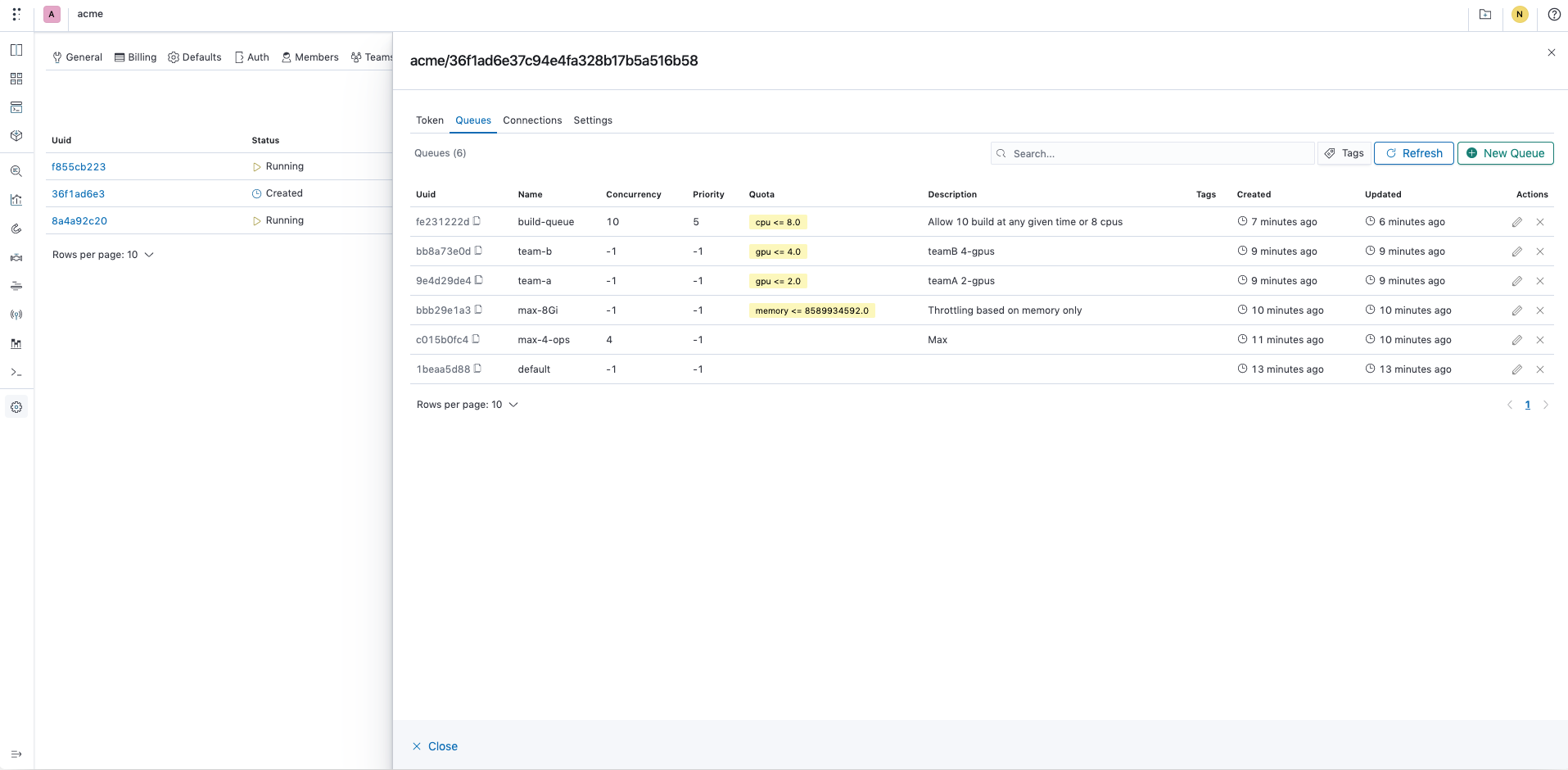
The queue management view shows priority, concurrency, and quotas together. In this documentation example, team-a has a GPU quota of two and team-b has a quota of four. Another queue limits operation count instead.
Separate dispatch from placement
Polyaxon compiles the operation, resolves presets and connections, applies queue controls, and routes work to a connected compute cluster. Run status, logs, and outputs remain associated with the operation.
Kubernetes and your configured scheduler place the resulting workload on nodes. GPU drivers, device plugins, compatible capacity, node labels, and any preemption or gang-scheduling configuration remain part of the cluster setup.
Your platform team operates that infrastructure. Polyaxon does not provision GPU capacity simply because a queue has waiting work, and queue concurrency is not the same as GPU utilization or fractional GPU allocation.
GPU resource requirements · Node placement and scheduler configuration