
See it in code
Log a run. Open its results.
Record inputs and metric history from a local script or notebook, then open the run in Polyaxon to inspect what it logged.
Follow the tracking quick startfrom polyaxon import tracking
tracking.init(project="quick-start", name="baseline")
tracking.log_inputs(learning_rate=0.001)
tracking.log_metrics(step=0, train_loss=0.5, val_accuracy=0.8)
tracking.log_metrics(step=1, train_loss=0.3, val_accuracy=0.86)
tracking.log_outputs(best_val_accuracy=0.86)
tracking.end()The numbers illustrate the tracking calls, not measured model results. Local tracking needs an authenticated client connected to your deployment.
Track local and managed runs together
Use the tracking client to log inputs, metric histories, outputs, and files from your application. Local scripts and notebooks can send results to a Polyaxon project without moving their execution to a cluster.
Managed operations add the execution context known to Polyaxon, such as the submitted configuration and run status. Your code still needs to log the domain-specific measurements you want to compare. For local tracking, configure an authenticated client and access to the deployment.
See what changed between experiments
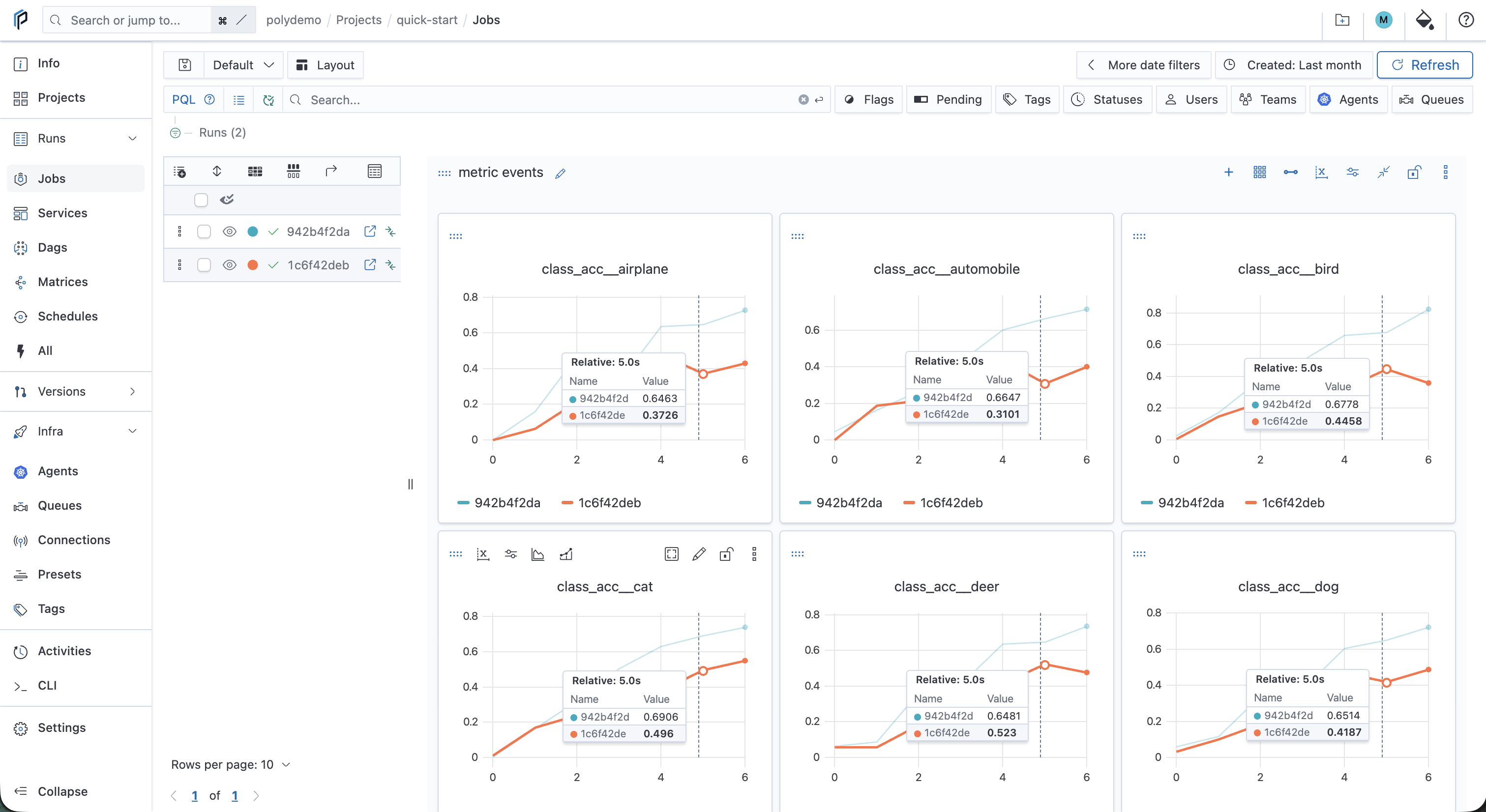
Select runs to compare their parameters, outputs, and metric histories. Filter the runs table to the experiment set you care about, then use charts to inspect how the results evolved rather than relying only on a final score.
The example below comes from the tracking quick start. Two local runs use the same training simulator with different learning rates. It demonstrates comparison—not a model benchmark or a claim about training speed.
Follow an output back to its inputs
The lineage view connects a run to its recorded input and output artifacts and related operations. Inspect the source configuration, the files produced, or the relationship to an earlier run that was restarted or resumed.
Record the identifiers that matter for your work: code revision, model and dataset revision, container image, and framework configuration. A lineage record helps you inspect and repeat a setup; it does not pin a mutable dependency on your behalf.
Add managed execution when you need it
The same project can contain locally executed experiments and jobs submitted to Kubernetes. This lets a team start by tracking experiments, then package selected workloads as managed operations with explicit resources and output storage.
Tracking and execution solve different problems. Tracking records what happened; scheduling controls where and when managed work runs. Comparing two records also does not establish a fair performance comparison unless their inputs and execution conditions are comparable.
Track local and managed runs · Connect compute clusters · Scheduling controls