Troubleshoot FailedAttachVolume and FailedMount
Diagnose Kubernetes volume failures across claims, provisioning, topology, attachment, node mounts, permissions, and workload ownership.
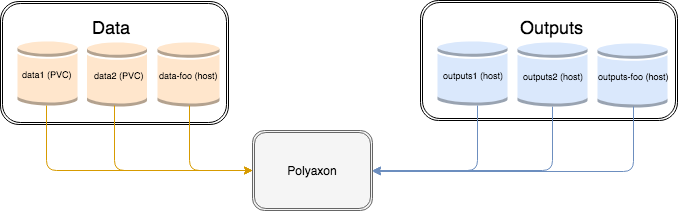
FailedAttachVolume and FailedMount are event reasons, not complete diagnoses. They identify the stage where Kubernetes could not make a volume usable by a Pod. The event message, claim state, storage object, node, and CSI components reveal the actual failure.
ML workloads expose these problems quickly because they combine large artifacts, shared datasets, local caches, checkpoints, and accelerator-constrained placement.
Locate the failing stage
A persistent volume typically moves through several decisions:
- A Pod references a PersistentVolumeClaim (PVC).
- The claim binds to a compatible PersistentVolume (PV), sometimes through dynamic provisioning.
- The scheduler selects a node compatible with the Pod and volume topology.
- The storage controller attaches the underlying device when attachment is required.
- The node's CSI plugin prepares and mounts it.
- The container runtime exposes the mount at the requested path.
FailedAttachVolume usually points to controller, provider, topology, or multi-attach work. FailedMount often points to node-side staging, filesystem, permission, Secret, ConfigMap, or path problems. The exact message matters more than the label.
Read the Pod events and claim state
Start with the affected Pod and its namespace:
kubectl describe pod training-job-r8m4x \
  --context acme-production \
  --namespace ml-team

kubectl get events \
  --context acme-production \
  --namespace ml-team \
  --field-selector involvedObject.kind=Pod,involvedObject.name=training-job-r8m4x \
  --sort-by=.metadata.creationTimestamp
List every claim the Pod references, then inspect the relevant one:
kubectl get pod training-job-r8m4x \
  --context acme-production \
  --namespace ml-team \
  --output jsonpath='{range .spec.volumes[*]}{.name}{"\t"}{.persistentVolumeClaim.claimName}{"\n"}{end}'

kubectl describe pvc training-checkpoints \
  --context acme-production \
  --namespace ml-team
A Pending claim is a provisioning or binding problem, not a node mount problem. Check the requested storage class, access modes, capacity, selected node annotations, and provisioning events.
Inspect the bound storage objects
Once the claim is Bound, identify its PV and StorageClass:
kubectl get pvc training-checkpoints \
  --context acme-production \
  --namespace ml-team \
  --output jsonpath='{.spec.volumeName}{"\t"}{.spec.storageClassName}{"\n"}'

kubectl get pv pv-training-4f2a \
  --context acme-production \
  --output yaml

kubectl get storageclass fast-rwo \
  --context acme-production \
  --output yaml
PV and StorageClass objects are cluster-scoped, so they do not accept --namespace. Review the CSI driver, reclaim policy, volume mode, access modes, node affinity, and volumeBindingMode. The Kubernetes PersistentVolume documentation describes binding and topology behavior.
Do not delete a PV, PVC, or provider disk as an exploratory step. Reclaim policies and finalizers exist because storage deletion can be irreversible.
Check topology and multi-attach constraints
A zonal disk normally must attach to a node in the same zone. A Pod can also require a GPU type, architecture, taint toleration, or affinity rule that leaves no node compatible with both compute and storage.
Compare the scheduled node with the PV's node affinity and the storage provider's actual location. For ReadWriteOnce volumes, confirm that another Pod or stale node attachment is not holding exclusive access. ReadWriteOnce describes access by a single node; it does not mean one process or necessarily one Pod on that node.
When a node has disappeared, involve the storage and cluster owners before forcing detach. Attaching a writable filesystem in two places can corrupt data.
Inspect CSI controllers and node plugins
Volume operations cross CSI controller components and a node plugin. Find the driver name from the PV, then inspect its workload and recent logs in the platform-owned namespace. Prefer bounded time windows and avoid printing credentials.
Provider errors often reveal quota, attachment limits, missing disks, permissions, API throttling, or regional outages. Node-plugin errors may identify a missing device, unsupported filesystem, failed format, stale mount, or driver mismatch.
Compare a failing node with a healthy node running the same CSI version. If failures follow a particular node image or zone, recreating the workload alone will not solve them.
Separate filesystem and configuration mounts
Not every FailedMount involves a persistent disk. A Pod can fail to mount:
- a Secret or ConfigMap that does not exist in its namespace;
- a projected ServiceAccount token;
- a host path missing on the selected node;
- a subPath that is absent or has the wrong type;
- a volume whose ownership or security context cannot be applied;
- a network filesystem blocked by DNS, routing, firewall, or identity policy.
Check the Pod specification before debugging the storage provider. A missing ConfigMap should not become a CSI incident.
Recover at the declaring layer
Fix the object or platform configuration that declares the failing mount. A Job, StatefulSet, operator, or Polyaxon operation will recreate Pods from its template; editing a generated Pod does not create a durable correction.
After the underlying issue is resolved, let the controller retry or recreate the Pod according to its lifecycle. Verify the claim remains Bound, attachment and mount events stop repeating, the expected filesystem is visible, and the application can read and write without corrupting prior data.
Prevent volume failures with Polyaxon
Use Polyaxon connections and platform-owned presets to standardize dataset, artifact, and checkpoint storage. Keep access mode, topology, performance, retention, and backup expectations explicit.
For distributed training, decide which roles need shared read-write access and which can use object storage or local scratch space. Record the operation, node pool, storage class, claim, driver version, and affected zone during incidents.
Persistent storage crosses Kubernetes, CSI, cloud or on-premises infrastructure, and the application filesystem. Diagnose the boundary in that order. It is safer—and faster—than deleting resources until a Pod happens to start.