Control notebook and inference service lifetimes
Reuse Polyaxon's termination specification to bound notebook and inference service lifetimes, stop idle services, and distinguish inactivity from ongoing work.
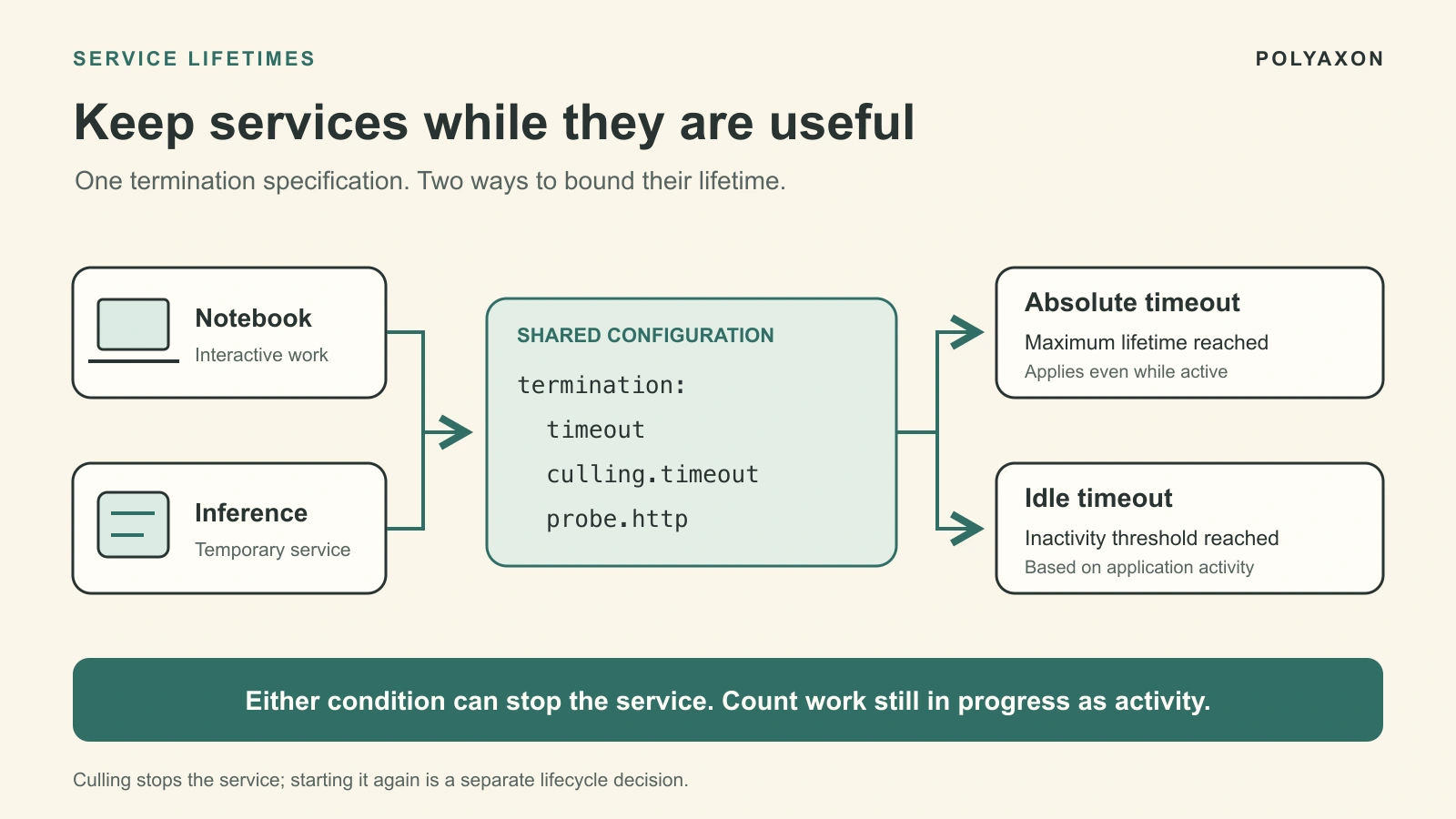
A notebook should stay available while its user is working. A temporary model endpoint should remain available while it is serving requests. Both also need a clear answer to what happens when that work ends: closing a browser or finishing a client script does not necessarily release the service's resources.
Polyaxon brings these lifecycle decisions into one termination specification, shared across jobs, distributed workloads, and services. You can give a notebook a maximum lifetime, stop a temporary inference service after an idle period, and reuse the policy through a preset instead of building a separate cleanup script for each workload.
The shared specification already covers timeouts, retries, and resource retention. Idle culling adds an activity-based stopping condition for services. Operator support was introduced as Beta in Polyaxon 2.12; use a compatible client and deployment, and confirm the behavior supported by your operator version.
Separate lifetime, inactivity, and retention
The controls answer different questions:
| Setting | Question it answers | Example |
|---|---|---|
termination.timeout | How long may this execution remain active? | Stop a temporary notebook after 24 hours, even if busy |
termination.culling.timeout | How long may this service remain idle? | Stop after an hour without reported activity |
termination.probe.http | Where does the application report activity? | Query Jupyter's /api/status endpoint |
termination.ttl | How long should completed workload resources be retained? | Keep completed Job resources for inspection |
termination.maxRetries | How much retry allowance does this runtime receive? | Bound repeated failures of a batch job |
Polyaxon maps settings to the underlying runtime and supplies lifecycle management where the Kubernetes primitive does not provide it directly. That makes the configuration consistent without making every control interchangeable: Job retry and pod failure rules do not become service idle policies. The termination specification describes the fields and their mappings.
For services, use the absolute timeout as an overall bound and culling as the inactivity rule. A TTL is neither a runtime extension nor persistent storage. Do not assume it preserves a culled service for an additional retention period.
Give notebooks a reusable lifetime policy
Start with a notebook that may be used throughout the day but should not remain allocated indefinitely. Save the following local preset as notebook-lifetime.yaml:
termination:
  timeout: 86400
  culling:
    timeout: 3600
  probe:
    http:
      path: /api/status
      port: 8888
This sets a 24-hour maximum lifetime and a one-hour idle threshold. It is an override for an existing service component, not a complete notebook definition.
With a configured Polyaxon CLI, an existing project, and access to the JupyterLab component, launch it with the preset:
polyaxon run --hub jupyterlab -p YOUR_PROJECT -f notebook-lifetime.yamlReplace YOUR_PROJECT with your project. Use your organization's approved component reference or version if it differs from jupyterlab. The JupyterLab integration documents component selection and customization; the service timeout guide covers these termination settings.
Jupyter Server exposes /api/status to report server activity. Its status handler excludes status polling itself from activity tracking. That distinction prevents the culling probe from keeping an otherwise idle session alive forever.
Confirm that your deployed notebook reports long-running cells and other work according to your intended idle policy. A quiet kernel can still be computing. Also confirm the operator can reach the endpoint with the notebook's base path and access configuration; an authentication page or an unreachable port is not an idle signal.
The policy has two independent boundaries. In this illustrative timeline:
| Event | Policy consequence |
|---|---|
| Notebook starts at 09:00 | Its 24-hour lifetime begins |
| Last reported activity is 11:00 | It reaches the idle threshold at 12:00 |
| Activity continues into the next morning | The absolute deadline still applies at 09:00 |
These are eligibility times, not measured termination timestamps. The operator evaluates conditions during reconciliation, so stopping can occur after a threshold is reached. Warn users about the maximum lifetime and save important work before it expires.
Define activity for an inference service
A prediction request can outlast the idle threshold. Recording only its arrival time would make a busy service look abandoned. Conversely, treating every health check as activity would prevent cleanup entirely.
For a temporary inference endpoint, a useful contract is:
- Count accepted work from the point it enters the service's responsibility until it finishes, including time in an internal queue.
- Report current activity while any tracked work remains in progress.
- Begin the idle interval after the last tracked request finishes.
- Keep status, readiness, and health polling outside that accounting.
Here is a focused helper for one Python process and one service replica. It requires only the standard library. Create one shared instance at process startup:
from contextlib import contextmanager
from datetime import datetime, timezone
from threading import Lock


def utc_now():
    return datetime.now(timezone.utc)


class ActivityWindow:
    def __init__(self):
        self._lock = Lock()
        self._in_flight = 0
        self._last_activity = utc_now()

    @contextmanager
    def work(self):
        with self._lock:
            self._in_flight += 1
            self._last_activity = utc_now()
        try:
            yield
        finally:
            with self._lock:
                self._in_flight -= 1
                self._last_activity = utc_now()

    def status(self):
        with self._lock:
            timestamp = (
                utc_now() if self._in_flight else self._last_activity
            )
        return {"last_activity": timestamp.isoformat()}


activity = ActivityWindow()
Inside an existing prediction handler, use with activity.work(): around the entire operation. Your activity HTTP handler returns activity.status() as JSON with HTTP status 200. The returned last_activity is a UTC timestamp compatible with Polyaxon's documented RFC3339 contract. The application still supplies model loading, prediction, request validation, and HTTP routing.
Calling status() while idle does not update the stored timestamp. While work is in progress, it reports a current timestamp; the finally block records completion even when prediction raises an exception. For streamed responses, keep the work context open until the stream ends. For background tasks, track the task itself rather than only the handler that schedules it.
The activity route must remain responsive while prediction runs. Multiple processes or replicas need a shared activity view: a probe reaching one idle worker cannot establish that every worker is idle. This helper also does not lock request admission against shutdown; if that race matters, add coordinated draining and request ownership to your serving design.
Connect the activity endpoint to culling
For an existing temporary inference component listening on port 8000, save this as inference-lifetime.yaml:
termination:
  timeout: 28800
  culling:
    timeout: 1800
  probe:
    http:
      path: /activity
      port: 8000
The example allows an eight-hour lifetime and a 30-minute idle interval. Apply it to your existing component:
polyaxon run -p YOUR_PROJECT -f inference.yaml -f inference-lifetime.yamlHere, inference.yaml is your existing service definition. It must expose the port and activity handler, use the shared activity instance above, and keep durable model assets and outputs outside disposable process memory. The command does not create those application features for you.
Check the internal route as well as the public URL. In the operator implementation reviewed for this article, the activity request goes directly to the Kubernetes Service with the Polyaxon service base path, including the run and port, before the configured /activity suffix. The application must serve that route. A working public URL with rewritePath: true alone does not establish that the internal probe reaches it. The service specification explains base-path and rewrite configuration.
Keep the service's normal access controls. If application-level authentication protects the activity route, configure a compatible internal access path; the reviewed probe does not inject custom application credentials. Read the operator's logged probe URL and result when diagnosing path, port, or authorization mismatches.
Use HTTP activity probes for this workflow. Handling failures and termination documents that exec probes are not fully implemented. When an HTTP activity check fails, the operator treats the service as active to avoid accidental culling. Monitor those failures so a broken probe does not silently defeat your idle policy; retain the absolute timeout as a separate bound.
Reuse the policy where the service contract matches
Keep local presets alongside the components they apply to. Polyaxon also supports saved organization presets in EE and Cloud, including organization and project defaults. The preset guide explains local overrides and merge strategies, and organization presets covers centrally managed settings.
A shared field does not mean every service should receive the same values:
| Workload | Appropriate policy |
|---|---|
| Interactive notebook | Idle timeout plus a communicated maximum lifetime; durable workspace |
| Temporary inference endpoint for a review or experiment | Activity-aware culling, maximum lifetime, and an explicit owner for the next launch |
| Continuously available prediction API | Availability and capacity policy; do not apply idle culling merely because traffic is quiet |
Culling stops the service. It does not save process memory or automatically start the endpoint when the next request arrives. Recovery, model loading, and any mechanism that starts services on demand remain separate responsibilities. Our bounded sandbox lifetime guide discusses the related workspace persistence decisions.
Before applying a preset broadly, review a representative session's activity timestamps, a long-running request, probe failures, and the resulting stop reason. The snippets here were reviewed against documentation and source but have not been executed. After any development exercise, use the run's stop action in Polyaxon if it remains active, and retain only the artifacts your workflow needs.
Start with the lifecycle your users expect, then encode it once: a useful activity signal, a deliberate maximum lifetime, and a clear plan for saving work and starting again.