Kubernetes nodes, Pods, and containers for ML workloads
Understand how nodes, Pods, and containers divide responsibility for resources, lifecycle, networking, storage, and failures in Kubernetes ML systems.
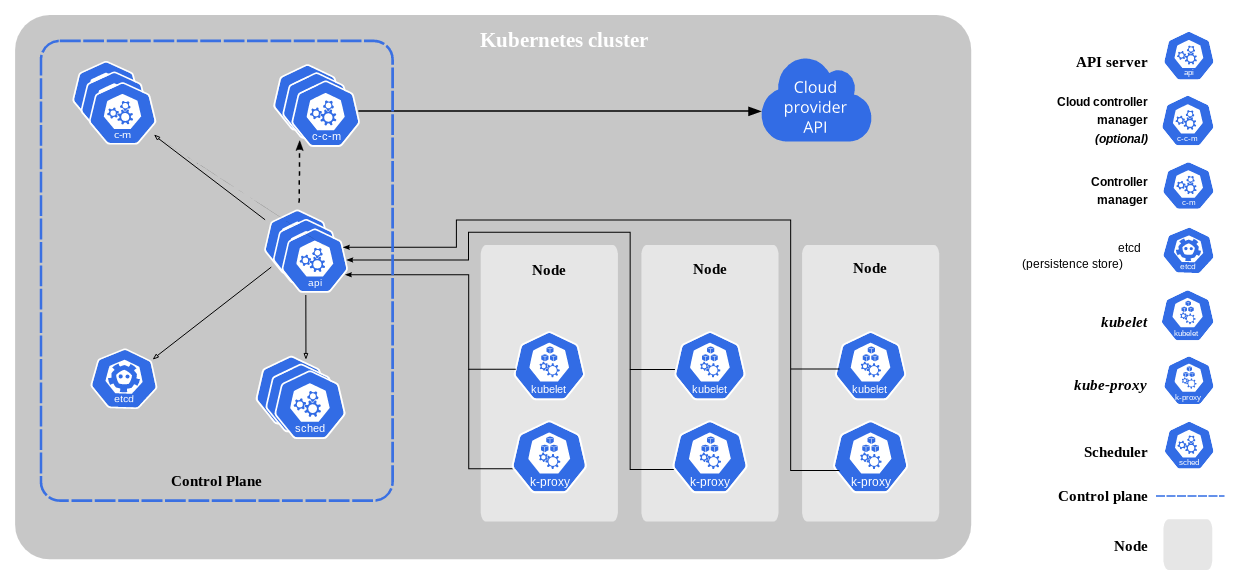
Nodes, Pods, and containers describe different layers of Kubernetes execution. Confusing them leads to incorrect scaling, resource, and recovery assumptions—especially for ML workloads with GPUs, large images, checkpoints, and several cooperating processes.
A container packages a process and its dependencies. A Pod provides the shared execution context for one or more containers. A node supplies the machine resources on which the Pod runs.
See the execution hierarchy
The basic relationship is:
Kubernetes cluster
└── Node
    ├── Pod
    │   ├── application container
    │   └── optional init, sidecar, or debug container
    └── Pod
        └── application container
The scheduler assigns Pods to nodes; it does not place individual containers independently. All containers in one Pod share that placement and lifecycle boundary.
Controllers such as Deployments, StatefulSets, Jobs, and DaemonSets create and replace Pods. They are usually the desired-state owners that applications should manage rather than creating standalone Pods directly.
Understand what a node provides
The official Kubernetes node documentation defines a node as a physical or virtual machine managed by the control plane.
A worker node normally runs:
- the kubelet, which registers the node and reconciles assigned Pods;
- a container runtime, which pulls images and runs containers;
- networking components that connect Pods and Services;
- operating-system and device services required by the workloads.
The node reports capacity and allocatable resources. The scheduler evaluates Pod requests against allocatable CPU, memory, ephemeral storage, extended resources such as GPUs, placement rules, and current cluster policy.
Capacity is not the same as availability. System reservations, already scheduled Pods, taints, affinity, topology, and device health can all make a node ineligible.
Treat the Pod as the scheduling unit
Kubernetes Pods are the smallest deployable compute objects. A Pod contains one or more co-located containers with shared network and storage context.
Containers in a Pod:
- receive the same Pod IP and communicate through
localhost; - can mount shared volumes;
- are scheduled to the same node;
- share the Pod's creation and deletion lifecycle;
- cannot be scaled independently.
Use one main application container by default. Add another container when it provides tightly coupled supporting behavior that must share the Pod—for example, a log adapter or local proxy. Use init containers for ordered setup that must finish before application containers start.
Do not place unrelated services in one Pod. If they need independent scaling, rollout, resources, ownership, or failure recovery, they should usually be separate workloads.
Know what the container controls
A container image carries the filesystem, executable, libraries, and default process configuration. At runtime, Kubernetes adds environment, secrets, volumes, networking, identity, and resource isolation according to the Pod specification.
Containers in the same Pod can have separate commands, images, probes, environment variables, and resource declarations. A failing sidecar can prevent a Pod from becoming Ready or keep it running after the main process finishes, depending on how lifecycle behavior is designed.
The container's writable layer is ephemeral. Store valuable models, checkpoints, datasets, and outputs in durable storage rather than assuming the container filesystem survives replacement.
Follow resource accounting across layers
Each application container declares resource requests and limits. The scheduler uses requests to place the Pod, while the node enforces runtime isolation according to the configured container runtime and operating system.
For ordinary app containers, a Pod's effective steady-state request is based on the sum of its running containers, with init-container calculations handled separately by Kubernetes. A “small” sidecar therefore still consumes schedulable capacity on every replica.
GPU resources are normally exposed as extended resources by a device plugin. Request the resource in the container that uses it. All containers still share the Pod placement, so adding a CPU-only helper can increase the memory or CPU needed on the GPU node.
Measure actual workload behavior before setting requests. Under-requested training jobs create noisy-neighbor risk; over-requested accelerators reduce cluster utilization even if device activity is low.
Understand failure boundaries
A container process can restart within the same Pod according to its restart policy. The Pod identity and mounted volumes remain while that Pod exists.
If the node fails or the Pod is deleted, a controller creates a replacement Pod with a new identity. Persistent storage may be reattached, but memory and container-local state are lost.
Kubernetes can restore the requested number of Pods. It cannot infer how to resume a training step, deduplicate an agent tool call, validate a checkpoint, or decide whether model output remains acceptable.
Design recovery at both layers:
- Kubernetes reconciles infrastructure and process state;
- the application preserves durable progress and implements safe retry semantics.
Map workload types to controllers
Use a Job for finite training, evaluation, or data processing. Use a Deployment for interchangeable model-serving replicas. Use a StatefulSet when stable identity and volume association are part of the service contract. Use a DaemonSet for software that must run on selected nodes, such as infrastructure agents.
This choice sits above the Pod. Changing from a Pod to a Job does not change the container image; it changes who owns completion and replacement.
The Kubernetes workload documentation describes these controller patterns and their lifecycle.
Connect the layers through Polyaxon
Polyaxon operations describe the ML intent above Kubernetes objects: component, parameters, environment, resources, connections, termination, tracking, and outputs.
An agent compiles and submits the required Kubernetes workload. The cluster then schedules Pods onto eligible nodes and runs their containers. Polyaxon retains the run context needed to understand why those lower-level objects exist and what result they produced.
Use node scheduling for placement and scheduling presets for reusable resource and environment policy.
The practical mental model is simple: containers run processes, Pods bind cooperating containers into one schedulable execution context, nodes supply machine capacity, and controllers continuously work to match declared state.