Autoscale AI agent workers on Kubernetes with KEDA
Scale an SQS-backed agent worker pool from waiting and in-flight tasks, and handle a worker shutdown without losing the task.
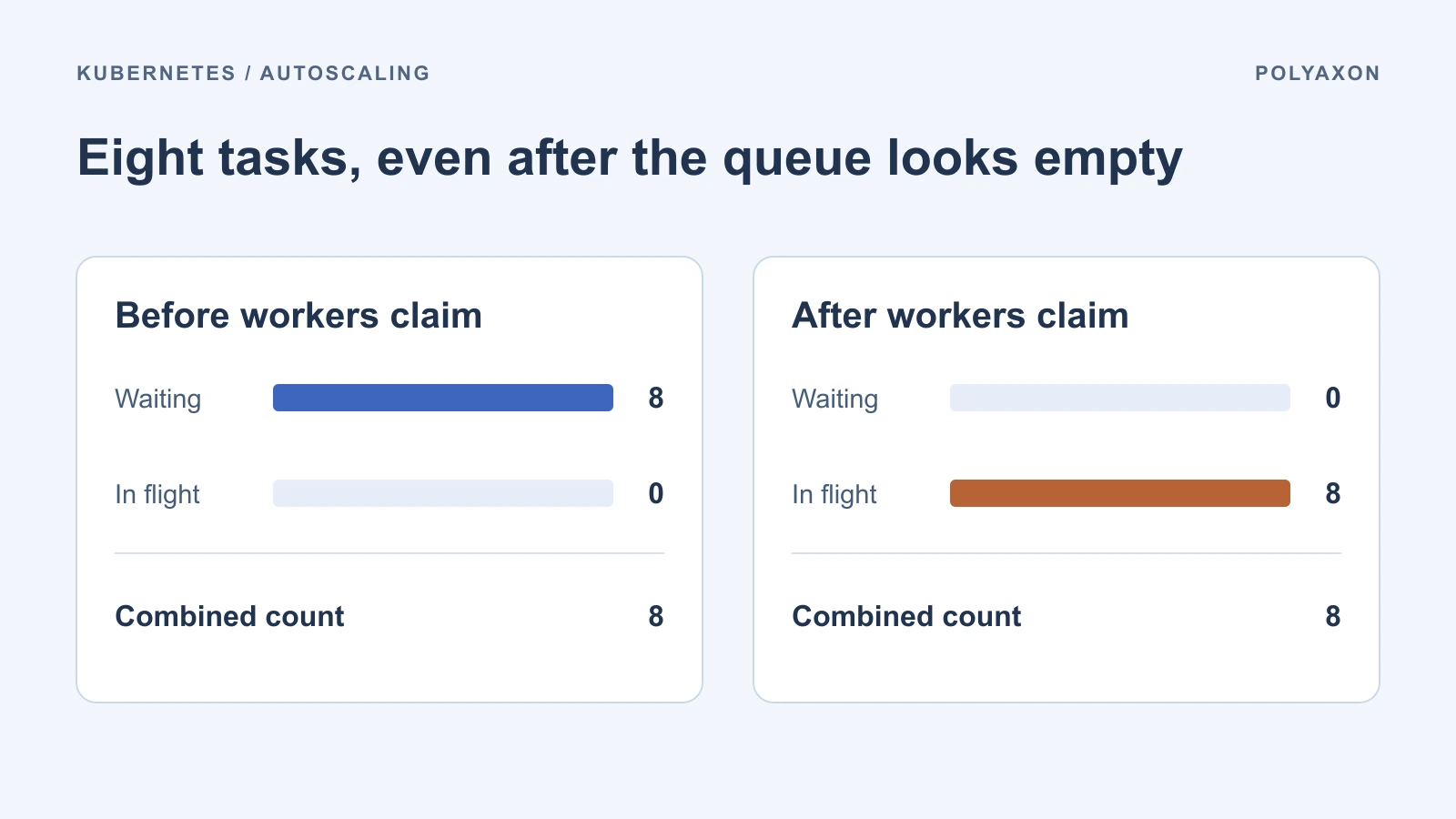
Eight agent workers have each picked up one document to review. The queue now shows zero messages available to receive, even though all eight workers are busy. A scaler that looks only at available messages has already lost sight of the work it just started.
For an asynchronous agent that processes one task at a time, an Amazon SQS queue and KEDA can give Kubernetes a better scaling signal. The queue needs to count claims already in progress, and the worker needs a way to hand work back when its Pod exits.
Count claimed messages when choosing a target
When a worker receives an SQS message, the message becomes temporarily invisible to other workers. KEDA's SQS scaler can add the approximate number of visible messages to the approximate number in flight. Use both counts for this pool and set a target of one message per replica. That target starts from the worker's actual concurrency of one, including messages it has already claimed. KEDA SQS scaler
For this example, assume an existing agent-worker Deployment, a standard SQS queue, and KEDA 2.21. Each worker long polls that queue and takes at most one message at a time. Configure a TriggerAuthentication named agent-sqs-scaler in the same namespace with your cluster's AWS identity integration. The scaler needs access to queue attributes. Workers need their own permissions to receive and delete messages and to extend visibility if they renew claims. Replace the example queue URL and Region with your own. KEDA authentication options
apiVersion: keda.sh/v1alpha1
kind: ScaledObject
metadata:
  name: agent-worker
  namespace: agents
spec:
  scaleTargetRef:
    name: agent-worker
  minReplicaCount: 0
  maxReplicaCount: 12
  pollingInterval: 15
  cooldownPeriod: 120
  advanced:
    horizontalPodAutoscalerConfig:
      behavior:
        scaleDown:
          stabilizationWindowSeconds: 180
  triggers:
    - type: aws-sqs-queue
      authenticationRef:
        name: agent-sqs-scaler
      metadata:
        queueURL: https://sqs.us-east-1.amazonaws.com/123456789012/document-review
        awsRegion: us-east-1
        queueLength: "1"
        scaleOnInFlight: "true"
        scaleOnDelayed: "false"
Use one autoscaler for the target Deployment. With zero waiting and eight in flight, the combined input remains about eight. The observed replica count can differ because SQS counts are approximate, and the autoscaler applies its own control loop, tolerances, bounds, and scaling policies. Choose the replica ceiling from what your cluster and downstream services can sustain. If each task starts four model calls in parallel, twelve active workers can produce up to forty-eight concurrent calls. A requests-per-minute limit still needs rate control in the application. ScaledObject settings
Treat scale-down as a worker shutdown
The aggregate count tells the autoscaler how many workers to keep. It has no information about which Pod holds which claim. When three of the eight tasks finish, a reduction to five replicas can still remove a worker that is busy. Design the worker to handle the same shutdown during a rollout or a node drain.
- On termination, stop polling or cancel the outstanding receive. If a receive completes during shutdown, hand back that message without starting a new task.
- Finish a bounded step if it fits within the remaining shutdown time. Persist the checkpoint or final result against a stable application task ID before acknowledging completion with
DeleteMessage. - If the step cannot finish, stop local processing before releasing the claim. On an abrupt loss, let visibility expire so another worker can receive the task. Set or renew the visibility timeout to cover active processing. Use a durable claim or idempotent completion keyed by task ID because standard queues can redeliver a message even within a visibility window.
Set terminationGracePeriodSeconds on the Deployment's Pod template to cover the measured time to stop polling and checkpoint a step. Ensure the worker process receives the termination signal. A hard node failure can still skip graceful shutdown, so only acknowledge after the durable write succeeds. If the result was committed but acknowledgment failed, the next delivery should recognize the completed task and acknowledge it without repeating the work. Pod termination · SQS visibility timeout
The 180-second HPA window in the example dampens reductions while the pool has active replicas. KEDA's 120-second cooldown applies to going to zero. Those timers give the pool time to settle, while the worker's shutdown logic handles any Pod selected for removal. KEDA cooldown behavior
Watch queue age alongside replica count
Track time from enqueue to claim and the count of redeliveries. SQS also exposes ApproximateAgeOfOldestMessage, which is useful for detecting a growing backlog. For a standard queue, repeatedly received messages can move to the back and be excluded from that signal, so track failed and dead-lettered tasks separately. SQS CloudWatch metrics
| What you observe | What to check next |
|---|---|
| Queue age rises while desired replicas increase | Check for Pending Pods, slow startup, and unavailable nodes. |
| Queue age rises at the replica ceiling | Check per-worker processing time and provider throttling before adding replica capacity. |
| Redeliveries rise just after a scale-down | Compare termination events with checkpoint timestamps and visibility timeouts. |
| The first task after an idle period waits too long | Measure polling and startup separately. Keep a minimum of one replica if the startup delay exceeds the queue's latency budget. |
Run each task as a Polyaxon job
If each document review needs its own resources, logs, and outputs, make the SQS consumer a dispatcher. Have it use RunClient.create_from_polyaxonfile() to submit the team's reviewed job with the task ID as an input. Run the dispatcher in the KEDA-scaled Deployment above, or host it as a Polyaxon service with a fixed replica count if a small pool can keep up with submissions. In either case, Polyaxon starts independent job runs as tasks arrive.
For example, set the commercial Polyaxon queue to admit up to eight concurrent reviews on the compute cluster with the right resources. The dispatcher submits new runs as messages arrive. When all eight slots are occupied, more runs can wait in the Polyaxon queue. Track enqueue-to-submission time and submission-to-start time separately so you can tell whether the dispatcher or the execution queue needs attention. A cap on dispatchers limits submission capacity. Set an application backlog bound as well if you need to limit how much work can wait in Polyaxon.
If the message's job is to request submission, save the task ID and returned run UUID durably before acknowledging it. A reconciler can then track the job to completion. Keep a separate completion state for the review itself. If a submission returns an uncertain result, look for an existing run before sending it again. Example of a durable Polyaxon handoff
The ScaledObject above targets a Kubernetes Deployment you manage. The documented Polyaxon service replica setting specifies a fixed count. The Polyaxon Service custom resource does not expose the /scale subresource KEDA needs. Its generated Deployment is technically a valid Kubernetes scale target, but that leaves the Polyaxon service specification and lifecycle separate from KEDA's replica changes. Use the dispatcher and job path when you want a Polyaxon run for each task. KEDA scale targets