Bring up GPU nodes only when an agent needs them
Run the agent controller on CPU, wake a GKE GPU node pool with a Polyaxon job, and measure where cold startup spends its time.
An agent can spend most of its time reading results and planning its next step. When it needs to run a GPU evaluation, give that step its own Polyaxon job. The controller stays on CPU and the GPU node pool can shrink to zero between bursts.
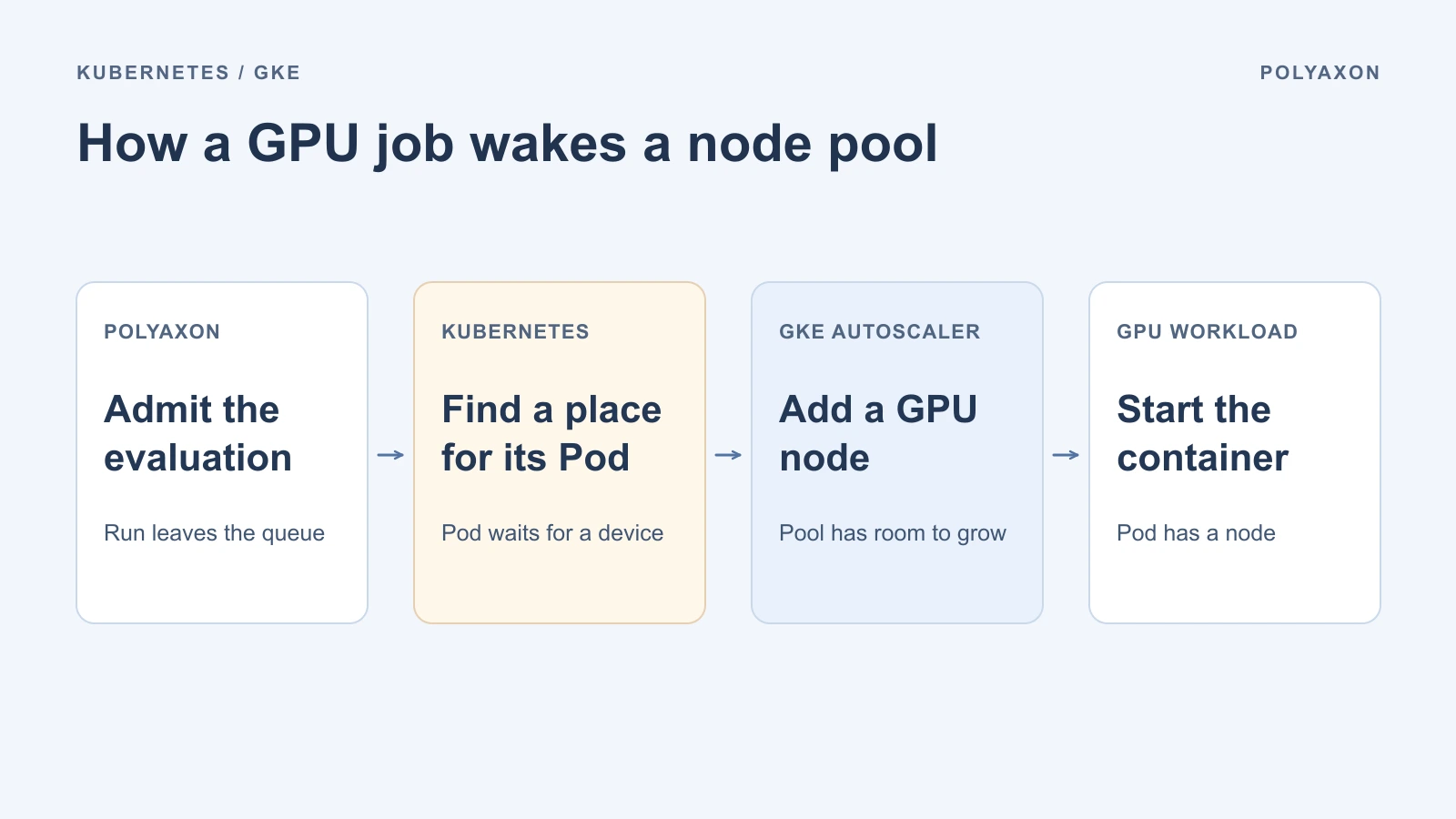
Here is the path on GKE Standard. Polyaxon admits the run and creates a workload. Kubernetes sees a Pod it cannot fit on the existing nodes. If the Pod fits a new node from an eligible pool, the GKE cluster autoscaler can expand that pool. A run waiting in the Polyaxon queue has yet to create the Pod that would trigger this process.
Prepare a GPU pool that can reach zero
Use an existing GKE Standard cluster connected to Polyaxon and keep its regular CPU pool available. This example uses a separate, single-zone GPU pool named agent-l4 with one NVIDIA L4 per node. Choose a zone where G2 machines are available and check GPU quota, node service-account permissions, image access, and driver compatibility before creating the pool. Use the approved node identity and network settings for your cluster. GPU node pools
A cluster administrator can create the pool with these settings. Starting with one node gives you a chance to check that the driver and device plugin work before observing a start from zero.
gcloud container node-pools create agent-l4 \
  --project "$GCP_PROJECT" \
  --cluster "$GKE_CLUSTER" \
  --location "$GKE_LOCATION" \
  --node-locations "$GPU_ZONE" \
  --machine-type g2-standard-8 \
  --accelerator type=nvidia-l4,count=1,gpu-driver-version=default \
  --image-type COS_CONTAINERD \
  --node-taints nvidia.com/gpu=present:NoSchedule \
  --num-nodes 1 \
  --enable-autoscaling --min-nodes 0 --max-nodes 2
Set GKE_LOCATION to the control plane's zone or region and choose one compatible GPU_ZONE for this pool. The limits are per zone, so the single zone makes two the maximum for the example. The selector in the next section uses GKE's node-pool label. The taint keeps ordinary CPU work off the GPU pool. The minimum of zero permits scale-down when the nodes can be removed safely. GKE autoscaling and size limits
Let the agent submit a separate GPU job
Run this probe before sending a real evaluation through the pool. Use an existing, pinned CUDA image with PyTorch that works with the installed driver. The probe prints when the user command starts, checks CUDA, and prints the device name after CUDA work has completed. Save it as gpu-probe.yaml.
name: agent-gpu-probe
inputs:
  - name: image
    type: str
container:
  image: "{{ image }}"
resources:
  cpu: "2..2"
  memory: "4Gi..4Gi"
  gpu: 1
environment:
  nodeSelector:
    cloud.google.com/gke-nodepool: agent-l4
  tolerations:
    - key: nvidia.com/gpu
      operator: Equal
      value: present
      effect: NoSchedule
termination:
  timeout: 1800
cmd: |
  python -u - <<'PY'
  from datetime import datetime, timezone

  print("user_code_started", datetime.now(timezone.utc).isoformat())

  import torch

  value = torch.ones(1, device="cuda").sum().item()
  print("cuda_ready", datetime.now(timezone.utc).isoformat(),
        torch.cuda.get_device_name(0), value)
  PY
This uses the simplified job format in Polyaxon 2.18 and later and assumes the standard NVIDIA GPU resource. The selector and toleration make the target pool eligible. The GPU request makes the Pod demand a device on that pool. Verify the final Pod spec because presets and injected containers can add other requirements. Polyaxon 2.18 · Polyaxon resource configuration
Use the cluster's default routing if it already points to the right compute agent. With commercial queues, add --queue YOUR_AGENT/YOUR_GPU_QUEUE for the configured GPU evaluation queue. Run a fresh probe for each observation.
polyaxon run -p YOUR_PROJECT -f gpu-probe.yaml \
  --cache=false -P image="$GPU_IMAGE"
For the real workflow, have the CPU agent submit a reviewed evaluation component through the Polyaxon run client and record the resulting run UUID against the task. The job can request its GPU independently of the controller. Route and cap concurrent GPU runs with a dedicated Polyaxon queue where available. Agent-driven ML experiments · Polyaxon queues
Time the stages of a cold start
Wait for the GPU pool to be empty before submitting the cold run. In separate terminals, observe the nodes, the run, and the Pods in the namespace the compute agent uses. Set RUN_UUID to the ID returned at submission, and replace YOUR_POD once the selected Pod appears.
kubectl get nodes -l cloud.google.com/gke-nodepool=agent-l4 -w
polyaxon ops statuses -p YOUR_PROJECT -uid "$RUN_UUID"
kubectl -n YOUR_NAMESPACE get pods -l "app.kubernetes.io/instance=$RUN_UUID" -o wide -w
kubectl -n YOUR_NAMESPACE describe pod YOUR_POD
Save the Pod's events while they are available and record timestamps in UTC. Compare these intervals for the same run and attempt.
| Interval | Evidence and interpretation |
|---|---|
| Run submitted → Pod created | Polyaxon status timestamps and the Pod's metadata.creationTimestamp. This includes queue wait, resolution and workload creation. Use the run history to isolate queue wait. |
| Pod created → Pod assigned | Pod scheduling events and the PodScheduled condition. If the pool began at zero, correlate with the autoscaler's scale-up event, node appearance, and GPU becoming allocatable. |
| Pod assigned → user code starts | Pod events for image pulls, mounts and init containers, plus the job's user_code_started timestamp. |
| User code starts → CUDA ready | Difference between the two probe timestamps, including the PyTorch import and first CUDA operation. In a real evaluator, measure up to the first usable result so model download and initialization are visible too. |
If no Pod appears, inspect Polyaxon queue and workload creation status. If a Pod is unschedulable and no eligible node is added, check GKE autoscaler events and confirm that the pool is below its maximum, the full Pod fits the node template, and GPU quota and zonal capacity are available. A node can register before its GPU is allocatable. Once the Pod has a node, investigate the driver, image, storage, or initialization signals that apply. GKE scale-up troubleshooting
Compare a warm node and let the pool shrink
Repeat the same job while a GPU node is Ready and has a free device, before scale-down. Keep the image, selectors, resources and inputs fixed. Record whether the image was already cached. The difference in Pod assignment time helps isolate provisioning, while the difference after assignment can include image-cache effects. Repeat both conditions if startup latency matters to your users.
A pool that scales to zero suits sporadic work with enough time to wait for the first result. If the startup delay misses that budget, keep one compatible node warm and compare the idle cost against the measured wait. Confirm that the pool can actually shrink after a run finishes. Other Pods, placement constraints, or disruption restrictions can prevent a node from being removed. Keep job outputs in durable storage so the evaluation evidence survives node removal. GKE scale-down behavior · Polyaxon artifact storage
This direct path works well for independent Polyaxon jobs. If the agent sends many smaller tasks to a shared Ray cluster, Ray worker autoscaling supplies the worker Pods, and GKE can add nodes when those Pods need capacity.