Control Kubernetes Job retries with pod failure policies
Stop retrying permanent errors, preserve the retry budget for marked disruptions, and inspect Kubernetes Job failure decisions with a concrete example.
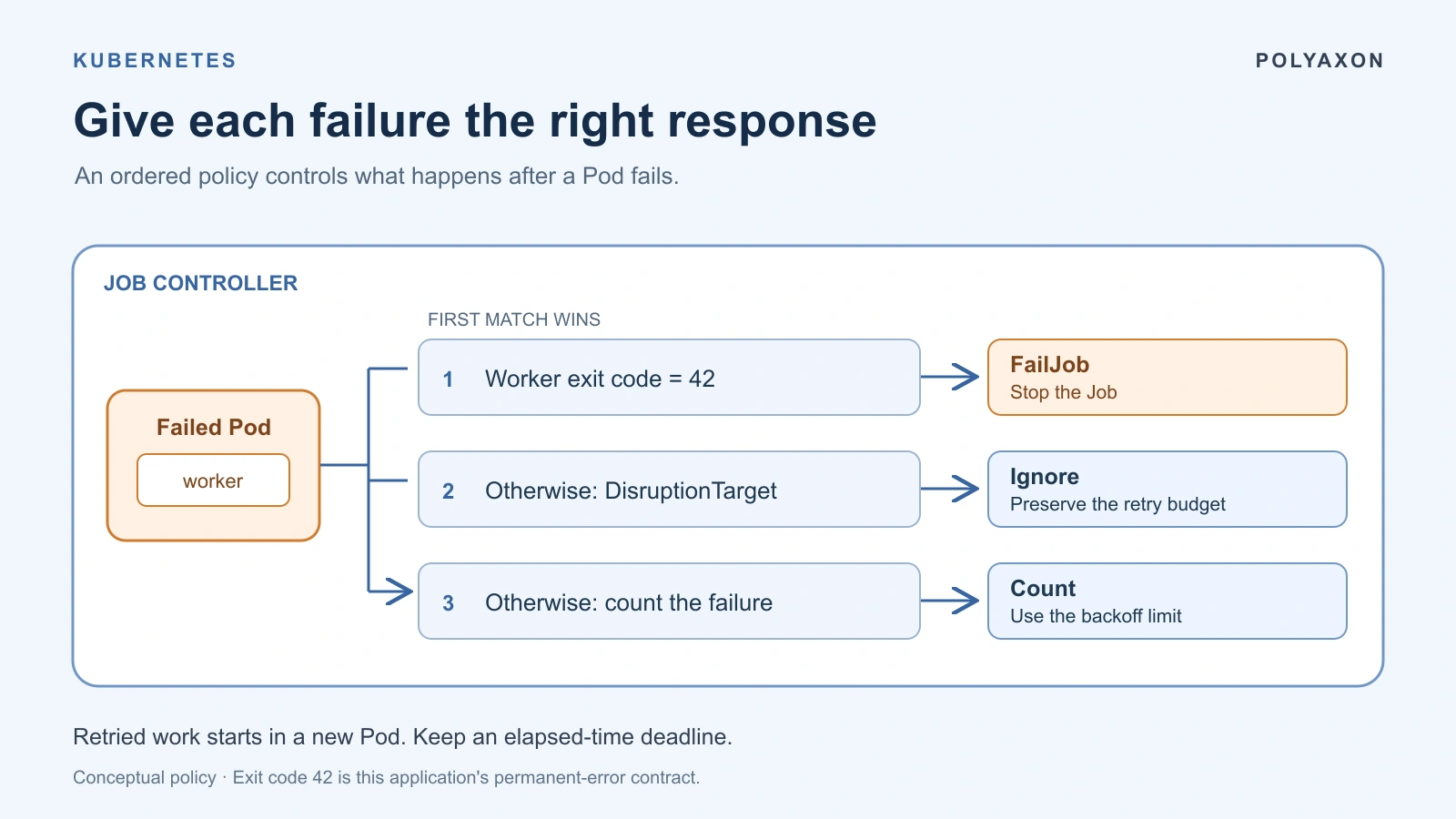
A batch evaluation can fail because its input schema is wrong, a dependency is temporarily unavailable, or the cluster interrupts its Pod. Those failures deserve different responses. Retrying the same incompatible dataset repeats the same work; treating every interruption as an application failure can exhaust a useful retry budget.
Kubernetes Jobs support podFailurePolicy to make that distinction explicit. This guide builds a small input-validation example, then connects the policy to Polyaxon's termination settings. The example uses no GPU and performs no training.
Define what another attempt can fix
Before writing YAML, agree on the application's failure contract. For an evaluation worker, one possible contract is:
| Evidence | Interpretation in this application | Decision |
|---|---|---|
Worker exits with code 42 | Input schema is incompatible with this worker | Stop and correct the input or image |
Failed Pod has DisruptionTarget=True, without the permanent-error match | Kubernetes marked a disruption | Allow replacement without consuming the retry budget |
| Another failure | Cause is not classified by this policy | Use the bounded retry budget and retain evidence |
Exit code 42 is an application convention we choose here. Kubernetes does not assign it the meaning “invalid input.” Reserve a code your program emits only for that specific, permanent condition. A missing object-store response, for example, does not establish that a dataset is invalid.
Likewise, a generic exit code 1 carries too little information to justify failing every job immediately. Record the underlying exception before deciding whether another attempt could help.
Make rule order deliberate
Pod failure policy has been stable since Kubernetes 1.31. Use a supported cluster release that includes it. The Job's Pod template must specify restartPolicy: Never: replacement happens through the Job controller instead of restarting the failed container inside its existing Pod.
Rules are evaluated in order; the first match wins. FailJob initiates termination of the whole Job, Ignore excludes that failure from the backoff budget and permits replacement, and Count uses normal failure accounting. Unmatched failures also count. See the Kubernetes Job documentation for these semantics.
Our policy puts the permanent-error rule first. If a failed Pod carries both that exit code and a disruption condition, we want the invalid-input evidence to win. Reversing the order would make the disruption rule win instead. This is a decision about the application's contract, not cosmetic YAML ordering.
A small Job that rejects incompatible input
To try the example, you need kubectl, a suitable cluster, permission to create a namespace and Jobs, and access to the public Python image. Use a disposable development context. The image tag is convenient for this illustration; pin an approved digest in maintained workloads.
Save this manifest as schema-preflight.yaml:
apiVersion: batch/v1
kind: Job
metadata:
  name: schema-preflight
spec:
  backoffLimit: 3
  activeDeadlineSeconds: 300
  podFailurePolicy:
    rules:
      - action: FailJob
        onExitCodes:
          containerName: worker
          operator: In
          values: [42]
      - action: Ignore
        onPodConditions:
          - type: DisruptionTarget
            status: "True"
  template:
    spec:
      restartPolicy: Never
      containers:
        - name: worker
          image: python:3.12-slim
          command: [python, -u, -c]
          args:
            - |
              import os
              import sys

              expected = "2"
              actual = os.environ["DATASET_SCHEMA_REVISION"]
              if actual != expected:
                  print(f"Unsupported schema: expected {expected}, got {actual}")
                  sys.exit(42)
              print("Schema accepted; the evaluation worker can proceed")
          env:
            - name: DATASET_SCHEMA_REVISION
              value: "1"
          resources:
            requests:
              cpu: "100m"
              memory: 64Mi
            limits:
              cpu: "500m"
              memory: 128Mi
The revisions are illustrative values, supplied through an environment variable to keep the example self-contained. A real worker should obtain the schema revision from its validated dataset manifest. Perform this preflight before loading a large model or starting an expensive evaluation.
Create the isolated namespace and Job after confirming your context:
kubectl config current-context
kubectl create namespace retry-policy-demo
kubectl create --namespace retry-policy-demo -f schema-preflight.yaml
Expected behavior, not recorded execution: the worker prints the mismatch and exits 42. Its failed Pod matches FailJob, so the controller begins terminating the Job instead of spending the three-retry allowance on the same input. The official pod failure policy walkthrough demonstrates the corresponding controller behavior.
The five-minute deadline provides a separate elapsed-time bound. Ignore does not impose a limit on repeated disruptions; a deadline remains useful even when those failures do not consume the backoff budget. The Job API reference describes activeDeadlineSeconds and backoffLimit.
Inspect the decision before cleaning up
Read both the Job and its Pods:
kubectl get job schema-preflight --namespace retry-policy-demo -o yaml
kubectl get pods --namespace retry-policy-demo \
  -l batch.kubernetes.io/job-name=schema-preflight -o yaml
kubectl logs --namespace retry-policy-demo \
  -l batch.kubernetes.io/job-name=schema-preflight \
  -c worker --prefix=true
In the Pod, inspect the worker container's terminated exit code and the Pod phase. In the Job conditions, look for FailureTarget and then Failed, with a reason identifying the policy match. On Kubernetes 1.31 and later, terminal Job conditions wait for Pod termination, so deciding to fail and finishing cleanup need not happen simultaneously. The Job lifecycle reference explains that distinction.
These snippets were reviewed against the documentation but have not been executed. If your result differs, preserve the actual objects and logs, including any admission mutation, image-pull problem, or sidecar that changes the Pod's lifecycle.
To explore another application outcome, save a second manifest with a different Job name and set the revision to "2". That worker should succeed. A separate variant that exits 1 instead of 42 should use normal backoff accounting. These are deliberate variants, not instructions to patch the existing Job's Pod template.
When you have retained the evidence, remove the namespace created for this exercise:
kubectl delete namespace retry-policy-demoRecognize what a disruption condition means
DisruptionTarget is evidence attached by Kubernetes for specific disruption paths, including scheduler preemption and API-initiated eviction. It is not a universal label for every unexpected termination. Match the condition actually present on the failed Pod instead of inferring it from a disappearing node or a signal-related exit code. The Kubernetes feature announcement explains which disruption scenarios it covers.
In particular, do not treat every 137 as a retryable cluster event. Inspect the termination reason, limits, and events; use the OOMKilled troubleshooting guide when memory exhaustion is involved. The Pod eviction guide covers the different eviction mechanisms.
Apply the permanent-error contract in Polyaxon
Polyaxon exposes this policy under termination.podFailurePolicy. Support was introduced as Beta in 2.13 in the release notes. Check your deployed version and runtime support; Kubernetes feature stability does not change the status recorded for a Polyaxon release.
For an existing Polyaxon job component, this excerpt makes the permanent-error rule explicit:
termination:
  maxRetries: 3
  timeout: 300
  ttl: 3600
  podFailurePolicy:
    rules:
      - action: FailJob
        onExitCodes:
          containerName: polyaxon-main
          operator: In
          values: [42]
environment:
  restartPolicy: Never
# Keep your component's image, command, arguments, and resources.
This is a configuration excerpt, not a complete component. Merge it into your existing definition and retain the workload fields. Polyaxon's ordinary Job container is named polyaxon-main; confirm the rendered Pod uses that name when applying a container-specific rule. Its application must implement the exit-code contract. This excerpt deliberately contains only the permanent-error rule; unmatched failures use normal retry accounting.
maxRetries, timeout, and ttl control retry allowance, execution timeout, and resource retention respectively. The one-hour TTL leaves cluster objects available for inspection after completion. See handling failures and termination and the termination specification for configuration details. A shared scheduling preset can carry a reviewed policy across components with the same failure contract.
Keep this example scoped to ordinary Jobs. A distributed training controller may have its own worker-group recovery rules. Also retain the checkpoint and restoration contract: starting another Pod does not restore an optimizer or make repeated external writes safe.
Start with one permanent error that your application can identify reliably. Assign it a distinct exit code, inspect the controller's response, and keep other failures bounded while you collect evidence for more specific rules.
Use one termination specification across workloads
Polyaxon unifies lifecycle configuration through the same termination specification across jobs, distributed workloads, and services, including notebooks and inference servers. It maps the relevant settings to the underlying runtime and supplies lifecycle management where a Kubernetes primitive does not provide it directly. Teams can reuse that configuration through presets. The available controls still depend on the runtime: a Job's podFailurePolicy does not become a service failure policy.
For services, an absolute termination.timeout bounds lifetime even while work is active. Polyaxon also provides idle culling through termination.culling.timeout and an activity probe. These controls can be combined—for example, stopping a notebook after an hour of inactivity or at a maximum lifetime of 24 hours, whichever comes first. ttl has a different purpose: retaining resources after the workload finishes.
Jupyter exposes an activity endpoint at /api/status. A custom inference service needs a compatible endpoint reporting last_activity, with activity accounting that includes requests still in progress. A successful health check alone does not establish useful activity. Culling stops the service; it does not automatically restart it when another inference request arrives. Use it for services whose lifecycle permits that shutdown. The service timeout and culling guide explains the shared configuration, and handling termination documents the HTTP activity-probe contract.