Resume interrupted training without losing progress
Build recoverable PyTorch training jobs with complete checkpoints, durable storage, and explicit restoration. Practice recovery locally and with Polyaxon.
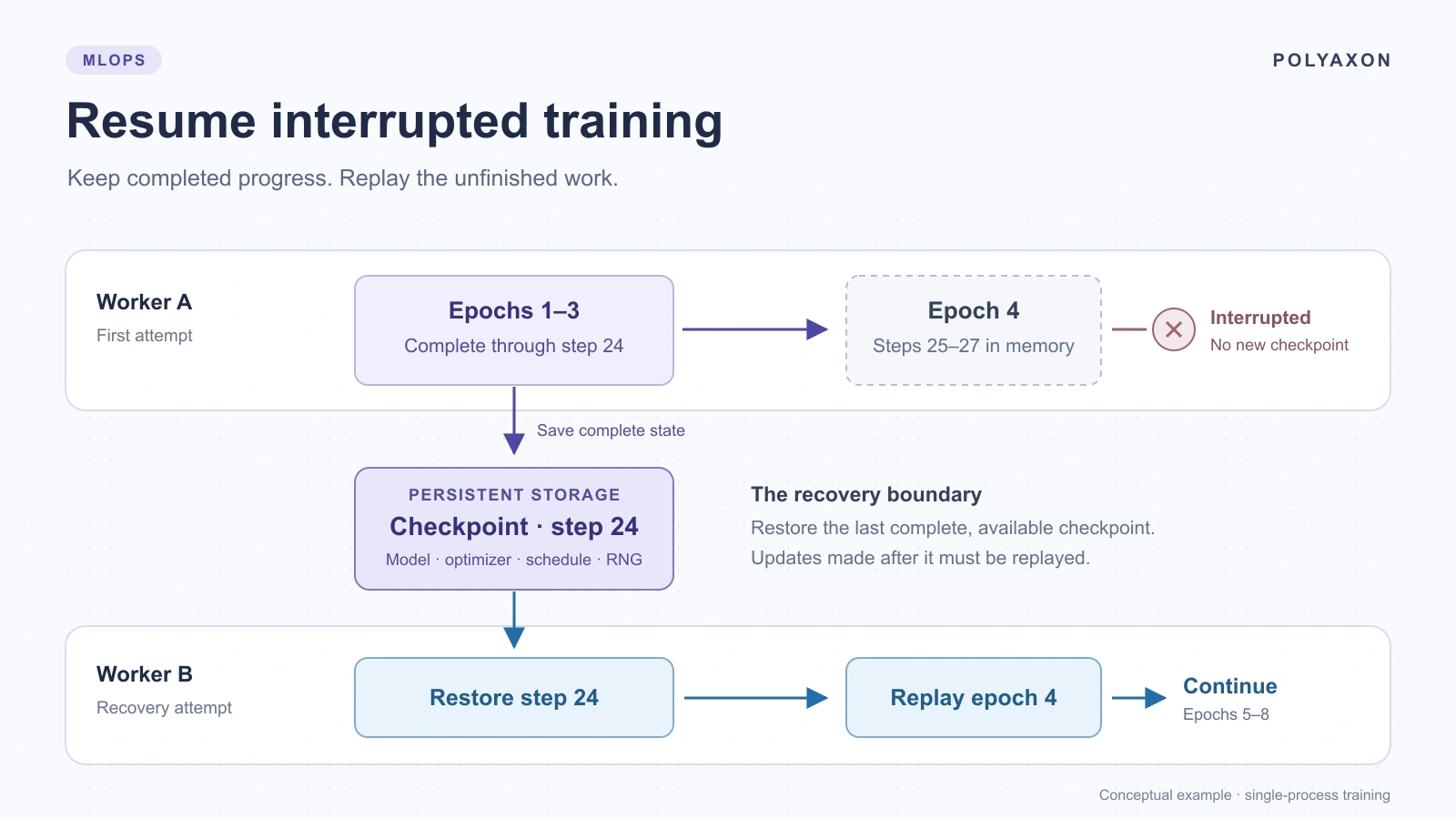
A training job has been running for hours when its worker disappears. A replacement starts, the model loads, and the loss begins moving again. But did training continue from the same state? Or did the optimizer, learning-rate schedule, and data order start over?
Recovering training means preserving the state needed for the next update and making that state available to another process. A restart policy can launch that process; your training code must know what to restore.
This walkthrough builds a small PyTorch job that checkpoints at epoch boundaries, deliberately interrupts during the next epoch, and resumes from the latest completed checkpoint. You can try it on a CPU, then run the same code with Polyaxon. Progress saved in a durable checkpoint survives; work performed after that checkpoint may need to repeat.
Define the recovery boundary
Decide what the replacement worker is allowed to repeat. That decision determines both the checkpoint format and where you save it.
For this example, the boundary is a completed epoch. The job has eight batches per epoch. It saves after epoch 3, at step 24, then stops after step 27. Recovery restores step 24 and repeats epoch 4, including the three updates that were lost with the interrupted process. These numbers describe the exercise's control flow, not measured results.
| Boundary | State the application needs | Work that may repeat |
|---|---|---|
| Completed epoch | Training state and enough information to construct the next epoch | The unfinished epoch |
| Completed optimizer step | Training state plus the current data order and position | Updates after the last checkpoint |
| Midway through gradient accumulation | All of the above, accumulated gradients, and the accumulation position | Work after that more detailed boundary |
An epoch boundary keeps this first implementation understandable. The fixture has no streaming source, random augmentation, prefetched workers, or distributed ranks. Those features introduce additional state; skipping it changes what “resume” means.
Save the state that determines the next update
Model weights are only part of a training checkpoint. Momentum and adaptive optimizer statistics also influence the next update. PyTorch's saving and loading guide describes saving model and optimizer state together.
Our companion saves the following:
| State | Purpose |
|---|---|
| Model parameters and buffers | Restore what the model has learned |
| Optimizer state | Preserve momentum and optimizer settings |
| Learning-rate scheduler | Continue the schedule at the correct point |
| Next epoch and global step | Identify completed work and the next boundary |
| PyTorch CPU random state | Continue dropout's random sequence |
| Dedicated shuffle-generator state | Construct the same next epoch's batch order |
| Training history | Keep the completed epochs associated with that checkpoint |
| Code/data hashes, configuration, and runtime | Detect incompatible recovery attempts |
The example saves after the epoch's optimizer updates and scheduler step. On restore, it creates the model, optimizer, and scheduler, loads their states, and restores the random generators last. Creating a model can itself consume random numbers, so restoring randomness before initialization would put the generator at the wrong position. The model then returns to training mode.
If your workload uses mixed precision, include the gradient scaler. If it uses Python or NumPy randomness, capture those generators too. GPU training needs the relevant device RNG states. A streaming dataset may require an offset or cursor rather than an epoch number.
Even a complete checkpoint does not guarantee identical results across PyTorch versions, devices, or platforms. Keep the environment stable when checking recovery, and read PyTorch's reproducibility guidance before interpreting differences as a checkpoint bug.
Publish complete checkpoints to surviving storage
Overwriting a single checkpoint.pt directly creates a failure window: the worker can disappear while writing the file that was supposed to protect it.
The companion keeps separate completed generations such as epoch-0003.pt. It writes each new checkpoint to a unique temporary sibling, flushes and synchronizes the file, renames it to its completed name, then synchronizes the directory. The loader only considers completed epoch-*.pt files. An unfinished .tmp file is never selected.
This uses the same-filesystem rename behavior documented by Python's os module. It assumes a filesystem with the required rename and synchronization semantics and one writer per checkpoint directory. It is not a distributed lock or an object-store commit protocol.
The storage location matters just as much:
- A container's writable layer is not a recovery store for a replacement Pod.
- An
emptyDircan survive a container crash within the same Pod, but is deleted when the Pod is removed from its node. See the Kubernetes volume documentation. - A persistent volume must be reachable by the replacement worker. Review its storage backend, access mode, and topology rather than assuming every PVC survives every failure.
- For object storage, finish uploading a checkpoint generation before publishing the manifest or pointer that selects it. Retain an earlier recoverable generation until the new one is confirmed available.
A local rename does not prove a remote artifact upload has completed. If a worker dies before synchronization, recovery may only have an older checkpoint. Measure the gap between saving locally and having a checkpoint another worker can actually read.
The example fails if its latest completed checkpoint is corrupt or incompatible. It does not silently reset training or skip backward. An operator can recover from an earlier verified generation in a separate directory, retaining the failed artifact for investigation.
Try a controlled interruption locally
The training-recovery companion contains the trainer, requirements, Polyaxonfile, resume preset, and ignore files. Use Python 3.12 on Linux or macOS with a filesystem supporting file and directory synchronization. No dataset download or GPU is required.
git clone https://github.com/polyaxon/polyaxon-examples.git
cd polyaxon-examples/blog/training-recovery
python3.12 -m venv .venv
source .venv/bin/activate
python -m pip install -r requirements.txt
python train.py --output outputs/recovery --interrupt-at-step 27
The last command intentionally exits with code 75 during epoch 4. Run the recovery command separately:
python train.py --output outputs/recovery --resumeThe first invocation leaves the completed epoch checkpoints in outputs/recovery/checkpoints/. The second loads epoch-0003.pt and continues toward eight total epochs, rather than adding eight more. Its attempt record identifies the checkpoint name, hash, and restored step.
Each process writes a separate directory under outputs/recovery/attempts/, including its runtime record and resolved dependencies. A completed attempt also writes a summary of the training history. If a process is killed abruptly, its attempt record may still say running; the completed checkpoint is the recovery authority.
The --resume flag is deliberate. A missing checkpoint causes an error, so an unavailable mount or missing artifact cannot quietly turn recovery into a fresh run. Conversely, starting without --resume fails when the directory already contains completed checkpoints.
The fixture also rejects differences in its source hash, generated dataset, training configuration, Python version, PyTorch version, OS, or architecture. This is a useful guard for this exercise, not a complete environment fingerprint. A deliberate training change deserves a reviewed continuation or a new experiment.
To compare against an uninterrupted execution, use the same source and environment with a separate output directory:
python train.py --output outputs/baselineCompare the final model tensors, optimizer and scheduler state, random-generator states, and full epoch history in the two epoch-0008.pt files:
python compare.py outputs/baseline/checkpoints/epoch-0008.pt outputs/recovery/checkpoints/epoch-0008.ptThe comparison reports exact equality per state field and exits nonzero on a mismatch. Both runs reaching step 64 is necessary but does not establish equivalent recovery. The script compares loaded contents rather than serialized file bytes. A mismatch deserves inspection; do not simply loosen the comparison until it passes.
This companion has been reviewed against source but has not been executed. The deliberate exit exercises restoration across processes; it does not establish recovery after node loss, forced termination during a write, or interrupted cloud uploads.
Run and resume the example with Polyaxon
Use an existing Polyaxon project and an artifact store suitable for the failure you want to recover from. The CLI must be configured, and workers need access to the Python image and package index. The job installs the supplied requirements, including polyaxon, at startup.
The included polyaxonfile.yaml is:
name: training-recovery
inputs:
  - name: epochs
    type: int
    value: 8
  - name: interrupt_at_step
    type: int
    value: 27
  - name: resume
    type: bool
    value: false
container:
  image: python:3.12-slim
  workingDir: "{{ globals.run_artifacts_path }}/uploads"
resources:
  cpu: 1
  memory: 2Gi
cmd: |
  python -m pip install --no-cache-dir -r requirements.txt
  exec python train.py --tracked --epochs {{ epochs }} --interrupt-at-step {{ interrupt_at_step }} {% if resume %}--resume{% endif %}
From the companion directory, upload the whole folder and start the job. Replace quick-start with your existing project:
polyaxon run -p quick-start -f polyaxonfile.yaml -uThe included .polyaxonignore excludes the local virtual environment, caches, and output directories. The upload supplies the code under uploads; the trainer writes checkpoints under tracking.get_outputs_path(), in training-recovery/checkpoints/.
After the intentional failure is terminal, confirm that outputs/training-recovery/checkpoints/epoch-0003.pt is available through the run's artifacts. The supplied resume.yaml overrides only the recovery controls:
params:
  resume: true
  interrupt_at_step: 0
Use the UUID returned by the original submission:
RUN_UUID="replace-with-the-interrupted-run-uuid"
polyaxon ops resume -p quick-start -uid "$RUN_UUID" -f resume.yaml
Polyaxon makes the previous run's available artifacts accessible to the resumed execution. The preset tells the application to load them and disables the deliberate interruption. Python restores the training state; Polyaxon does not infer how to reconstruct your optimizer or data iterator. The resume and restart documentation explains the execution controls.
Choose the operation that matches the history you want to retain:
| Operation | Use it when |
|---|---|
polyaxon ops resume … -f resume.yaml | Continue the existing run using its available artifacts |
polyaxon ops restart … --copy -f resume.yaml | Keep the original run and continue in a new run with copied artifacts |
polyaxon ops restart … | Start a new execution without selecting artifact-copy mode; do not assume the application is restoring a checkpoint |
For the copy variant, use this command as an alternative to resume, after the original run is terminal:
polyaxon ops restart -p quick-start -uid "$RUN_UUID" --copy -f resume.yamlUse the new UUID returned by that command for subsequent operations on the copy. The example has a single-writer requirement; do not launch competing training processes against the same checkpoint directory.
The trainer logs loss at the global optimizer step and records which checkpoint each attempt restored. Its artifact references point to files already saved under outputs. A reference entry is lineage metadata, not confirmation that cloud storage has acknowledged an upload. The attempt records remain useful when a resumed run appends to an existing metric history or repeats work after an older checkpoint.
Installing dependencies at startup keeps this small tutorial easy to try. Before a long training job, pin the reviewed dependency versions and base image digest. A floating environment can change between attempts; the example rejects a recorded runtime mismatch instead of assuming compatibility.
The jobs terminate after the deliberate interruption or the final epoch. If you need to stop an active attempt:
polyaxon ops stop -p quick-start -uid "$RUN_UUID"Keep its checkpoint and recovery records until you have reviewed the outcome. Then apply your usual artifact retention policy. The example creates no service or PVC to tear down.
Choose a checkpoint frequency you can afford
The latest completed, durable checkpoint sets the recovery point. Saving once per hour exposes more work to replay than saving every few minutes, but frequent saves can consume training time, network bandwidth, and storage capacity.
Measure checkpoint serialization time, remote availability delay, replacement-worker startup, restore time, and replayed updates separately. Large models may benefit from asynchronous checkpointing, but the snapshot must remain consistent while training continues. Keep the previous durable generation until the new one is complete.
For the small fixture, every epoch is a convenient boundary and all generations are retained. For production, choose a cadence and retention policy from measured overhead and an acceptable recovery window. A “best validation model” alone is usually insufficient: the best score may be far behind the latest recoverable training state. Keep model selection and recovery policies separate.
Account for failures the small example does not simulate
Graceful shutdown can help save recent progress, but it is an additional opportunity. Kubernetes normally gives a terminating container a bounded grace period before forceful termination; a sudden node failure may provide no such opportunity. The Pod lifecycle documentation describes that process. Periodic durable checkpoints remain the foundation.
If you add a signal handler, have it request a stop at a safe training boundary rather than serialize a complex checkpoint directly inside the handler. Make sure the boundary, write, and remote upload can finish within the available time. An epoch can be too long to wait; recovering within an epoch requires the extra data-position state described earlier.
For distributed or sharded models, use the framework's coordinated checkpoint facilities. A file from one rank is not necessarily the state of the whole job. PyTorch's Distributed Checkpoint tutorial covers saving and loading state across ranks. Gang scheduling coordinates worker placement; it does not replace that recovery protocol.
Finally, review what happens outside the model. Replaying training may also replay metric writes, notifications, or exports. Associate those effects with an attempt and step, or make them safe to repeat. A completed checkpoint commits training state; it does not make every external side effect exactly once.
Final thoughts
A recoverable training job has a clear boundary: complete application state, a checkpoint another worker can read, and code that restores it deliberately. The replacement should identify what it loaded and how much work it must repeat.
Start with the small interruption exercise, inspect the checkpoint and attempt records, and compare the resumed execution with an uninterrupted baseline. Then extend the recovery contract to your actual data loader, precision settings, distributed framework, and storage backend. The repeatable jobs guide and GPU utilization article connect this recovery work to reproducible execution and useful compute time.