Deploy Laya typed decisions on Polyaxon
Serve the open Laya typed-decisions checkpoint through Polyaxon, with a CPU classifier endpoint, explicit model scope, and a review path for uncertain classifications.
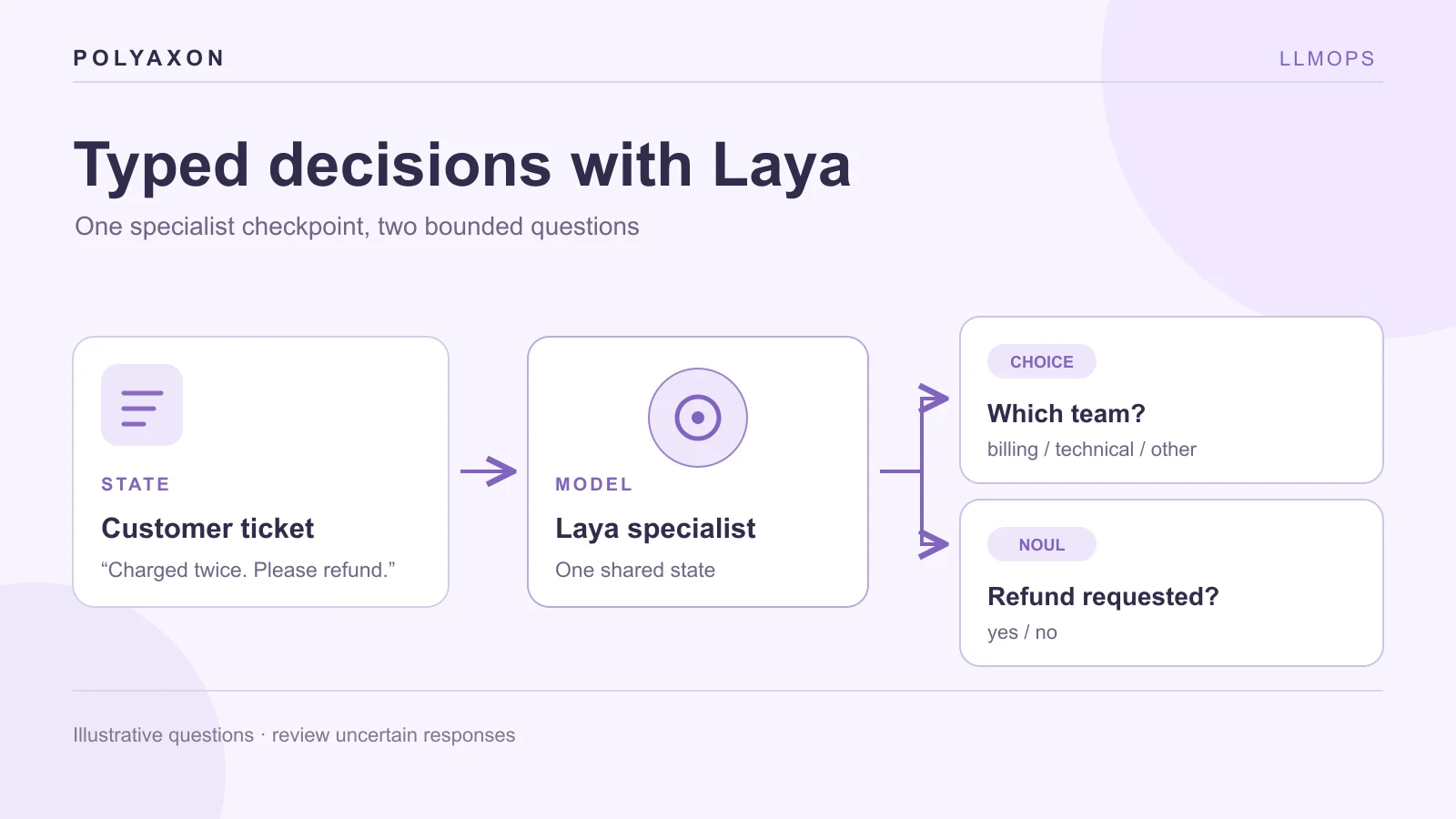
An application can spend a full generation call deciding whether a support ticket asks for a refund. For a fixed decision such as routing, urgency, or a yes/no check, ConvAI Innovations' Laya uses an encoder and typed decision heads instead of generating prose. Its open typed-decisions checkpoint was tuned for four documented workflows, including customer service and security incidents.
This tutorial serves that checkpoint on Polyaxon. Laya supplies the decision model; Simple Jev's Laya backend supplies the HTTP classifier API; Polyaxon schedules and exposes the service. The similarly named aayushch/laya project is a separate local-first notification desktop application, not this model.
Select the checkpoint for the job
The Laya model family includes a general English checkpoint, a multilingual checkpoint, and the typed-decisions specialist. The specialist is the sensible starting point for the documented customer-service, invoice, security, and agent-trace examples. It is not a general-purpose guarantee: the model card warns that behavior outside those workflows may resemble the base model or worsen.
The server loads the specialist from the typed-decisions subfolder of convaiinnovations/laya. That is the upstream server's documented launch form; requests name the root model ID. We retain its native 1,024-token budget and do not enable the optional RoPE extension, because a longer context would need its own accuracy and calibration review.
Use a PyTorch runtime image
There is no need to build a separate image for this example. Start from the official PyTorch runtime image, let a Polyaxon Git initializer fetch a reviewed Simple Jev commit, and install its laya extra when the service starts. The selected 2.14.0-cuda12.6-cudnn9-runtime tag includes Python 3.12, which Simple Jev requires. This walkthrough still runs Laya on CPU; the published PyTorch runtime tag carries CUDA libraries, so the image is larger than a purpose-built CPU image.
Replace YOUR_REVIEWED_FULL_COMMIT_SHA with a full commit from the Simple Jev repository. For repeatable deployments, record the PyTorch image digest, the server commit, the Laya checkpoint revision, and resolved Python packages. Runtime installation needs package-index access on each start and adds startup time; a prebuilt image remains useful when those constraints matter.
Schedule the Laya endpoint
Configure a persistent model-cache connection mounted at /mnt/model-cache, then save the following as laya-classifier.yaml. The initial CPU and memory allocation must be adjusted from actual startup and traffic measurements.
name: laya-typed-decisions
service:
  ports: [8000]
  rewritePath: true
connections: [model-cache]
init:
  - git:
      url: https://github.com/featherless-ai/simple-jev
      revision: YOUR_REVIEWED_FULL_COMMIT_SHA
container:
  image: pytorch/pytorch:2.14.0-cuda12.6-cudnn9-runtime
  workingDir: "{{ globals.artifacts_path }}/simple-jev"
env:
  HF_HOME: /mnt/model-cache
  USE_TF: "0"
resources:
  cpu: "4..4"
  memory: "8Gi..8Gi"
cmd: |
  python -m pip install --break-system-packages --no-cache-dir -e './hf-server[laya]'
  exec simple-jev \
    --backend laya \
    --model convaiinnovations/laya \
    --subfolder typed-decisions \
    --device cpu \
    --max-model-len 1024 \
    --host 0.0.0.0 \
    --port 8000
The PyTorch image is based on Ubuntu, whose Python installation is marked externally managed; pip's --break-system-packages option permits installation into this disposable container. The USE_TF=0 setting follows the model card's guidance for environments where Transformers probes an installed TensorFlow runtime. Polyaxon clones the server before the main container starts; pip then installs the API and its Laya dependency. The model is downloaded on first start unless already cached. Submit the service and inspect startup:
polyaxon run -f laya-classifier.yaml
polyaxon ops dashboard
The endpoint runs the same /v1/classifier contract as the Qwen classifier tutorial. The upstream server has no built-in authentication. Use Polyaxon access controls or your approved gateway, and keep raw Pod ports private.
Ask a typed question
After the model has loaded, get the URL of this Polyaxon operation. Set an authorized token appropriate for your installation:
LAYA_URL=$(polyaxon ops service --external --url)
: "${POLYAXON_TOKEN:?Export an authorized Polyaxon token first}"
curl --fail-with-body "$LAYA_URL/health" \
  --header "Authorization: token $POLYAXON_TOKEN"
Send a synthetic example with one choice and one noul question:
curl --fail-with-body "$LAYA_URL/v1/classifier" \
  --header "Authorization: token $POLYAXON_TOKEN" \
  --header "Content-Type: application/json" \
  --data '{
    "model": "convaiinnovations/laya",
    "state": "I was charged twice for invoice 4411. Please refund the duplicate.",
    "questions": {
      "team": {
        "type": "choice",
        "instructions": "Which team should review this request?",
        "criteria": {
          "billing": "Charges, invoices and refunds",
          "technical": "Bugs and outages",
          "other": "Any different request"
        }
      },
      "refund_requested": {
        "type": "noul",
        "instructions": "Does the customer explicitly ask for a refund?"
      }
    }
  }'
Inspect the returned answers and the model ID. The expected semantic reading of the synthetic message is billing with a refund request, but no numerical score or actual model response is claimed here.
Keep a review boundary
The upstream model card reports accuracy and calibration on its test split, and calls out overconfidence and weaker performance for some probability comparisons. Those are source-reported figures under that dataset, not measurements of this Polyaxon deployment. Recheck the model on your own held-out examples before a probability threshold drives automated refunds, escalations, or security actions.
Start with a small case set: routine tickets, ambiguous requests, language variants, input near the context limit, and tickets outside the specialist's four domains. Record both the expected typed answers and the outcome of human review. Save the case set and responses with a Polyaxon run's artifacts and compare model revisions before promoting a routing rule.
For multilingual traffic, investigate Laya's multilingual checkpoint and router separately; this specialist is English-focused. For a large label space, the model card warns that options share a fixed token budget, so an apparently valid choice schema can still perform poorly. Route uncertain and unsupported cases to a person.
Stop the selected service with polyaxon ops stop when the evaluation is finished. Its cache can be reused if your storage connection remains mounted, while the service's CPU or GPU allocation is released.