Extract invoice fields with Qwen-VL on Polyaxon
Serve an open vision-language model on your GPU cluster, extract typed invoice fields, and evaluate whether the values actually match the document.
An invoice can contain a subtotal, a tax amount, a balance due, and a payment already received. Returning a number under a JSON key named total does not tell you which number the model read.
This tutorial deploys Qwen2.5-VL-7B-Instruct as a Polyaxon GPU service and extracts three fields: invoice number, currency, and final invoice total. It then compares those fields with reviewed labels. The distinction matters: the serving engine can constrain the output format, while the application must determine whether the answer is supported by the page.
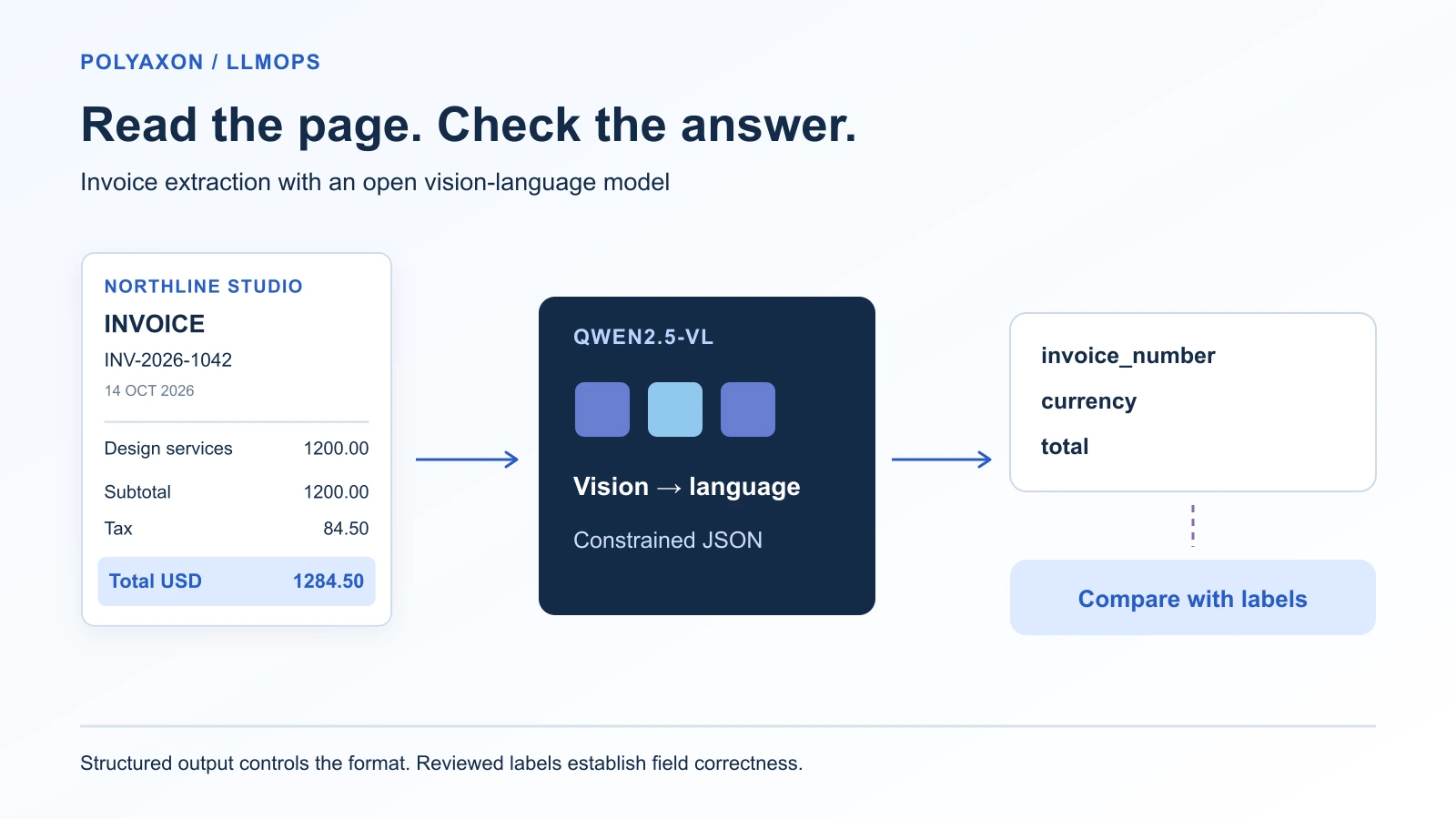
Qwen2.5-VL is a useful starting point because its published design includes a vision encoder, a merger that connects visual features to the language model, and training for document understanding and structured extraction. That establishes a reason to try it; its published benchmark results do not establish accuracy on your invoices. Qwen2.5-VL technical report.
Define the answer before deploying
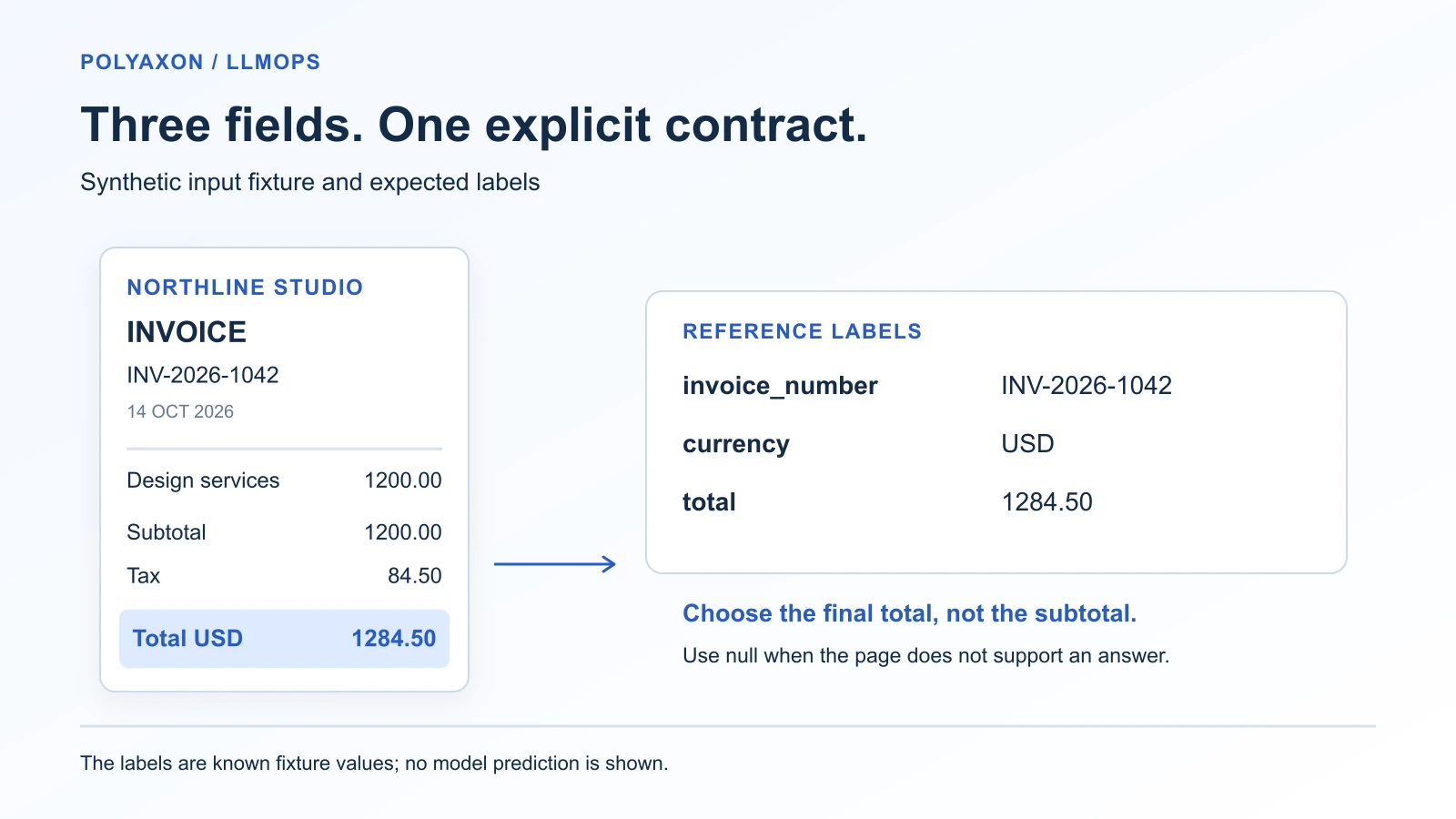
Use a small schema with explicit missing values. An unreadable invoice number should return null. A dollar sign by itself should not become USD: several currencies use it. The amount is a decimal string rather than a floating-point number.
The companion's Pydantic model defines the format:
from pydantic import BaseModel, ConfigDict, Field

class Invoice(BaseModel):
    model_config = ConfigDict(extra="forbid")
    invoice_number: str | None
    currency: str | None = Field(pattern=r"^[A-Z]{3}$")
    total: str | None = Field(pattern=r"^(0|[1-9][0-9]*)\.[0-9]{2}$")
These choices are part of this application's contract. Nonnegative amounts with two decimal places suit the supplied USD fixture; extend the representation and labels before handling credit notes or currencies with other minor-unit conventions. Decide whether your task needs final invoice total or balance due, and keep that decision consistent in the prompt and ground truth.
The supplied synthetic invoice contains INV-2026-1042, an explicit USD label, a subtotal of 1200.00, tax of 84.50, and a final total of 1284.50. It provides an input you can inspect and known reference labels. It is one example, with no model result or accuracy claim attached.
Serve the model on a GPU queue
Get the complete companion, including the service, client, synthetic invoice, and evaluation script:
git clone https://github.com/polyaxon/polyaxon-examples.git
cd polyaxon-examples/blog/vision-document-extraction
python -m pip install -r requirements.txt
polyaxon run -f service.yaml -p YOUR_PROJECT --queue YOUR_AGENT/YOUR_GPU_QUEUE
The project needs service permissions and an NVIDIA GPU queue. The node needs compatible drivers and access to the model download. Start with a dedicated GPU with at least 40 GiB memory, inspect startup logs, and adjust for your image sizes and traffic. This is a starting configuration, not a measured memory requirement.
The service configuration pins the model and tokenizer to commit cc594898137f460bfe9f0759e9844b3ce807cfb5 and the vLLM v0.11.2 image to an immutable digest. It requests one GPU, exposes port 8000, waits for /health, and applies a two-hour termination timeout. Its key serving limits are:
--served-model-name invoice-extractor
--max-model-len 4096
--max-num-seqs 2
--limit-mm-per-prompt '{"image": 1}'
--gpu-memory-utilization 0.85
Large images can produce many visual tokens. A request can exceed the model-length limit even if its written prompt is short. Keep image preprocessing fixed while evaluating; if you resize or crop pages, retain that transformation with the input revision.
Polyaxon schedules and exposes the service on your cluster. vLLM performs image processing, model execution, and constrained generation. The Polyaxon vLLM integration describes the service routing and authentication.
Send a page and keep the response
Approve the run if required. Once the service is healthy, obtain its URL and retain its path prefix:
polyaxon ops service -p YOUR_PROJECT -uid SERVICE_UUID --external --url
export SERVICE_URL='PASTE_THE_RETURNED_URL'
export POLYAXON_TOKEN='YOUR_CONFIGURED_POLYAXON_TOKEN'
python extract.py demo-invoice.png --out extraction.json
The client sends a base64 image through image_url in the chat request and uses Polyaxon's Authorization: token ... header. It accepts PNG, JPEG, or WebP and rejects oversized local inputs. The JSON-schema response format constrains the three fields; the client also checks the finish reason and validates the returned object. vLLM multimodal inputs, structured outputs.
The instruction asks for the final total, preserves uncertainty with null, and treats instructions printed inside the document as document content. Those are application instructions, not a guarantee against prompt injection. The client writes the prediction, image hash, model revision, usage, and response identifier to extraction.json so you can inspect what happened.
This example handles one page image. Render PDFs before calling it. Documents that span pages also need page association and a policy for conflicting or repeated fields; adding several images to a request does not define that policy automatically.
Evaluate values, missingness, and failures
Start by exercising the interface with the supplied fixture:
python evaluate.py demo.jsonl --out demo-evaluationFor a useful evaluation, replace the one-case manifest with reviewed invoices from the workload you intend to support. Include difficult layouts, multiple candidate totals, ambiguous currencies, poor scans, and missing fields. Keep a held-out set separate from the examples used to revise the prompt.
The evaluator retains every case and reports:
| Measure | Question it answers |
|---|---|
| Exact-document rate | Were all three fields, including expected nulls, correct? |
| Supported-field accuracy | Of the labeled non-null fields, how many were recovered correctly? |
| Supported-field coverage | How often did the model provide a value for a labeled non-null field? |
| Failed documents | How many requests failed or returned incomplete or invalid output? |
Failed requests remain in the accuracy and coverage denominators. Inspect cases.jsonl to find unsupported non-null answers; the aggregate coverage measure alone cannot expose them. Group errors by layout and field before changing the prompt or model.
For identifiers, currency codes, and canonical amounts, exact comparison is appropriate for this contract. For long text fields, a different metric may be useful. DocVQA uses both exact accuracy and normalized edit similarity, illustrating how a metric's treatment of small transcription errors changes the assessment. A nearly correct invoice number or amount can still be operationally wrong. DocVQA paper.
Retain the evaluation manifest, predictions, preprocessing, companion commit, and service run UUID with each comparison. Polyaxon can keep the GPU deployment and subsequent evaluation jobs in the same project, with their configurations and artifacts available for review. Stop the service when finished:
polyaxon ops stop -p YOUR_PROJECT -uid SERVICE_UUIDThe deployment and client were source-reviewed for this tutorial; no extraction run was executed. The synthetic invoice establishes the expected answer, not the model's performance.
References
- Qwen2.5-VL technical report, Qwen Team, 2025: architecture, document understanding, and structured-output training.
- Qwen2.5-VL-7B-Instruct model card: checkpoint identity, license, and model usage.
- DocVQA, Mathew, Karatzas, and Jawahar, WACV 2021: document-question evaluation and exact versus edit-similarity metrics.
- vLLM v0.11.2 multimodal inputs and structured outputs: the request and output mechanisms used here.