Profile a slow PyTorch training run on Polyaxon
Capture a short CPU/CUDA trace, identify whether input loading or GPU work is delaying training, and measure a targeted change without profiler overhead.
Low GPU utilization is a clue, but it does not tell you whether training is waiting for input, copying tensors, launching many small kernels, or synchronizing with the CPU. Those delays require different fixes.
This tutorial uses a short PyTorch trace to locate the delay and a separate unprofiled run to measure a change. The worked example compares zero and four DataLoader workers under the same CPU and GPU allocation in Polyaxon. More workers may help, do nothing, or make the run slower; the trace and measurement decide.
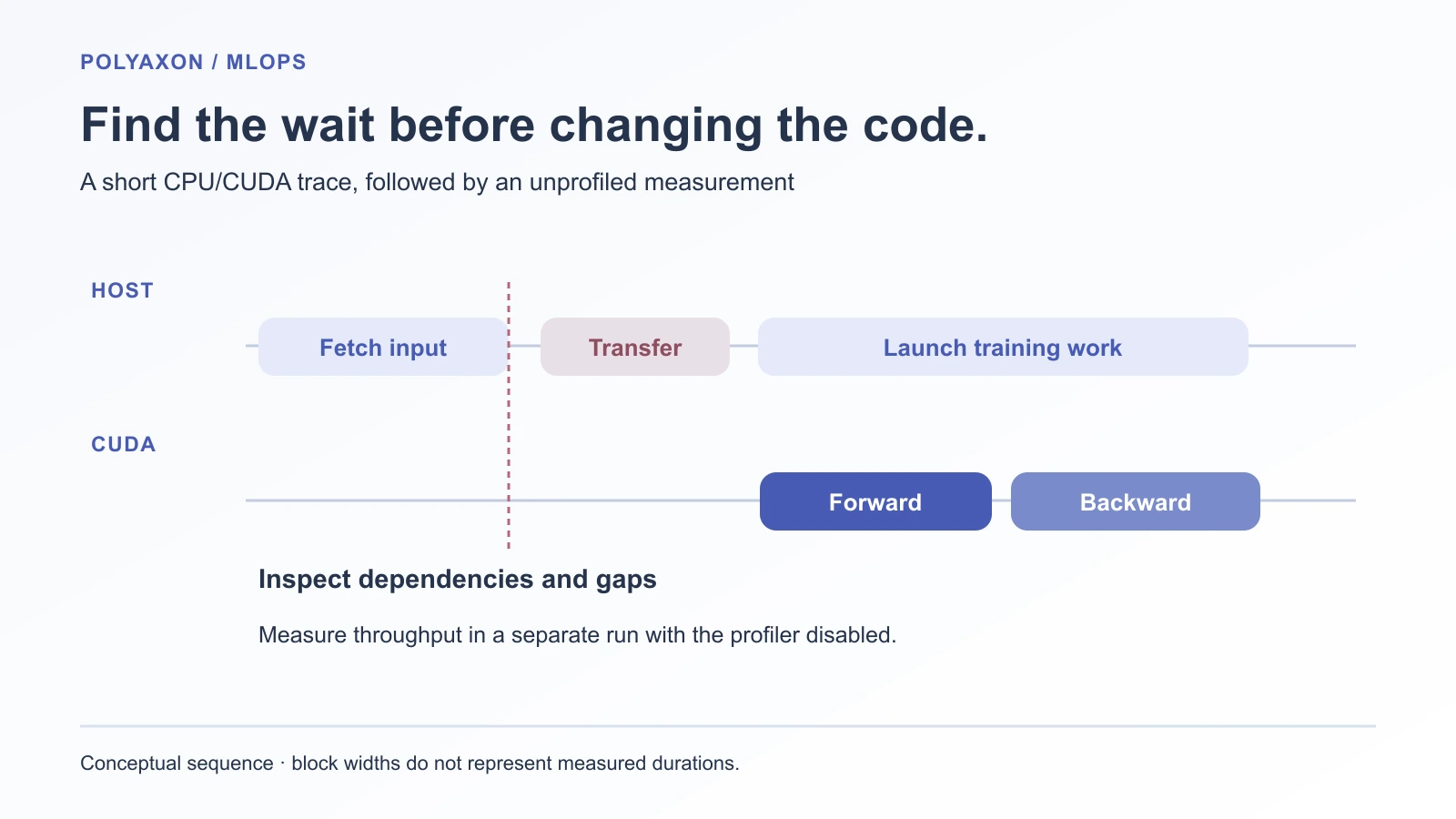
Mark the work you need to distinguish
The companion trains a small ResNet18 variant on CIFAR-10. It uses a 3×3 stride-one first convolution, no initial max pooling, a ten-class output, batch size 128, and SGD. This is a short systems workload, with no claim about final CIFAR-10 accuracy.
The training step labels four scopes:
from torch.profiler import record_function

with record_function("input/next_batch"):
    images, targets = next(iterator)

with record_function("input/to_device"):
    images = images.cuda(non_blocking=True)
    targets = targets.cuda(non_blocking=True)

with record_function("train/forward_backward"):
    optimizer.zero_grad(set_to_none=True)
    loss = criterion(model(images), targets)
    loss.backward()

with record_function("train/optimizer"):
    optimizer.step()
Excerpt from the complete training step; the companion also initializes the dataset, model, optimizer, iterator, and tracking.
These CPU scopes explain what the Python code is doing. CUDA operations can continue after their launching scope ends. Read the corresponding GPU tracks to locate the work itself. Adding a synchronization after every scope would alter the execution pattern you are trying to diagnose. PyTorch profiler, CUDA timing guidance.
Capture a short steady-state trace
Start in a configured Polyaxon project with a dedicated NVIDIA GPU queue, compatible drivers, four CPUs, and 8 GiB host memory for the job:
git clone https://github.com/polyaxon/polyaxon-examples.git
cd polyaxon-examples/blog/pytorch-training-profiler
polyaxon run -f polyaxonfile.yaml -u . -p YOUR_PROJECT --queue YOUR_AGENT/YOUR_GPU_QUEUE -P mode=profile -P workers=0
The image contains PyTorch 2.7.1/CUDA 12.6. Runtime installation adds torchvision 0.22.1 and a deployment-compatible Polyaxon client; the package inventory is printed to the logs. The source folder is uploaded, and output artifacts are written through Polyaxon's tracking client. The node needs dataset and package-download access. Approve the job if required.
The script performs 20 training steps before opening the profiler. It then records ten more steps with this schedule:
from torch.profiler import ProfilerActivity, profile, schedule

with profile(
    activities=[ProfilerActivity.CPU, ProfilerActivity.CUDA],
    schedule=schedule(wait=1, warmup=1, active=3, repeat=2),
    on_trace_ready=save_trace,
    record_shapes=True,
    profile_memory=True,
    with_stack=True,
) as profiler:
    for _ in range(10):
        step()
        profiler.step()
Excerpt; save_trace and step are defined in the companion.
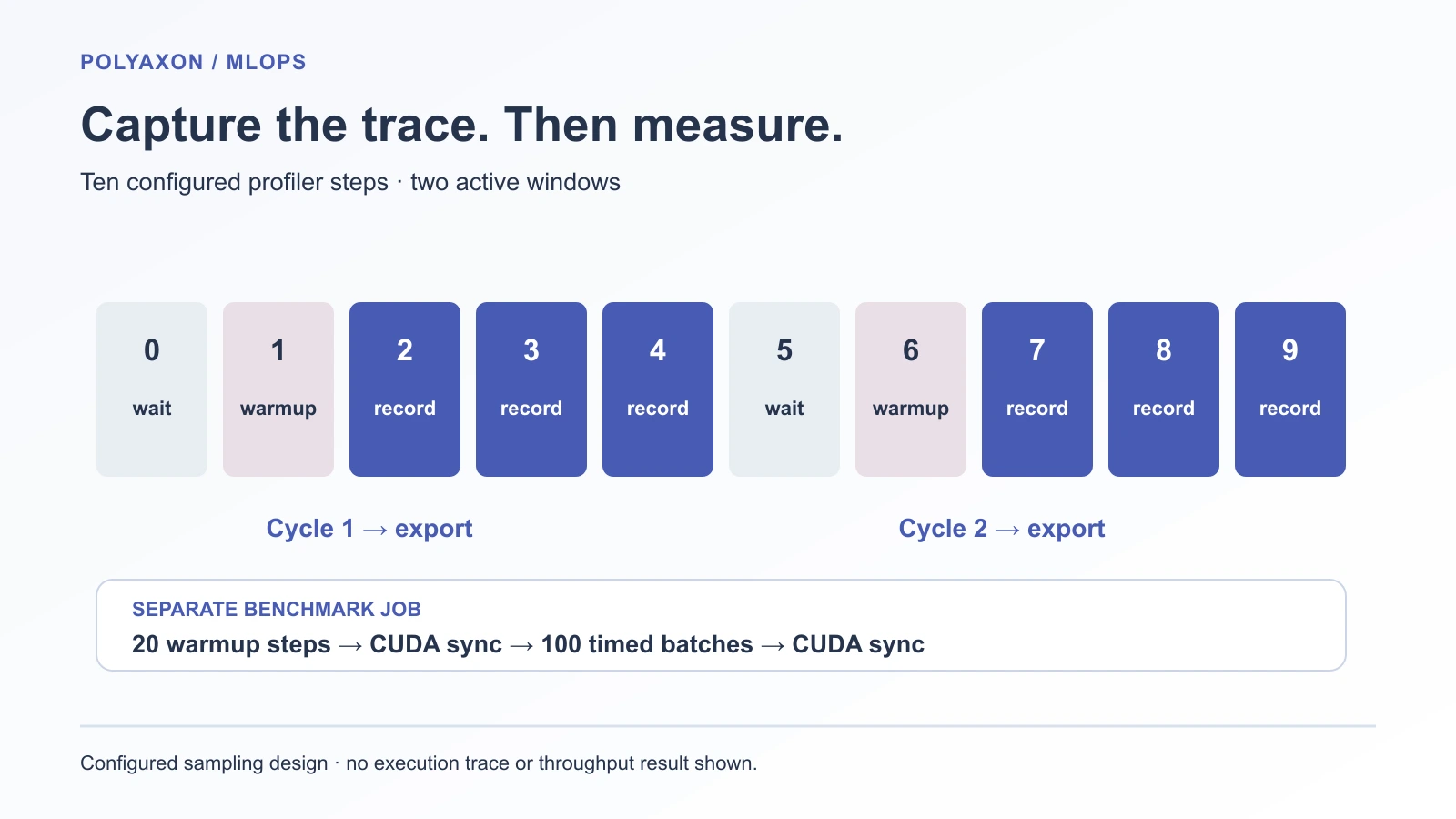
Configured capture schedule, not a measured execution trace.
The output contains two Chrome-format trace files, operator summaries, and run.json with the GPU name, framework versions, input transform, seed, and settings. Download them from the run's artifacts and open the traces in a viewer such as Perfetto.
Shape, stack, and memory recording add overhead. A short capture limits file size and makes repeated steps easier to inspect. If the problem occurs only at checkpointing or validation, capture that phase explicitly; this steady-state window would miss it.
Let the trace choose the change
Inspect several steps rather than one long operator row. Start with the relationship between input fetching and the next CUDA work:
| Observation in the trace | Next experiment |
|---|---|
input/next_batch delays each step while CUDA is idle | Change input workers or preprocessing; keep CPU allocation fixed |
| Copies occupy the critical path | Inspect pinned memory, transfer sizes, and actual stream dependencies |
| Many short kernels with gaps between launches | Investigate Python dispatch or launch overhead before adopting compilation |
| CUDA work is continuous and dominates the step | Inspect the model's operators and batch shape; input workers may not help |
| A host read waits for CUDA work | Find the synchronization, such as .item() or a device-to-host copy |
These are hypotheses, not a diagnostic classifier. For example, non_blocking=True allows asynchronous behavior where supported; it does not by itself create transfer/compute overlap on a separate stream. Our example uses pinned input memory but does not implement a separate prefetch stream.
The saved operator table is sorted by self CPU time. Use it to find host work; use the CUDA tracks and device-time summaries for GPU work. Summed operator times can also overlap, so they need not equal the run's wall-clock duration.
For the input-loading hypothesis, collect a second trace:
polyaxon run -f polyaxonfile.yaml -u . -p YOUR_PROJECT --queue YOUR_AGENT/YOUR_GPU_QUEUE -P mode=profile -P workers=4With num_workers=0, loading runs in the main process. Worker processes and prefetching change that arrangement. They also consume CPU, memory, and sometimes shared memory. This experiment fixes the job at four CPUs and keeps batch size, transforms, model, and GPU type unchanged. PyTorch DataLoader documentation.
Measure throughput with profiling disabled
Run both settings in benchmark mode:
polyaxon run -f polyaxonfile.yaml -u . -p YOUR_PROJECT --queue YOUR_AGENT/YOUR_GPU_QUEUE -P mode=bench -P workers=0
polyaxon run -f polyaxonfile.yaml -u . -p YOUR_PROJECT --queue YOUR_AGENT/YOUR_GPU_QUEUE -P mode=bench -P workers=4
After the same warmup, this mode times 100 batches. It synchronizes CUDA before starting and after the final batch. The window includes input fetching, transfers, forward/backward work, and optimizer steps. Dataset download, initialization, and worker startup occur before it. The complete script logs samples per second as a Polyaxon output.
Repeat whole jobs in alternating order on an otherwise idle GPU. Compare the spread of rates as well as the typical rate. Keep the trace run and measurement run separate in the run comparison: profiler overhead should not become evidence that a loader setting is slower.
If four workers improve throughput and shorten the input gaps, the evidence supports that change for this workload and CPU budget. If gaps disappear without a throughput gain, another stage may now dominate. If throughput falls, inspect CPU contention and the cost of transporting small batches. The result is conditional on the workload; changing augmentations, storage, or GPU can change the answer.
Use the same procedure before adding a performance change to a larger PyTorch tuning study. Polyaxon retains the queue, source, settings, traces, and outputs needed to compare the attempts. The profiler explains execution; the unprofiled window measures it.
The companion was source-reviewed but not executed. No trace screenshot or speedup result is presented here.
References
- PyTorch 2.7 profiler: CPU/CUDA recording, schedules, trace export, and instrumentation costs.
- PyTorch 2.7 data loading: workers, pinned memory, and persistent-worker behavior.
- NVIDIA CUDA best practices: asynchronous execution and timing with synchronization.
- torchvision 0.22 ResNet18: the base model used for this workload.