Reuse a persistent Ray cluster with Polyaxon
Keep a Polyaxon-managed Ray cluster available for repeated job submissions, with explicit resource settings, job identities, storage, and shutdown ownership.
During an experiment session, you may want to submit several Ray applications to the same head and worker group. A persistent Ray cluster separates the compute environment's lifetime from the applications submitted to it: finish one job, inspect its result, then submit another without creating a new cluster for every invocation.
Polyaxon defines and tracks the cluster workload; KubeRay manages its Kubernetes head and workers; Ray schedules the submitted tasks and actors. Keeping those responsibilities explicit makes reuse easier to operate and its resource cost easier to understand.
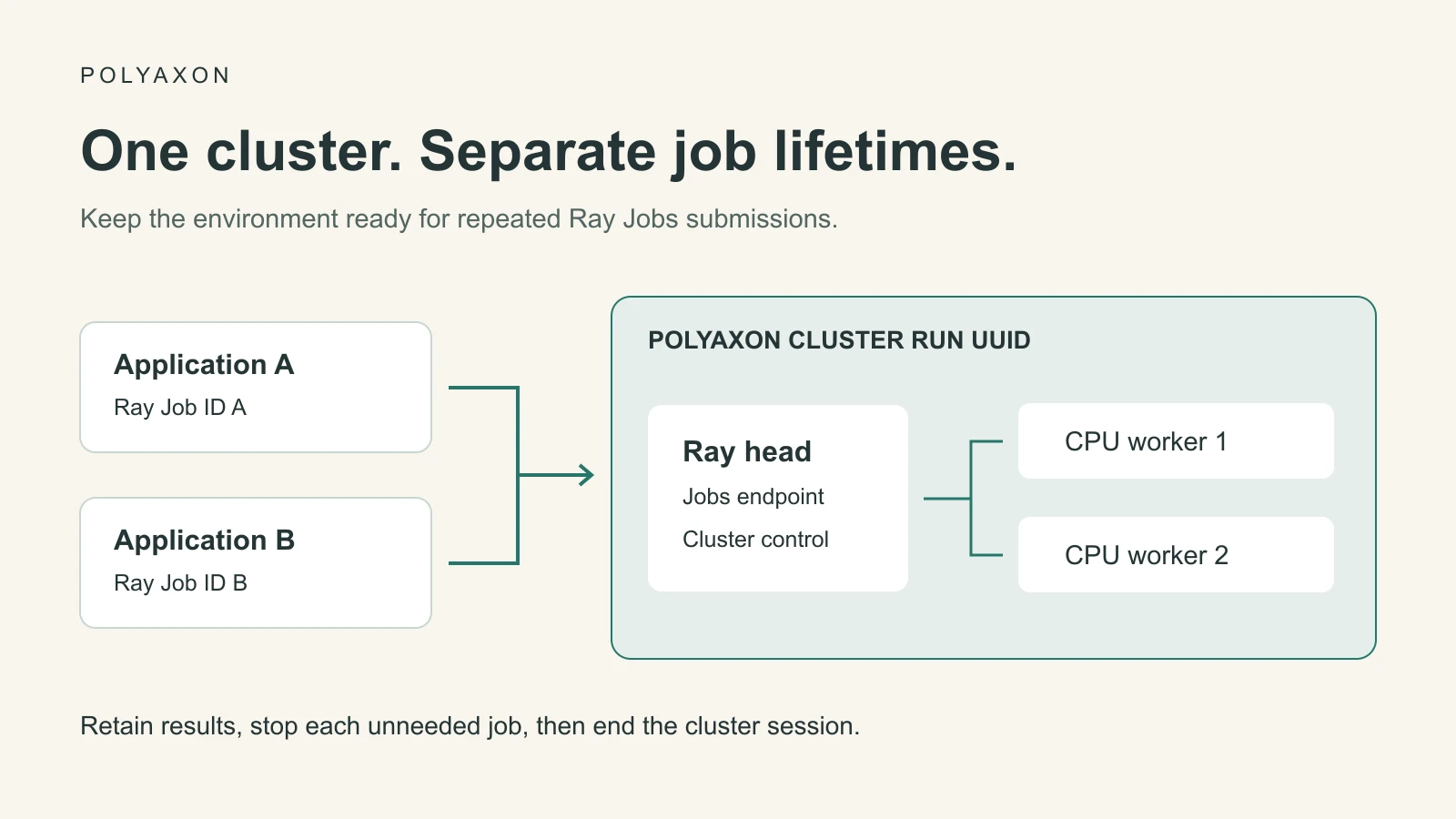
Polyaxon v2.12 introduced persistent Ray clusters as a beta capability. This walkthrough uses the documented raycluster runtime and a separate Ray Jobs submission path. Confirm compatible Polyaxon, KubeRay, and Ray versions in your deployment before adopting the configuration.
Prepare the cluster integration
The RayCluster integration requires KubeRay and its RayCluster CRD on the managed Kubernetes cluster, plus operators.raycluster: true in the Polyaxon CE or Agent configuration. You also need a configured Polyaxon CLI and a project where you can create operations.
Choose a Ray image containing the dependencies needed by the head and workers. Keep its installed Ray version aligned with rayVersion; use a compatible local Ray CLI for job submission. Pin a reviewed image digest for repeated studies rather than relying on a mutable tag.
This article uses a small CPU cluster and a finite demonstration. For GPU jobs, configure GPU resources and placement for the worker group and declare the corresponding logical resources in Ray tasks. A GPU limit on a Kubernetes Pod and a GPU request by a Ray task operate at different scheduling layers.
Define a cluster without a one-shot application
Save this as persistent-ray.yaml. The image and installed Ray version are required inputs so you can use the combination approved for your environment. The cluster has one head and two fixed CPU workers. It omits entrypoint: applications will be submitted separately after the cluster is ready.
name: persistent-ray-review

inputs:
  - name: image
    type: str
  - name: ray_version
    type: str

termination:
  timeout: 3600

plugins:
  shm: true

container:
  image: "{{ image }}"
resources:
  cpu: "1..1"
  memory: "2Gi..2Gi"
run:
  kind: raycluster
  rayVersion: "{{ ray_version }}"
  enableInTreeAutoscaling: false
  head:
    rayStartParams:
      dashboard-host: "0.0.0.0"
      num-cpus: "0"
  workers:
    cpu-workers:
      replicas: 2
      minReplicas: 2
      maxReplicas: 2
The root container and resources apply to the head and every worker group, so both receive the same image and a one-CPU, 2Gi allocation.
The head reserves Kubernetes CPU and memory for cluster management but advertises zero logical Ray CPUs for ordinary tasks. Workers supply the task capacity. These are illustrative resource sizes, not production sizing recommendations. See the Ray replica specification and KubeRay configuration guide when sizing your workload.
Set RAY_IMAGE to the digest of your prepared image and RAY_VERSION to the version installed in it, then submit:
: "${RAY_IMAGE:?Set your prepared Ray image digest}"
: "${RAY_VERSION:?Set the Ray version installed in that image}"
polyaxon run -p YOUR_PROJECT -f persistent-ray.yaml \
  -P image="$RAY_IMAGE" -P ray_version="$RAY_VERSION"
Save the resulting Polyaxon run UUID. Inspect the operation and its replicas before submitting an application; creating the run does not mean the Ray head is ready or the workers have joined. The one-hour operation timeout is a lifecycle backstop, not an idle-worker policy or a promise of one hour of useful application time.
Reach the Ray Jobs endpoint
Ray Jobs uses the head's dashboard HTTP endpoint. An authorized operator can identify the head service associated with this run and forward it locally:
kubectl -n YOUR_NAMESPACE get services
kubectl -n YOUR_NAMESPACE port-forward --address 127.0.0.1 \
  service/YOUR_RAY_HEAD_SERVICE 8265:8265
Replace the namespace and service name with the actual resources for this operation, and leave the forwarding session open. The port-forward requires Kubernetes access and permission to reach the target; a Polyaxon run UUID is not itself a Ray Jobs address. Use your deployment's approved access path if direct Kubernetes forwarding is unavailable. Treat the Jobs endpoint as an execution interface and keep access scoped to intended users.
In a second terminal, point the Ray CLI at the local endpoint:
export RAY_API_SERVER_ADDRESS="http://127.0.0.1:8265"The Ray Jobs quick start documents submission through this HTTP endpoint and forwarding for Kubernetes clusters.
Submit two independent jobs
Create a directory named ray-work containing only the application files you intend to upload. Save this as ray-work/evaluate.py; it uses the installed Ray package and Python's standard library.
import argparse
import json

import ray

parser = argparse.ArgumentParser()
parser.add_argument("--batch", required=True)
args = parser.parse_args()

ray.init(address="auto")

@ray.remote(num_cpus=1)
def inspect_item(item):
    return {"item": item, "square": item * item}

results = ray.get([inspect_item.remote(item) for item in range(4)])
print(json.dumps({"batch": args.batch, "results": results}))
ray.shutdown()
Submit it twice to the same endpoint:
ray job submit --working-dir ray-work -- python evaluate.py --batch first
ray job submit --working-dir ray-work -- python evaluate.py --batch second
These commands wait for each job by default. Each submission gets its own Ray Job ID; retain it alongside the cluster's Polyaxon run UUID. The expected results contain squares 0, 1, 4, and 9 under different batch labels. This is a source-reviewed demonstration, not a measured execution or performance benchmark.
The Ray Jobs overview distinguishes a submitted application from the cluster hosting it. Calling ray.shutdown() disconnects this driver; it does not replace the explicit cluster shutdown step. Reusing the cluster also does not automatically preserve ordinary job-local Python state for the next submission.
Retain per-job evidence and durable outputs
Keep a small submission manifest containing the cluster run UUID, Ray Job ID, code revision, input dataset revision, and result location for each application. An external Ray Jobs submission is not automatically a separate Polyaxon child run. If every application needs its own Polyaxon experiment record, build a submit-and-monitor component that records the Ray Job ID and logs its results to that operation.
Retrieve job status and driver logs with the Ray CLI using the returned job ID. Store important predictions and checkpoints on configured durable storage rather than relying on the head filesystem or Ray's in-memory object store. Polyaxon connections can supply the needed storage to the head and workers; declare the connection on each replica that needs it. The application owns writing and naming its outputs.
For tracked comparisons, log each application's configuration and metrics and save its submission manifest with Polyaxon artifacts. Keep unrelated jobs from overwriting the same output directory. The Ray storage guide explains Kubernetes storage choices for Ray workloads.
End the right lifetime
Stopping an individual Ray Job and stopping the cluster are different actions. To cancel a submitted application, use ray job stop YOUR_RAY_JOB_ID and inspect its resulting status. Other applications may still use the cluster.
When the session is finished, save required outputs and stop the specific Polyaxon operation that owns the cluster. For an explicit target, use the run client:
from polyaxon.client import RunClient

client = RunClient(
    owner="YOUR_ORG", project="YOUR_PROJECT", run_uuid="YOUR_CLUSTER_RUN_UUID",
    manual_exceptions_handling=True,
)
try:
    client.stop()
finally:
    client.close()
Confirm that the operation and its cluster resources terminate, then close the forwarding session. A persistent cluster keeps compute allocated between submissions; it does not mean the cluster or its data is permanent. If you later enable worker autoscaling, define that policy separately from the lifetime of the head and the entire Polyaxon operation.