Start large ML containers with lazy image pulling
Use eStargz and containerd for lazy image pulls, then measure a Polyaxon GPU job through its first completed CUDA operation.
A GPU Pod can spend much of its startup waiting for a container image. A CUDA runtime, Python environment, and several training libraries may all be packaged together even when a particular job uses only part of them.
Lazy image pulling lets the container start before every image layer has been downloaded in full. It can shorten the wait on a fresh node, but it also changes when downloads happen: an import or file read can now wait for the registry. The useful question is whether the workload reaches its first useful operation sooner.
This article uses eStargz images and containerd's Stargz Snapshotter, then runs the same small GPU workload through Polyaxon on conventional and lazy-pulling nodes. The image conversion commands, runtime settings, and probe are included below.

Change when image data arrives
With a conventional cold pull, the runtime downloads and unpacks the required image layers before launching the process. A remote snapshotter can instead prepare the filesystem from image metadata and retrieve file contents as they are read. Stargz Snapshotter implements this for eStargz, an image-layer format compatible with ordinary OCI/Docker registries and runtimes.
The distinction between image size and startup working set has a research history. The Slacker paper, FAST 2016 examined which container data its workloads actually read and used lazy distribution to reduce provisioning work. Its benchmark results describe that system and workload collection; they are not an estimate for a modern PyTorch or model-serving image.
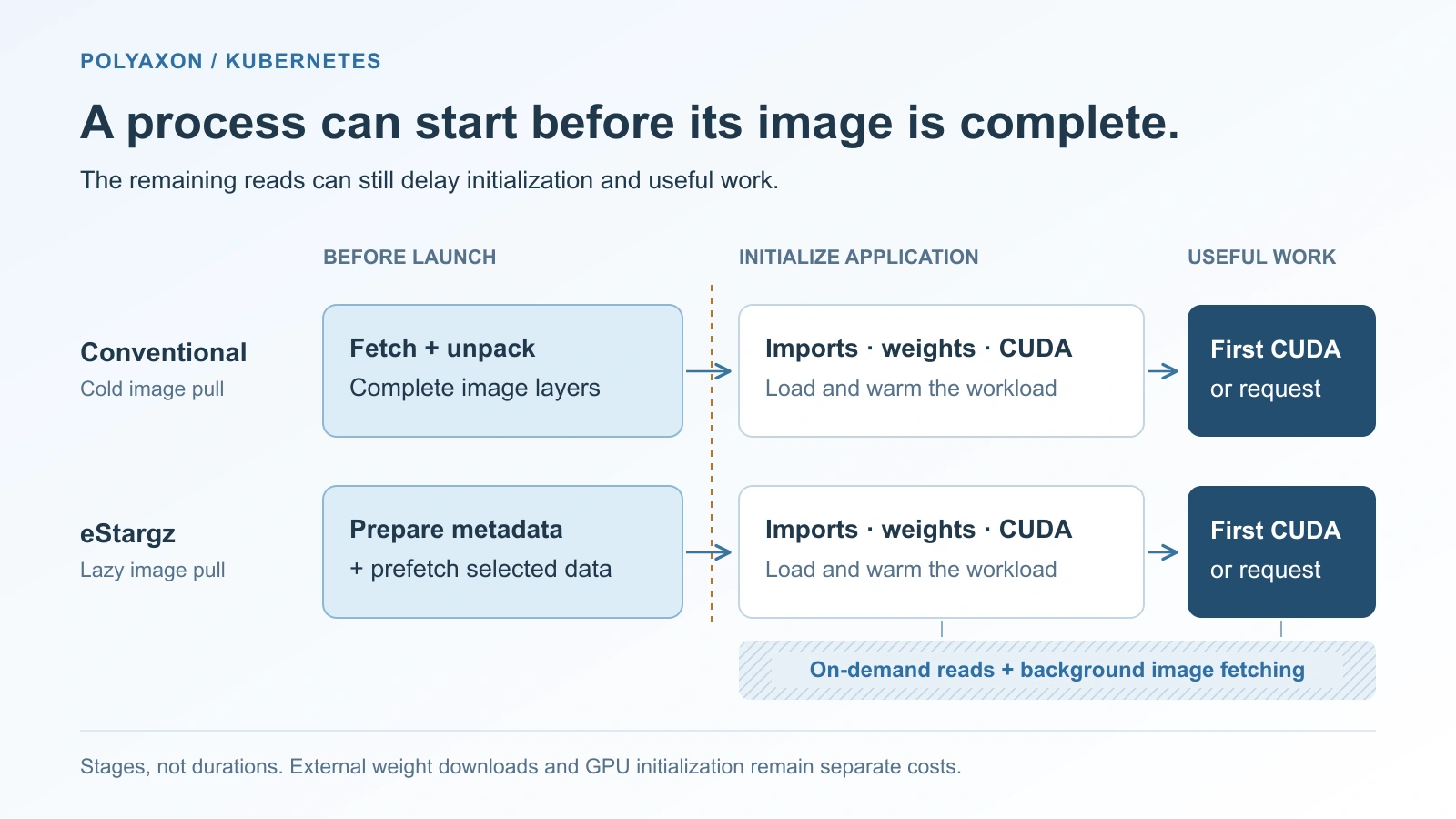
Startup stages, not measured durations. Lazy fetching changes the image-data boundary; it does not remove application initialization.
For an ML workload, distinguish three sources of delay:
| Work | What lazy image pulling changes |
|---|---|
| Image files: interpreter, libraries, code, or weights baked into layers | These can be fetched through the remote snapshotter |
| Weights fetched from Hugging Face or object storage, or read from a mounted store | This remains a separate data path |
| CUDA context creation, weight transfer, kernel compilation, warmup | The computation and device work still have to happen |
A model that reads almost every weight shard before becoming ready may still need most of its weight bytes before serving. A notebook using a small subset of a large environment presents a different access pattern. Image size alone does not decide whether lazy pulling helps.
Prepare a separate node pool
This is a node-runtime change. Use Linux AMD64 GPU nodes where CUDA-enabled containers already work. The configuration below targets containerd 2.1 or later with configuration version 3 and Stargz Snapshotter v0.19.0. Use a separate pool with the same GPU and host configuration as your baseline. Managed Kubernetes nodes must permit a supported custom runtime configuration.
Install the snapshotter binaries, FUSE support, and service in the node image using the upstream installation guide. Merge these settings into the existing containerd configuration; retain its GPU runtime handlers and other deployment settings:
# /etc/containerd/config.toml — excerpt for containerd 2.1+
version = 3

[proxy_plugins.stargz]
  type = "snapshot"
  address = "/run/containerd-stargz-grpc/containerd-stargz-grpc.sock"

[proxy_plugins.stargz.exports]
  root = "/var/lib/containerd-stargz-grpc/"

[plugins."io.containerd.cri.v1.images"]
  snapshotter = "stargz"
  disable_snapshot_annotations = false
  use_local_image_pull = true
The last setting explicitly chooses the CRI client-based pull path. Here, “local” names a containerd implementation path; it does not mean the image is already cached. Containerd 2.1 introduced Transfer Service pulls by default, whose remote-snapshot annotation configuration differs. This example keeps one path explicit. Containerd CRI configuration.
Use the following snapshotter configuration for this example, with FUSE manager mode disabled and CRI-based registry credentials enabled:
# /etc/containerd-stargz-grpc/config.toml — excerpt
[fuse_manager]
  enable = false

[cri_keychain]
  enable_keychain = true
  image_service_path = "/run/containerd/containerd.sock"
Configure the kubelet's image-service endpoint as well:
--image-service-endpoint=unix:///run/containerd-stargz-grpc/containerd-stargz-grpc.sockStargz v0.19.0 requires the CRI image-service proxy for image verification. With the configuration above, that route also receives the registry credentials sent by kubelet. A setup using the separate FUSE manager needs its documented listener configuration instead; do not mix socket paths from the two modes. v0.19.0 release notes, versioned configuration guide.
Activate the services through your node-provisioning process before accepting workloads. The snapshotter serves live filesystems, so restarting it is not equivalent to restarting an unused download helper. Treat the FUSE manager's lifecycle as a separate production design decision.
After confirming the pool uses the intended runtime, label its nodes. These are example labels you define; labels do not configure containerd:
kubectl --context YOUR_CLUSTER label node YOUR_LAZY_NODE platform.example.com/snapshotter=stargz
kubectl --context YOUR_CLUSTER label node YOUR_BASELINE_NODE platform.example.com/snapshotter=overlayfs
Convert the image once
On a Linux build host with containerd and nerdctl, choose an approved CUDA-enabled PyTorch image by digest and a destination in your registry. The references below are placeholders you replace. The source must contain Python and PyTorch; the probe does not install packages during startup.
SOURCE_IMAGE='registry.example.com/ml/pytorch@sha256:YOUR_SOURCE_DIGEST'
TARGET_IMAGE='registry.example.com/ml/pytorch-esgz:startup-study'

nerdctl login registry.example.com
nerdctl pull --platform linux/amd64 "$SOURCE_IMAGE"
nerdctl image convert --estargz --oci --platform linux/amd64 "$SOURCE_IMAGE" "$TARGET_IMAGE"
nerdctl push "$TARGET_IMAGE"
Run these commands with access to the build host's containerd daemon and permission to push the target repository. The conversion host does not need Stargz Snapshotter; the execution nodes do. This produces a single-platform image. A mixed-architecture deployment needs the corresponding images or index. nerdctl conversion reference.
Record the converted manifest digest reported by the registry and use it for the runs:
ESTARGZ_IMAGE='registry.example.com/ml/pytorch-esgz@sha256:YOUR_CONVERTED_DIGEST'An eStargz image can also run on a conventional snapshotter, which gives us a useful control. Conversion creates a new image identity; preserve its source digest and apply your normal image scanning/signing process to the new artifact. For private images, the build host's login does not configure the GPU nodes. Keep the workload's image-pull ServiceAccount and snapshotter credential path working together.
Run the same GPU probe through Polyaxon
Save this as cold-start.yaml. It records entry into the probe, completion of the PyTorch import, and the first completed CUDA operation:
version: 1.1
kind: component
name: image-startup-probe
inputs:
  - name: image
    type: str
  - name: snapshotter
    type: str
termination:
  timeout: 900
run:
  kind: job
  environment:
    nodeSelector:
      kubernetes.io/arch: amd64
      platform.example.com/snapshotter: "{{ snapshotter }}"
  container:
    image: "{{ image }}"
    imagePullPolicy: IfNotPresent
    command: [python, -u, -c]
    args:
      - |
        import json
        import time
        from datetime import datetime, timezone

        started = time.monotonic()

        def mark(stage):
            print(json.dumps({
                "stage": stage,
                "utc": datetime.now(timezone.utc).isoformat(),
                "seconds_since_probe_entry": time.monotonic() - started,
            }), flush=True)

        mark("probe_entered")
        import torch
        mark("torch_imported")
        if not torch.cuda.is_available():
            raise RuntimeError("The allocated GPU is unavailable to PyTorch")
        value = torch.ones(1, device="cuda")
        value.add_(1)
        torch.cuda.synchronize()
        mark("first_cuda_operation_complete")
    resources:
      requests:
        cpu: "2"
        memory: 4Gi
        nvidia.com/gpu: 1
      limits:
        cpu: "2"
        memory: 4Gi
        nvidia.com/gpu: 1
Submit three configurations to a configured Polyaxon GPU queue that can reach both pools:
polyaxon run -f cold-start.yaml -p YOUR_PROJECT --queue YOUR_AGENT/YOUR_GPU_QUEUE -P image="$SOURCE_IMAGE" -P snapshotter=overlayfs
polyaxon run -f cold-start.yaml -p YOUR_PROJECT --queue YOUR_AGENT/YOUR_GPU_QUEUE -P image="$ESTARGZ_IMAGE" -P snapshotter=overlayfs
polyaxon run -f cold-start.yaml -p YOUR_PROJECT --queue YOUR_AGENT/YOUR_GPU_QUEUE -P image="$ESTARGZ_IMAGE" -P snapshotter=stargz
Approve runs if required. The first is the baseline image, the second controls for image-format changes, and the third adds lazy pulling. Polyaxon retains the operation, GPU request, queue, and logs; the node's snapshotter implements the image behavior. Polyaxon's node selection routes the operation to prepared nodes. There is no Polyaxonfile switch that installs a snapshotter.
The image policy allows cache reuse. It does not make a node cold, and changing it to Always does not erase cached layers. Use fresh disposable nodes for cold trials, then collect warm repeats separately. Keep GPU SKU, CPUs, storage, registry location, and concurrent load aligned across pools.
Measure through useful work
The Python elapsed times begin after process launch, so they exclude the image-pull wait. Retain the Pod record, events, and main-container logs as well:
kubectl --context YOUR_CLUSTER -n YOUR_NAMESPACE get pod YOUR_POD -o json > pod.json
kubectl --context YOUR_CLUSTER -n YOUR_NAMESPACE describe pod YOUR_POD > pod-events.txt
kubectl --context YOUR_CLUSTER -n YOUR_NAMESPACE logs YOUR_POD -c YOUR_MAIN_CONTAINER --timestamps > startup.log
For each run, identify the interval from scheduling to the main container's start, then from that start to the final CUDA marker. Use synchronized clocks. Events explain the stages but can be coarse or aggregated; precise pull timings and proof that remote snapshots were used come from kubelet/containerd and snapshotter telemetry. Capture them before the temporary Pod is cleaned up.
Keep queue wait separate from node startup. Hold any Polyaxon init-container work constant and inspect the main image's events rather than attributing every startup delay to it. Repeat the three configurations on fresh nodes and compare their variation, not only their best attempt. A container that launches earlier but completes the CUDA probe later has not improved the outcome this probe measures.
The probe deliberately excludes model weights. For a serving decision, repeat with the real model, fixed model-cache state, and a readiness check that reflects completed initialization. Measure the first successful request too. Startup probes provide an initialization allowance; they do not accelerate that initialization.
The probe exits after its final marker. Once evidence is saved, stop any unfinished run with polyaxon ops stop -p YOUR_PROJECT -uid RUN_UUID and retire disposable nodes through your provisioning workflow. Keep the recorded image digests and logs; avoid clearing a shared production cache to manufacture a cold trial.
Decide whether the tradeoff helps
Lazy pulling is promising when newly provisioned nodes repeatedly download large environments whose startup working set is much smaller than the image. It is less compelling when layers are already warm, nearly all image data is required immediately, or remote reads become the bottleneck.
eStargz supports prioritizing files for prefetch. Upstream's workload-based optimization records file accesses and arranges the image around them. The conversion above does not profile the application. If you add optimization, profile the actual entrypoint and representative initialization; a shell startup does not describe PyTorch imports or a model loader. eStargz prioritized files.
Stargz can also fetch remaining layer data in the background. A fast launch does not prove that the full-image transfer was avoided, nor that all future reads are independent of registry availability. Keep transferred bytes, application errors, and post-start performance alongside startup latency.
The recipe was reviewed against upstream sources but not executed. The diagram is conceptual, and no startup improvement is claimed. Use the measured time to useful work to decide whether the additional runtime machinery earns its place in your GPU node pool.
References
- Slacker: Fast Distribution with Lazy Docker Containers, Harter et al., FAST 2016: early research on image working sets, lazy distribution, and cache effects.
- Stargz Snapshotter v0.19.0 overview and release notes: remote filesystems, image-service routing, credentials, and lifecycle.
- Containerd CRI configuration: version-3 plugin names and the local/Transfer Service pull paths.
- nerdctl image conversion and Stargz guide: conversion flags and builder/runtime separation.
- eStargz format: chunked access, verification, and workload-aware prefetch.