Version the dataset behind every evaluation
Use Polyaxon data references, artifact logging, and registered versions to retain the dataset and split behind each evaluation.
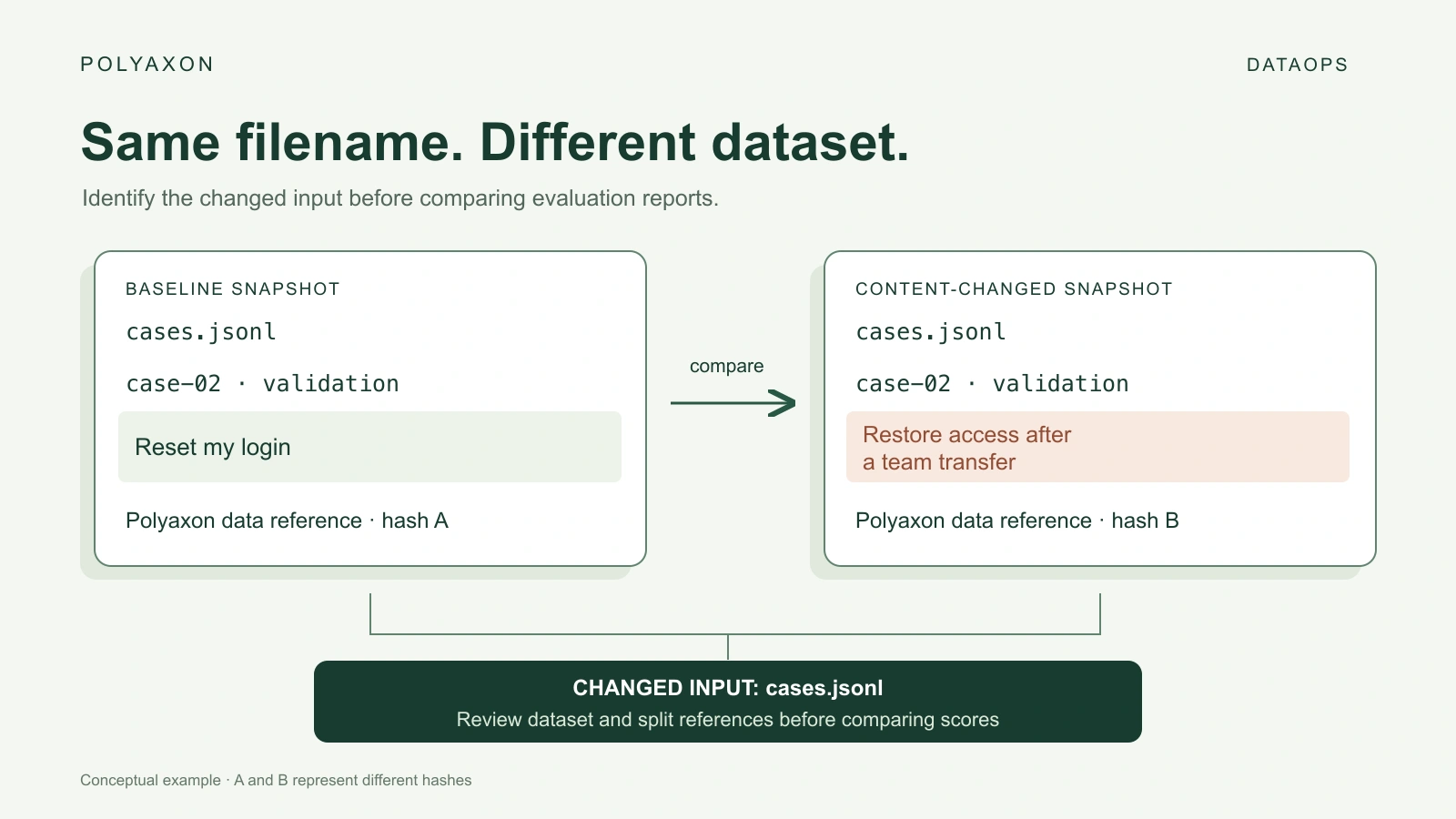
Two evaluation reports point to cases.jsonl. Between runs, someone corrected a label or replaced a question. The filename stayed the same, but the input changed. To interpret the score difference, you need to know which dataset each run actually consumed.
Polyaxon's tracking API can record that identity with the run. Use data, file, and directory references for input lineage; save prepared snapshots as artifacts; and register a reviewed snapshot as a reusable artifact version. Small logging functions fit into the preparation and evaluation code you already have.
Our evaluation-data leakage walkthrough covers choosing and auditing a split. This article follows that step: retain the chosen data and assignment so later evaluations can refer to them precisely.
Choose what to record and what to save
Reference logging and artifact storage solve related tasks. A reference identifies data and its role in the run. Saving an artifact retains the corresponding file or directory in the run's artifact storage.
| Task | Polyaxon method | Expected result |
|---|---|---|
| Identify the dataset consumed by an evaluation | tracking.log_data_ref(...) | A data lineage entry with its path, hash, summary, and input/output role |
| Identify a split file or manifest | tracking.log_file_ref(...) | A file lineage entry |
| Identify a directory of dataset shards | tracking.log_dir_ref(...) | A directory lineage entry |
| Save a prepared data file or directory | tracking.log_artifact(..., kind=...) | A saved artifact and its reference; supplying step records a versioned asset |
| Save a tabular view | tracking.log_dataframe(...) | A saved dataframe asset for inspection |
The examples use the method names exposed by the current tracking API. In particular, log_artifact is the general saving method for data, files, and directories; the _ref methods record lineage without copying their source. See artifact logging for the storage behavior.
The functions below assume an initialized tracking context. Inside a Polyaxon-managed job with the client installed and artifact storage configured, initialize once with tracking.init() and call tracking.end() after your logging and evaluation work. When running locally, configure your deployment, credentials, run, and artifact collection first.
Record the exact evaluation inputs
This function records an existing dataset and its split assignment. Call it after preparation has finished and before scoring, using the same files the evaluator will read.
from polyaxon import tracking


def record_evaluation_inputs(dataset_path, split_path, source_revision):
    tracking.log_data_ref(
        name="evaluation-dataset",
        path=dataset_path,
        is_input=True,
        summary={
            "source_revision": source_revision,
            "schema_revision": "support-case-v1",
            "transform_revision": "normalize-v2",
        },
    )
    tracking.log_file_ref(
        name="evaluation-split",
        path=split_path,
        is_input=True,
        summary={"policy": "case-grouped-v1"},
    )
For example, record_evaluation_inputs("cases.jsonl", "split.json", "support-export-v7") records two input references. For accessible local paths, the client calculates hashes when none are supplied and hash calculation is enabled. Expected lineage, shown schematically rather than as captured API output:
| Name | Kind | Role | Recorded details |
|---|---|---|---|
evaluation-dataset | Data | Input | Dataset path, computed hash, source/schema/transformation revisions |
evaluation-split | File | Input | Split path, computed hash, grouping policy |
Keep stable case IDs in the data and split file. A changed data hash tells you to inspect the dataset; the IDs help locate edited, added, or removed cases. A changed split hash tells you to review membership even if all text and labels stayed the same. The logging call does not perform that record-level comparison for you.
Keep the files stable through evaluation. A hash taken before a later overwrite would describe a different input from the one scored.
Reference data that lives elsewhere
You can retain an external snapshot's identity without copying it into every run. Pass a version-specific location and a digest supplied by the process that produced the snapshot:
from polyaxon import tracking


def record_external_dataset(snapshot_uri, sha256, source_revision):
    tracking.log_data_ref(
        name="evaluation-dataset",
        path=snapshot_uri,
        hash=sha256,
        is_input=True,
        summary={
            "hash_algorithm": "sha256",
            "source_revision": source_revision,
        },
    )
Expected result: an input data reference containing the supplied URI, digest, and revision. This call does not download the URI to verify the supplied digest. Use a retained object version or snapshot location, and verify the consumed bytes in your data-loading step. A mutable latest/ location is insufficient on its own.
For small in-memory datasets, log_data_ref(name="evaluation-cases", content=cases, is_input=True) can calculate identity from the supplied content. This still records a reference; use an artifact-saving method when you also need to retain the dataset itself. Keep the representation consistent when comparing hashes across runs.
Save a prepared snapshot with its metadata
A preparation job can save the dataset, split, and schema together as one directory. The following function expects a completed staging directory containing, for example, cases.jsonl, split.json, and schema.json:
from polyaxon import tracking
from polyaxon.schemas import V1ArtifactKind


def save_dataset_snapshot(snapshot_dir, source_revision):
    tracking.log_artifact(
        path=snapshot_dir,
        name="evaluation-snapshot",
        kind=V1ArtifactKind.DATA,
        summary={
            "source_revision": source_revision,
            "schema_revision": "support-case-v1",
            "split_policy": "case-grouped-v1",
        },
    )
Expected result: the directory is saved under the preparation run's outputs, with a data artifact reference and summary. Treat the argument as a staging path: artifact-saving methods manage the asset's placement. The run's configured artifact collection/storage makes the saved snapshot available after the job.
If your preparation code already writes directly to tracking.get_outputs_path(...), use log_dir_ref(path=snapshot_dir, name="evaluation-snapshot", is_input=False) to record the directory without saving it a second time. Use log_file_ref similarly for an already-saved manifest. These references describe the preparation run's outputs; the evaluation run records the selected snapshot as its input.
If one job produces several snapshots, supplying a distinct step to log_artifact stores versioned assets within that run. A step identifies an in-run asset revision. A registered artifact version supplies a separate reusable release identity across runs.
Register the reviewed dataset version
After the preparation run has saved its artifacts and completed your data checks, register its snapshot using the artifact registry:
from polyaxon.client import ProjectClient


def register_dataset_version(owner, project, producer_run_uuid, version):
    with ProjectClient(owner=owner, project=project) as client:
        return client.register_artifact_version(
            version=version,
            run=producer_run_uuid,
            artifacts=["evaluation-snapshot"],
            description="Reviewed support-case evaluation snapshot",
            tags=["evaluation-data"],
        )
Expected result: a version such as support-eval-v7 associated with the producing run and its evaluation-snapshot artifact. Registration records that relationship; the preceding preparation step saves the data. Keep the version, producer run, and input digest with the consuming evaluation so the relationship remains inspectable in lineage.
Use a new version name for a new reviewed dataset. Named versions can be overridden, so retain the producer and content identity as well as the readable label.
Interpret a changed score
Start by comparing the input references and their summaries:
| Observed difference | What to review |
|---|---|
| Dataset hash changed; split unchanged | Edited questions, labels, added or removed cases, or serialization changes |
| Split hash changed | Case membership and whether the original evaluation boundary still holds |
| Source revision changed; data hash unchanged | The provenance change and whether it affects qualification |
| Data and split unchanged | Model, prompt, retrieval, evaluator, decoding settings, and environment |
These are expected interpretations, not results from an executed evaluation. Matching dataset references helps establish a controlled comparison; it does not prove that the scoring procedure or application remained unchanged.
With these calls in the preparation and evaluation functions, every report can point back to its data, split, and producing run. When a score changes, you have a concrete place to start explaining why.