Work interactively with Polyaxon sandboxes
Choose between sandbox shells and exec, understand PTY lifetime and output replay, and manage terminal attachment explicitly through the Python SDK.
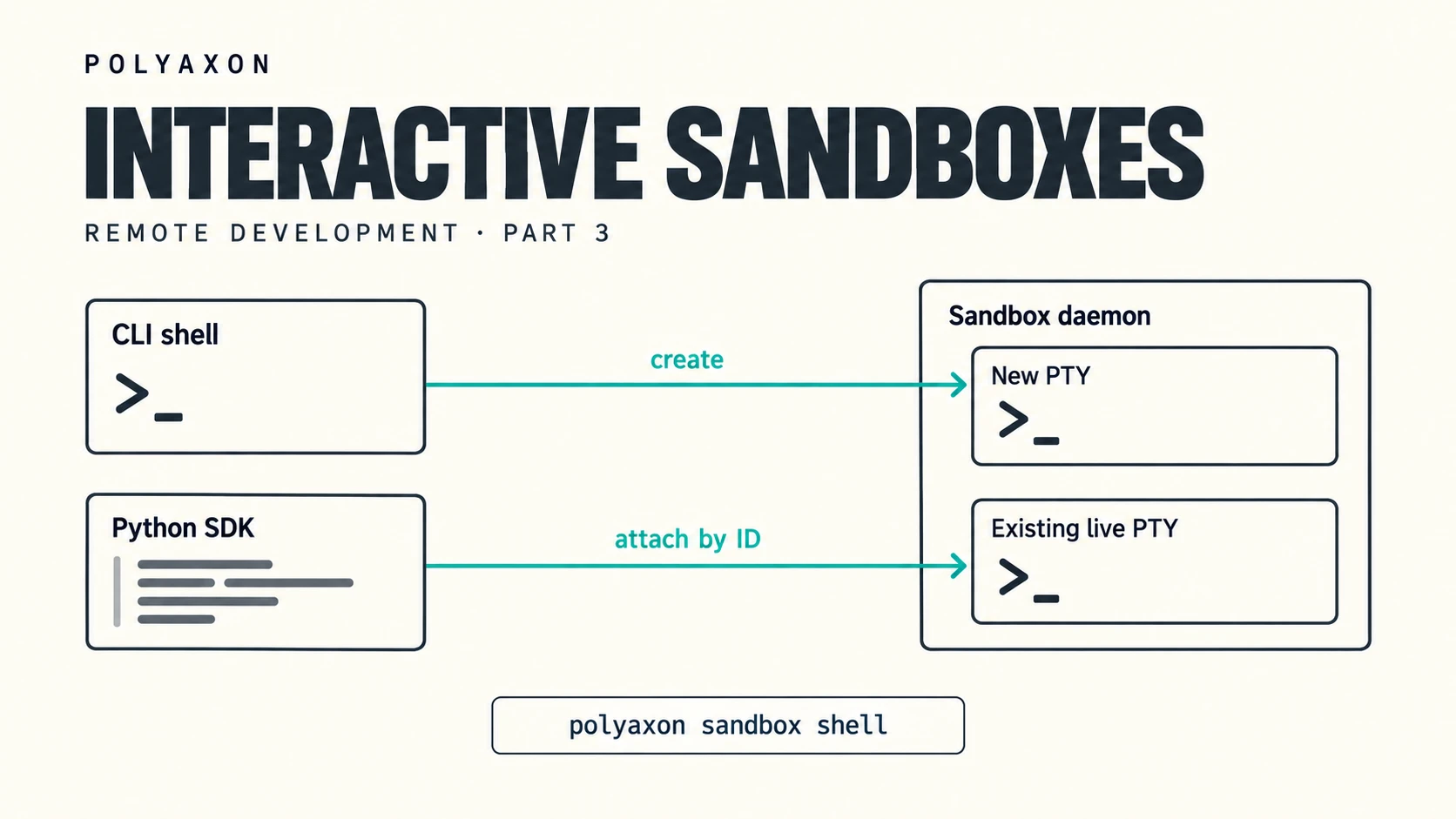
Some debugging tasks need an interactive Python prompt. Others only need a command's output. When you build an application or agent around a Polyaxon workbench, choosing the right interface also determines who owns the terminal session and how it is recovered after a disconnect.
This is part 3 of our remote development series. Part 1 covers operation shells and tmux. Part 2 covers native SSH tooling. Here we use the sandbox daemon's terminal and execution interfaces, introduced in Polyaxon 2.16, and explain the distinction between a surviving PTY and a CLI command that reattaches to it.
A pseudoterminal, or PTY, gives a program interactive terminal input, output, and resizing. Use one for a shell, REPL, or terminal application. When a command simply needs to run and return a result, sandbox exec is simpler.
Start a workbench
Use a Polyaxon 2.16 or later deployment and CLI with access to a project and a queue that supports services. Your deployment or agent administrator must enable the required access capabilities. The examples use the quick-start project; replace it with your project name.
Continue the workbench progression: keep tmux: true from part 1 and ssh: true from part 2, then add sandbox: true to declare the sandbox access used here. Save the complete component as interactive-sandbox.yaml:
name: interactive-sandbox

plugins:
  tmux: true
  ssh: true
  sandbox: true

container:
  image: python:3.11
  workingDir: /tmp
  command: ["sleep", "infinity"]

service: {}
Start a new run from this updated component in your local terminal:
polyaxon run -p quick-start -f interactive-sandbox.yamlCopy the run UUID printed by the command, and set it in your local terminal:
export RUN_UUID=PASTE_RUN_UUID_HEREWait for the run to reach running before using the access commands. The variable is local to this terminal; it is not automatically exported inside the remote shells.
This workbench now declares all three access plugins, so you can use the earlier tmux and SSH workflows alongside the sandbox commands. The sandbox terminal examples themselves only need sandbox: true; keeping the other plugins makes this a continuation of the same workbench configuration. You can also use an existing running service with these plugins enabled.
Open a sandbox shell
The sandbox daemon manages command execution, files, and PTYs inside a service. SSH already starts this supporting runtime for its own access path; the explicit sandbox declaration makes our use of the sandbox APIs clear. These interfaces are useful when you want to move between human inspection and commands driven by your application or an agent. They operate inside the workbench rather than creating a separate run or container.
From your local terminal, check that the endpoint is ready and open a shell:
polyaxon sandbox ping -p quick-start -uid "$RUN_UUID"
polyaxon sandbox shell -p quick-start -uid "$RUN_UUID"
This creates a PTY managed by the sandbox daemon and attaches over WebSocket. It defaults to sh and supports terminal input and resizing. It uses the sandbox interface rather than Kubernetes exec or SSH. Type exit to end that shell when finished.
You can also start an interactive program directly. For example, from your local terminal:
polyaxon sandbox shell -p quick-start -uid "$RUN_UUID" --command "python -i"Exit the Python interpreter when you finish. The sandbox CLI does not automatically wrap either command in tmux, even though this workbench enables plugins.tmux.
Understand sandbox reconnection and replay
A sandbox PTY can survive a client disconnect while its process and the sandbox daemon remain alive, subject to the detached-idle timeout. However, each polyaxon sandbox shell invocation creates a new PTY. Running that command again does not select the previous terminal or recover its shell variables.
Applications can manage that lifecycle explicitly through SandboxClient.pty: create() returns a pty_id, list() finds sessions, and attach(pty_id, replay_bytes=1024) connects to that existing PTY while replaying recent output. Reuse the ID to resume a live session; call delete(pty_id) to terminate it when the application is finished. An attachment exposes raw terminal output and control frames, so the application needs a terminal input/output loop. The PTY reference documents these methods.
Replay is output history, not session selection or a checkpoint. The CLI's --replay-bytes option replays output from the PTY it has just created; it does not restore an earlier PTY. If you simply want to leave a human shell and return with the same CLI command, the tmux-based ops shell workflow handles that for you.
Use exec when you do not need a terminal
For a one-off command that does not need a terminal, use sandbox exec:
polyaxon sandbox exec -p quick-start -uid "$RUN_UUID" -- python -VSandbox exec starts a separate process. It does not inherit variables exported only inside your tmux, SSH, or sandbox shell. Put shared environment values in the component's env; the environment guide explains how to make them available consistently. For background commands and their logs, continue with the sandbox quick start.
Keep terminal state and environment configuration separate
A directory change or exported variable belongs to its shell process. Reattaching to the same live PTY preserves that process; creating a new PTY or calling sandbox exec starts a separate process. Files written to the same container remain accessible through these interfaces while the environment stays available.
For a shell you want to revisit manually with the same CLI command, use this workbench's tmux plugin and follow part 1. For an application that creates and owns terminals, keep the PTY ID and manage attachment and cleanup explicitly. A replay buffer helps redraw recent output, but it cannot restore a terminated process.
Clean up the session and service
Type exit in a shell or exit the interactive program to finish its PTY. Applications should call sandbox.pty.delete(pty_id) when they no longer need a session. Do not rely on a client disconnect to terminate it; a detached PTY may remain active until its process exits or its detached-idle timeout is reached.
Closing a terminal does not stop the service. When finished with a workbench, stop it from your local terminal:
polyaxon ops stop -p quick-start -uid "$RUN_UUID"Container replacement, daemon termination, or stopping the run ends the in-memory sessions. Save durable results in your configured outputs or persistent storage before cleanup.
Match the interface to the task
Across the three parts, the important choice is which process or session you want to reach:
| Workflow | Best fit | What happens when you connect again? |
|---|---|---|
Ordinary ops shell | Quick inspection through Kubernetes exec | Opens another shell; it does not select a named persistent session |
ops shell with tmux | Returning to the same human shell | Reattaches to the named tmux session while it remains alive in the same container |
| SSH | Local terminals, IDEs, and forwarding | A new login starts a new shell by default; attach to tmux explicitly for continuity |
sandbox shell | Interactive programs through the sandbox interface | Creates a new PTY; applications use the SDK and a saved PTY ID to reattach to a live one |
sandbox exec | Commands that do not need a terminal | Starts a separate process for each command |
Use sandbox exec to run commands and collect results, and a sandbox PTY when a program needs terminal behavior. Treat reattachment as an explicit operation on a live PTY ID; starting another CLI shell creates another session.
Together with ordinary operation shells, tmux, and SSH, these interfaces let you work in the same managed environment from a human terminal or an application. The sandbox CLI reference and Python sandbox client reference provide the options for building that workflow.