Clean up finished Kubernetes Jobs without losing results
Use Kubernetes Job TTLs to bound finished workload retention, preserve logs and artifacts separately, and configure the same policy through Polyaxon.
A training sweep can leave hundreds of completed Jobs and Pods behind. Keeping them briefly helps diagnose failed trials. Retaining those API objects indefinitely still does not give you a durable copy of the checkpoints or logs.
Give finished workloads a defined inspection window, and save their useful results somewhere that outlives the Pods. Kubernetes supplies the Job TTL mechanism; Polyaxon adds a shared termination setting and collection of run outputs and logs.

Start the clock after the Job finishes
For a native Kubernetes Job, add these fields to its existing top-level spec:
spec:
  activeDeadlineSeconds: 3600
  ttlSecondsAfterFinished: 86400
This is a fragment for your existing Job manifest. The one-hour deadline bounds the Job's active lifetime, including time Pods spend Pending; the one-day TTL controls retention after completion. Neither field belongs under spec.template.spec in this example. The Job reference explains the runtime deadline and cleanup fields.
The TTL timer starts when the Job receives a terminal Complete=True or Failed=True condition. A failed Pod that will be retried does not start the timer. In the default Kubernetes 1.31+ behavior, terminal Job conditions wait until its Pods have terminated.
ttlSecondsAfterFinished | Effect of the TTL controller |
|---|---|
| Omitted | Does not remove the finished Job through this mechanism |
0 | Makes it eligible for immediate cleanup after completion |
86400 | Makes it eligible 24 hours after completion |
Other controllers or explicit deletion can still remove the Job earlier. Once eligible, the TTL controller requests cascading deletion of the Job and its dependents, including Pods. Finalizers can delay removal. This is asynchronous cleanup, not an exact deletion appointment. TTL-after-finished has been stable since Kubernetes 1.23.
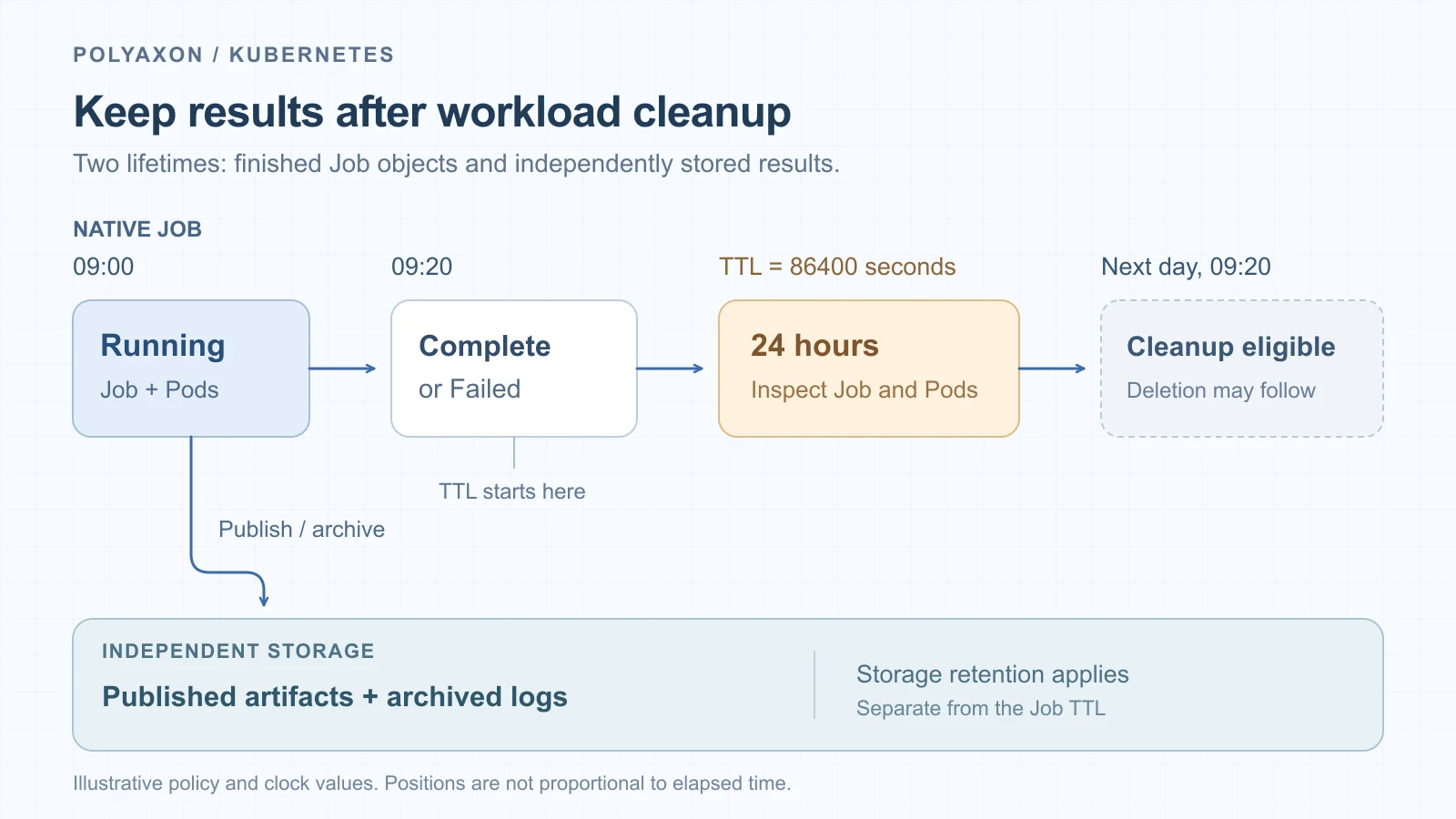
Illustrative times for ttlSecondsAfterFinished: 86400. The lower lane assumes the application has already published its outputs and logs to independent storage.
Preserve results outside the Pod
Decide where predictions, checkpoints, and logs will live before shortening retention:
- Container files and
emptyDir: copy required outputs to persistent storage before the Pod disappears. Kubernetes deletes anemptyDirwhen the Pod is removed. - Container logs: send them to an archive with its own retention policy. Keeping a Pod for a day does not prevent log rotation or node loss; Kubernetes recommends an independent log lifecycle.
- PVC-backed outputs: inspect ownership as well as the mount. A separately managed claim can outlive the Job. A generic ephemeral PVC is owned by its Pod and is normally garbage-collected with it; the volume's reclaim policy then matters.
A successful process exit alone does not establish that an asynchronous upload completed. Finish required output writes before reporting application success, and surface a failed upload as a failure. A longer TTL gives someone time to inspect the problem; it does not repair an incomplete result.
Inspect an existing Job before adding a TTL
The commands below target an existing native Job named eval-batch in namespace ml. Use your namespace and Job name, and confirm the selected cluster:
kubectl config current-context
kubectl -n ml get job eval-batch -o yaml
Look at spec.ttlSecondsAfterFinished, status.conditions, and any metadata.deletionTimestamp or finalizers. Check the terminal condition's transition time: a newly added TTL is measured from completion, not from the patch.
While the Pods still exist, capture the available diagnostic objects and logs. Selecting by the Job UID ties the capture to this execution even if a Job name is later reused:
K8S_JOB_UID=$(kubectl -n ml get job eval-batch -o jsonpath='{.metadata.uid}')
: "${K8S_JOB_UID:?Could not resolve the Job UID}"
kubectl -n ml get job eval-batch -o yaml > eval-batch-job.yaml
kubectl -n ml get pods \
  -l "batch.kubernetes.io/controller-uid=$K8S_JOB_UID" \
  -o yaml > eval-batch-pods.yaml
kubectl -n ml logs \
  -l "batch.kubernetes.io/controller-uid=$K8S_JOB_UID" \
  --all-containers=true --prefix=true --timestamps=true --tail=-1 \
  > eval-batch.log
The explicit --tail=-1 matters: kubectl logs otherwise defaults to ten lines when using a selector. This captures logs still available through the API, not older rotated files. If a container restarted, collect its previous instance's logs separately with --previous while they remain available.
After confirming the Job is finished and its required outputs are stored, set a one-day TTL:
kubectl -n ml patch job eval-batch --type=merge \
  --patch '{"spec":{"ttlSecondsAfterFinished":86400}}'
If the Job finished more than a day ago, that patch makes it eligible for cleanup immediately. Extending an already expired TTL is not a reliable way to rescue an object: deletion may already be underway. Set the intended window in new Job manifests whenever possible.
Use Polyaxon's termination policy for managed runs
For a Polyaxon-managed run, configure retention in its component or operation instead of patching generated Kubernetes objects. Save this local override as retention.yaml:
termination:
  timeout: 3600
  ttl: 86400
Apply it to your existing evaluation component:
polyaxon run -p acme/evaluation -f evaluation.yaml -f retention.yamlHere, evaluation.yaml is your component and acme/evaluation is a project you can access. Polyaxon normally cleans cluster resources after the operation finishes and its helpers collect logs and outputs. termination.ttl adds a retention window for inspecting finished resources. The termination specification unifies these controls across runtimes, using native mechanisms where available and helpers where needed.
At the end of your evaluator, save its existing predictions.jsonl with the run using the Polyaxon tracking library:
from polyaxon import tracking

tracking.init()
tracking.log_artifact(path="predictions.jsonl", name="predictions")
The artifact guide explains saving files under run outputs. For large checkpoints, write directly to the path returned by tracking.get_outputs_path() instead of staging them in disposable scratch space.
Keep log archiving enabled when you need logs after cleanup, and use an artifact-store connection with the durability you require. A node-local store still depends on that node. Run metadata, archived logs, and artifact storage have separate retention policies; termination.ttl controls cluster resources.
For notebooks and temporary inference endpoints, stopping active work is a different decision. Use service timeouts and activity-based culling to control their lifetime.
Account for other cleanup policies
A CronJob's successfulJobsHistoryLimit and failedJobsHistoryLimit retain counts of finished Jobs. TTL retains an elapsed-time window. If either controller deletes a Job first, the other policy does not preserve it. Keeping the last three successes therefore does not guarantee a full day of inspection. The CronJob reference documents these limits; our CronJob guide covers the broader scheduling setup.
Choose a window that matches how quickly someone can investigate a failure. Before reducing it broadly, confirm that one completed run's outputs and archived logs remain accessible after its workload objects are gone. If an expired Job remains, inspect finalizers and the responsible controller rather than forcing deletion.
The configuration and commands were reviewed against documentation; no workloads or cluster changes were executed while preparing this article.