Optimize one model three ways with NVIDIA Model Optimizer on Polyaxon
Compare INT8 quantization, FastNAS pruning, and distillation against one tracked baseline, then measure the candidate that meets your accuracy floor.
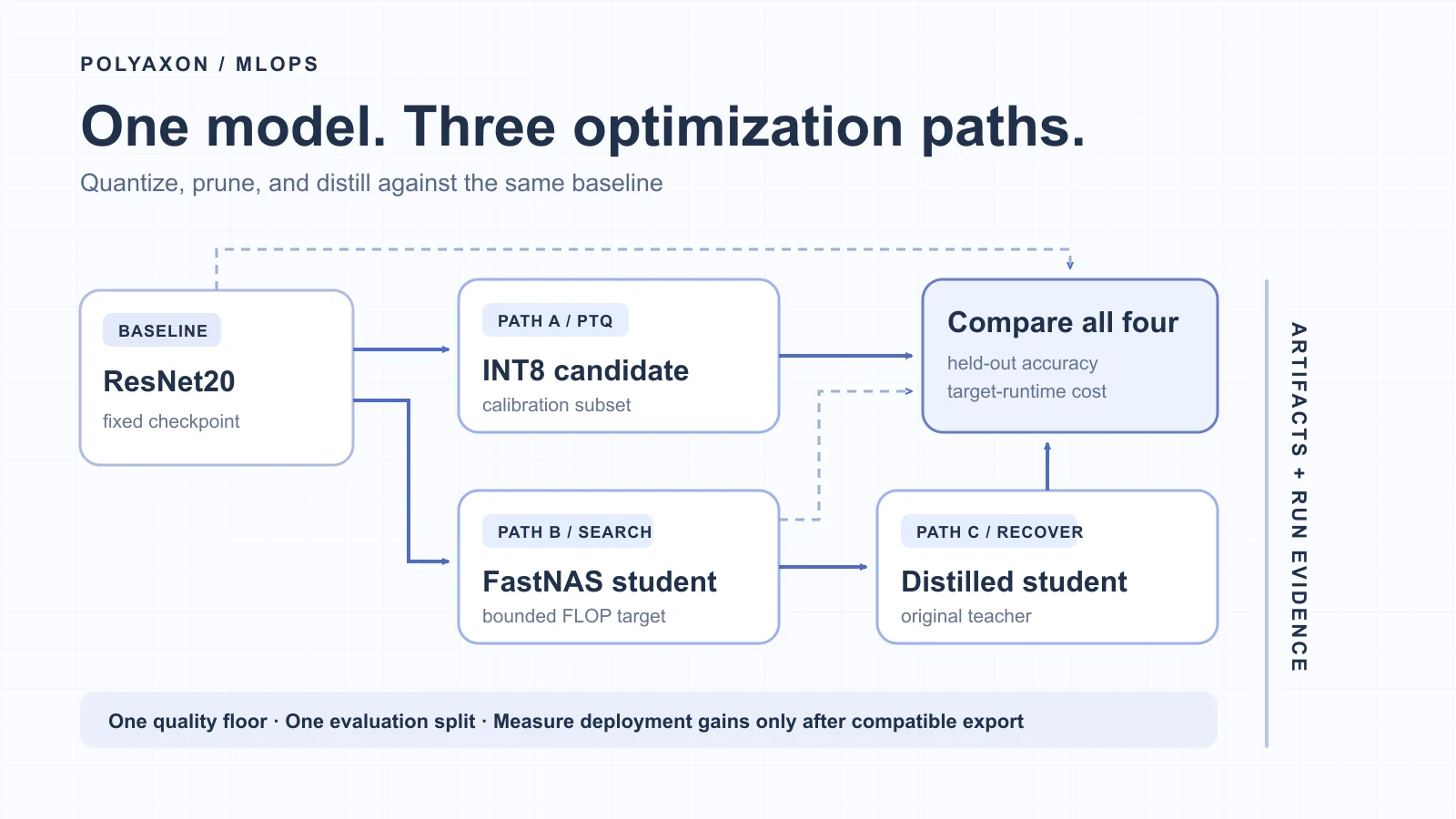
You have a classifier that meets your accuracy target, but its serving cost is too high. Quantization, pruning, and distillation are plausible ways forward. Which one helps depends on the model, the acceptable quality loss, and the runtime that will serve it. Running three unrelated demos will not answer that question.
This walkthrough uses one trained CIFAR-10 ResNet20 checkpoint as the starting point for three NVIDIA Model Optimizer paths. Polyaxon runs each path as attributable work, keeps its artifacts, and gives the team a place to compare the evidence. Model Optimizer performs the transformations and training; your evaluator and target serving runtime establish whether a candidate is actually useful.
The focused code below follows NVIDIA's current PyTorch guides, reviewed after the 0.47.0 release. It assumes your application already defines and trains ResNet20, loads its checkpoint, and creates PyTorch data loaders; NVIDIA's CIFAR-10 ResNet20 pruning notebook is a starting scaffold. Pin Model Optimizer 0.47.0, PyTorch, CUDA, and the container in your own image, and check the APIs against that exact environment before running the workflow. These excerpts have been reviewed against the upstream guides, not executed as a combined example.
Hold the baseline and evaluation fixed
Start with a Polyaxon baseline run that restores an already trained checkpoint or trains and saves one. Record its weights digest, code revision, model definition, preprocessing, CIFAR-10 revision and split manifest, seed, and software image. A checkpoint name alone is too weak: a changed normalization step can make every later comparison misleading.
Give the data four explicit roles. Training data fits the baseline and later student. A calibration subset drives INT8 activation statistics. A bounded search subset scores FastNAS candidate architectures. A held-out test split reports final quality. Do not select the pruning architecture or tune the quantization recipe on that final split.
The run graph is small:
| Run | Input | Output |
|---|---|---|
| Baseline | Pinned trained checkpoint, or training data and a fixed recipe | ResNet20 checkpoint and baseline evaluation |
| INT8 PTQ | A fresh copy of the baseline and calibration subset | Quantized candidate and recipe |
| FastNAS | A separate fresh copy and search data | Pruned student, search state, and pre-recovery evaluation |
| Distillation | The original teacher and the pruned student | Trained student and post-recovery evaluation |
| Comparison | Four exact artifact revisions and one held-out evaluator | Candidate table and qualification decision |
The INT8 and FastNAS runs can start after the baseline. Distillation waits for pruning. The comparison waits for all required evaluations; if one path fails, retain that missing result instead of silently comparing only the successful candidates. Reliable ML pipeline orchestration covers Polyaxon DAG dependencies, while candidate completeness shows how to report missing evidence.
Schedule the complete flow on Polyaxon
The three Polyaxonfiles below turn that graph into scheduled jobs. They assume your pinned image contains workflow.py, the ResNet20 definition, the Model Optimizer and Polyaxon Python packages, and code to load a named dataset revision. The application script implements baseline, int8, fastnas, distill, and compare using the Model Optimizer functions in the following sections. It saves each candidate and its evaluation report under tracking.get_outputs_path(...). This is the orchestration contract, not a claim that Polyaxon implements quantization or training internally.
First, save a reusable GPU component as modelopt-gpu.yaml:
version: 1.1
kind: component
name: modelopt-gpu-step
inputs:
  - {name: image, type: str}
  - {name: data_revision, type: str}
  - {name: stage, type: str}
  - {name: baseline_run, type: str, isOptional: true, value: ""}
  - {name: pruned_run, type: str, isOptional: true, value: ""}
run:
  kind: job
  container:
    image: "{{ image }}"
    workingDir: /workspace
    command: [python, workflow.py]
    args:
      - "--stage={{ stage }}"
      - "--data-revision={{ data_revision }}"
      - "--baseline-run={{ baseline_run }}"
      - "--pruned-run={{ pruned_run }}"
    resources:
      requests: {cpu: "4", memory: 16Gi}
      limits: {cpu: "8", memory: 32Gi, nvidia.com/gpu: "1"}
Each of the four model jobs requests one whole GPU. Its queue must point to an agent with a suitable GPU pool, and the image must contain a CUDA/PyTorch build compatible with that pool. CPU and memory values are example budgets to adjust for your model and data. The baseline stage may restore an already trained, pinned checkpoint and evaluate it; if it trains a new model instead, record that training recipe and checkpoint before the other branches start.
The final comparison only reads run status and evaluation evidence, so give it a CPU component. Save this as modelopt-compare.yaml:
version: 1.1
kind: component
name: modelopt-compare
inputs:
  - {name: image, type: str}
  - {name: dag_run, type: str}
run:
  kind: job
  container:
    image: "{{ image }}"
    workingDir: /workspace
    command: [python, workflow.py]
    args: ["--stage=compare", "--dag-run={{ dag_run }}"]
    resources:
      requests: {cpu: "1", memory: 2Gi}
      limits: {cpu: "2", memory: 4Gi}
Finally, save modelopt-pipeline.yaml beside those two files. Replace gpu-agent/gpu and cpu-agent/cpu with queues in your organization. Polyaxon resolves the local pathRef files when you submit this DAG through the CLI:
version: 1.1
kind: component
name: compare-modelopt-methods
inputs:
  - {name: image, type: str}
  - {name: data_revision, type: str}
run:
  kind: dag
  operations:
    - name: baseline
      pathRef: ./modelopt-gpu.yaml
      queue: gpu-agent/gpu
      params:
        image: {ref: dag, value: inputs.image}
        data_revision: {ref: dag, value: inputs.data_revision}
        stage: {value: baseline}
    - name: int8
      pathRef: ./modelopt-gpu.yaml
      queue: gpu-agent/gpu
      dependencies: [baseline]
      params:
        image: {ref: dag, value: inputs.image}
        data_revision: {ref: dag, value: inputs.data_revision}
        stage: {value: int8}
        baseline_run: {ref: ops.baseline, value: globals.uuid}
    - name: fastnas
      pathRef: ./modelopt-gpu.yaml
      queue: gpu-agent/gpu
      dependencies: [baseline]
      params:
        image: {ref: dag, value: inputs.image}
        data_revision: {ref: dag, value: inputs.data_revision}
        stage: {value: fastnas}
        baseline_run: {ref: ops.baseline, value: globals.uuid}
    - name: distill
      pathRef: ./modelopt-gpu.yaml
      queue: gpu-agent/gpu
      dependencies: [fastnas]
      params:
        image: {ref: dag, value: inputs.image}
        data_revision: {ref: dag, value: inputs.data_revision}
        stage: {value: distill}
        baseline_run: {ref: ops.baseline, value: globals.uuid}
        pruned_run: {ref: ops.fastnas, value: globals.uuid}
    - name: compare
      pathRef: ./modelopt-compare.yaml
      queue: cpu-agent/cpu
      dependencies: [baseline, int8, fastnas, distill]
      trigger: all_done
      skipOnUpstreamSkip: false
      params:
        image: {ref: dag, value: inputs.image}
        dag_run: {ref: dag, value: globals.uuid}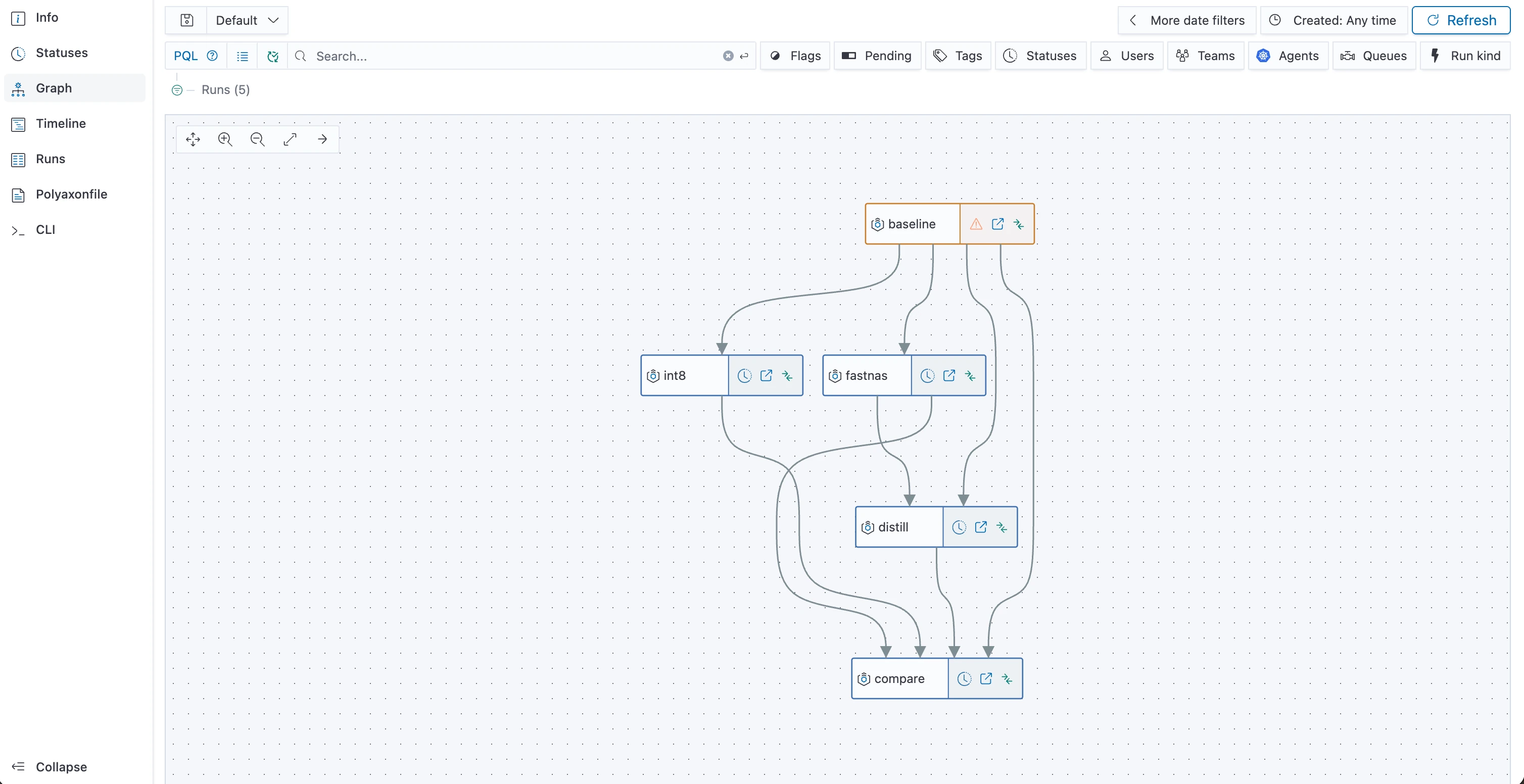
The Polyaxon Graph view makes the two parallel optimization branches and the final comparison dependency visible. The status icons show this run at one point in time; they are not optimization results.
Submit it with an immutable image digest and the exact dataset/split revision, for example polyaxon run -f modelopt-pipeline.yaml -P image=YOUR_PINNED_IMAGE -P data_revision=YOUR_DATA_REVISION. The int8 and fastnas operations become eligible together after baseline; queue capacity determines when their GPU Pods actually start. distill waits for the pruned student. The CPU comparison runs after all paths finish, including failures or skips, and uses the DAG run ID to collect all four expected outcomes. Its application code must treat a missing report as missing evidence, not as a zero score.
The run IDs identify the producers of the upstream artifacts. Have workflow.py save checkpoints under tracking.get_outputs_path("models/...") and register them with tracking.log_model_ref(...). It must retrieve the baseline checkpoint for both branches and the pruned checkpoint for distillation through your configured Polyaxon artifact store; a dependency alone does not copy a model file into the next container. Context references and artifact initialization describe the available handoff mechanisms. Keep the exact checkpoint paths and digests in each run's report so the comparison can verify that every branch used the intended input.
Path A: calibrate an INT8 candidate
NVIDIA's PyTorch quantization guide uses mtq.quantize with a recipe and a forward loop over calibration data. This function expects a loaded, device-placed baseline and a loader yielding (images, labels) batches. The loader must use the baseline's preprocessing and a recorded, non-test subset.
import torch
import modelopt.torch.quantization as mtq


def make_int8_candidate(baseline, calibration_loader):
    baseline.eval()
    device = next(baseline.parameters()).device

    def calibrate(model):
        with torch.no_grad():
            for images, _ in calibration_loader:
                model(images.to(device))

    return mtq.quantize(baseline, mtq.INT8_DEFAULT_CFG, calibrate)
Run held-out accuracy on the resulting candidate and retain its quantizer configuration, calibration sample IDs, sample count, and checkpoint. Model Optimizer inserts fake-quantization behavior into the PyTorch model. A PyTorch forward pass here can reveal quality loss, but it does not prove an INT8 deployment is faster or uses less memory. Export to a compatible inference backend, check that the intended operators actually run at the requested precision, and benchmark that exported artifact against the baseline on the same hardware. NVIDIA documents an ONNX export path for PTQ; whether that path works for your ResNet20 implementation and target runtime is a separate qualification step.
Path B: search for a smaller network
FastNAS searches a subnet under a resource constraint and ranks candidates with a score function. NVIDIA recommends it for computer vision models and notes that pruning modifies the model in place. Load a new baseline copy for this run so the INT8 and pruning paths cannot contaminate each other. The following excerpt expects a device-placed model, a training loader for batch-normalization calibration, and score_on_search_split(model) to return one numeric score on a fixed, bounded search subset.
import torch
import modelopt.torch.opt as mto
import modelopt.torch.prune as mtp


def make_pruned_student(baseline, train_loader, score_on_search_split, output_dir):
    device = next(baseline.parameters()).device
    student, search_state = mtp.prune(
        model=baseline,
        mode="fastnas",
        constraints={"flops": "60%"},
        dummy_input=torch.randn(1, 3, 32, 32, device=device),
        config={
            "data_loader": train_loader,
            "score_func": score_on_search_split,
            "checkpoint": str(output_dir / "fastnas-search.pth"),
        },
    )
    mto.save(student, str(output_dir / "pruned-student.pth"))
    return student, search_state
The 60% FLOP ceiling is an illustrative search constraint, not a measured speedup. The 32 × 32 dummy input matches CIFAR-10 images; change it if your model uses another input shape. Save the search checkpoint as well as the selected model so the search can be inspected or resumed. Measure the selected student's parameter count, estimated FLOPs, and held-out accuracy before recovery. A lower FLOP estimate does not guarantee lower latency on your actual serving hardware.
Path C: teach the pruned student
Pruning can reduce quality. NVIDIA's distillation API wraps a student and a teacher, computes a knowledge-distillation loss, and exports the student after training. Use the unchanged baseline as teacher and the saved pruned model as student. That makes this a pruning-plus-distillation path: any recovered accuracy belongs to the combined sequence, not to distillation in isolation.
This training-loop excerpt assumes both models and the loader are on the same device, and that the loader yields (images, labels). Choose the number of epochs and learning rate from a training plan fixed before looking at the held-out result.
import torch
import torch.nn.functional as F
import modelopt.torch.distill as mtd


def distill_student(teacher, student, train_loader, epochs, learning_rate):
    teacher.eval()
    for parameter in teacher.parameters():
        parameter.requires_grad_(False)

    model = mtd.convert(
        student,
        mode=[("kd_loss", {
            "teacher_model": teacher,
            "criterion": mtd.LogitsDistillationLoss(),
            "loss_balancer": mtd.StaticLossBalancer(),
        })],
    )
    optimizer = torch.optim.AdamW(
        (parameter for parameter in model.parameters() if parameter.requires_grad),
        lr=learning_rate,
    )
    for _ in range(epochs):
        model.train()
        teacher.eval()
        for images, labels in train_loader:
            optimizer.zero_grad(set_to_none=True)
            logits = model(images)
            classification_loss = F.cross_entropy(logits, labels)
            loss = model.compute_kd_loss(student_loss=classification_loss)
            loss.backward()
            optimizer.step()

    return mtd.export(model)
Save the exported student and its training checkpoint, teacher digest, loss configuration, seed, and training-data revision. Evaluate the student again on the same held-out split. If you also want to know what distillation alone contributes, run a separate unpruned-student experiment; this four-artifact comparison does not isolate that effect.
Record the experiment in Polyaxon
Use one Polyaxon job per transformation and training boundary. Keep the application code and pinned environment the same where possible, pass the method and input artifact revision as explicit parameters, and write each job's model and report under its own run output path. Polyaxon's tracking API can log the held-out accuracy and other numeric results, while the saved recipe, manifests, search state, and model files remain inspectable artifacts. Use the run comparison view to inspect candidates; the final qualification rule belongs in your evaluation code or review process.
In each candidate's evaluation job, let your evaluator produce a report with held_out_accuracy and parameter_count, then attach that report to its Polyaxon run. This function records actual evaluator output; it does not calculate those values or run Model Optimizer for you:
import json
from pathlib import Path

from polyaxon import tracking


def record_evaluation(candidate_id, baseline_digest, report):
    tracking.init()
    tracking.log_inputs(
        candidate_id=candidate_id,
        baseline_digest=baseline_digest,
    )
    tracking.log_metrics(
        held_out_accuracy=report["held_out_accuracy"],
        parameter_count=report["parameter_count"],
    )
    destination = Path(tracking.get_outputs_path("evaluation/report.json"))
    destination.write_text(
        json.dumps(report, indent=2, allow_nan=False), encoding="utf-8"
    )
    tracking.log_file_ref(path=str(destination), name="evaluation-report")
Store the candidate's model checkpoint and optimization recipe alongside this report. A separate comparison step reads the four reports and their exact artifact identities, rather than treating whichever files happen to exist as the planned candidate set.
| Field to retain | Why it matters |
|---|---|
| Baseline digest, code revision, image and Model Optimizer version | Establishes that each branch started from the same model and toolchain |
| Dataset revision and calibration/search/test manifests | Separates tuning data from final evidence |
| Method settings and random seed | Explains the actual transformation or training run |
| Output model and evaluation report paths | Connects a candidate to the artifact that was scored |
| Hardware, runtime, batch size and input shape | Makes latency and memory measurements comparable |
The comparison report should have one row each for baseline, INT8, pruned, and pruned + distilled. Include held-out accuracy, parameter count, estimated FLOPs, compatible exported artifact size, target-runtime latency, peak memory, and links to the Polyaxon runs and artifacts. Leave a field blank or mark it not measured until that measurement exists. A quantized PyTorch checkpoint's file size is not a substitute for the size of its deployable representation.
Choose the quality floor before running the candidates. Reject any candidate below it, then choose among the remaining ones using the resource metric that matters on your target runtime. If the INT8 export is unsupported, or the pruned student is smaller but no faster in service, that is a useful result. Polyaxon keeps the attempts and their evidence together so the decision survives beyond a notebook session. For a deeper serving measurement protocol, see repeatable inference benchmarks.