What is data lineage in machine learning?
Trace a model back to its data and transformations, find consumers of a changed dataset, and inspect recorded inputs and outputs in Polyaxon.
A team retrains a support-ticket classifier with the same training code and gets a different result. The data preparation job ran again before training. Which export did it read? Did it change the label mapping? Which prepared dataset reached the trainer?
Data lineage is the record of those relationships: where data came from, which executions transformed it, and which outputs and later consumers depend on it. In machine learning, that chain can connect a source export to a prepared dataset, training run, model artifact and evaluation.
Keep the identity of each input and output alongside the run that used or produced it. That gives you two useful starting points: trace a model backward to its inputs, or follow a dataset forward to its consumers.
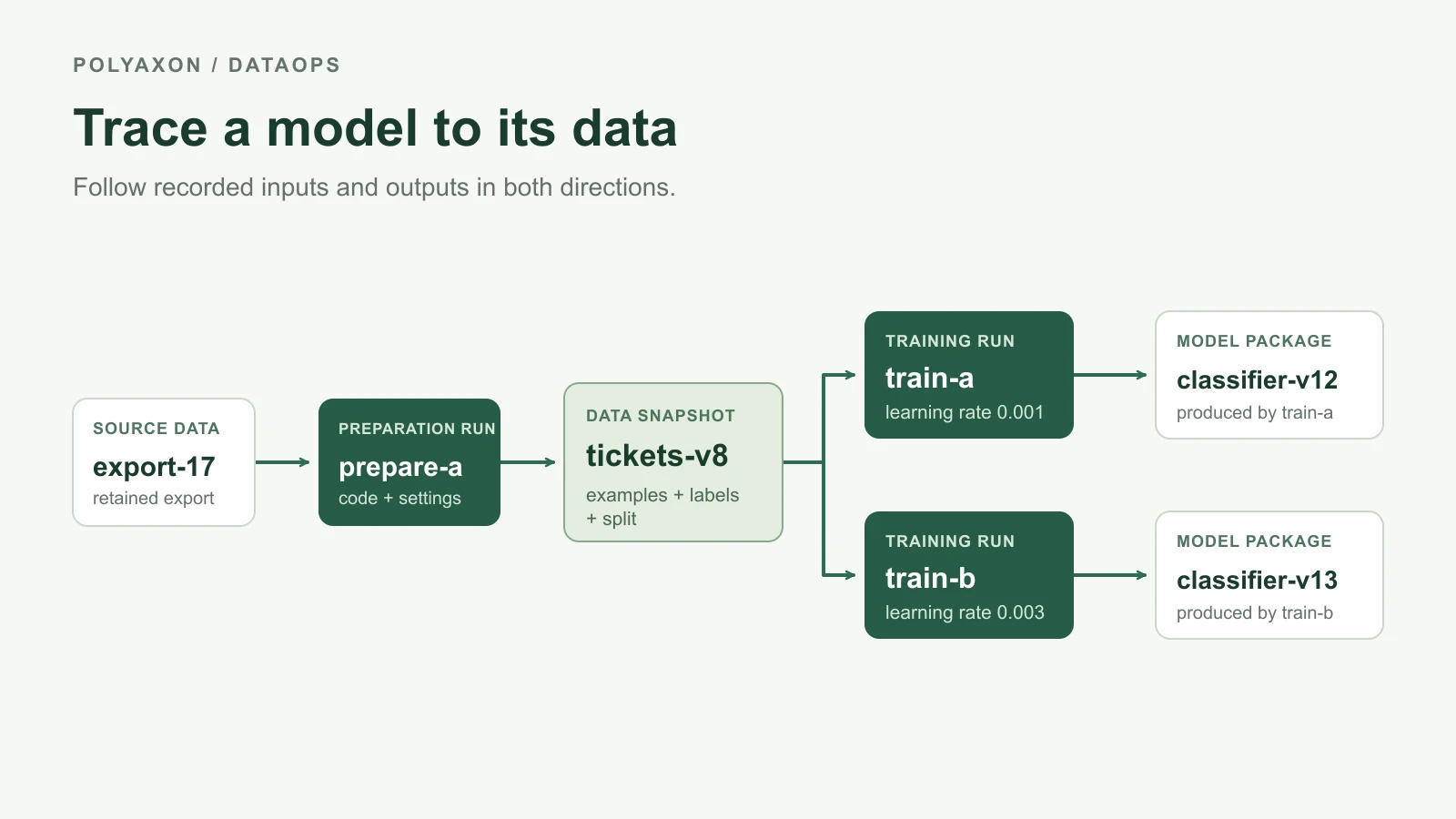
Illustrative lineage: arrows show data used or produced by a run. The identifiers describe an example, not an executed experiment.
Versions identify the data; lineage connects the work
Suppose tickets-v8 identifies a prepared snapshot containing training examples, labels and a split assignment. Two training runs consume it with different learning rates. Each produces its own model package.
The version identifies the dataset you mean. The lineage records its preparation run and both consuming training runs. A readable name is useful, but the record should also resolve to retained content: an object version, a snapshot, or a manifest and digest. If a name is later reassigned, the old run still needs the identity of what it consumed.
Three related terms answer different questions:
| Term | Useful question |
|---|---|
| Data versioning | Which state of the dataset can I identify and retrieve? |
| Data lineage | Which inputs, transformations and consumers connect this dataset to a result? |
| Provenance | How, when and by whom was this result produced? |
These terms overlap. W3C PROV describes provenance through entities, the activities that use or generate them, and the people or systems responsible. For an ML workflow, datasets and model packages are entities; preparation and training executions are activities.
Follow the chain backward to investigate a result
Start with the exact model package behind the result you are investigating. Resolve a model alias or registry label to its producing run and retained artifacts. Then inspect that run's data inputs, configuration, code revision and environment.
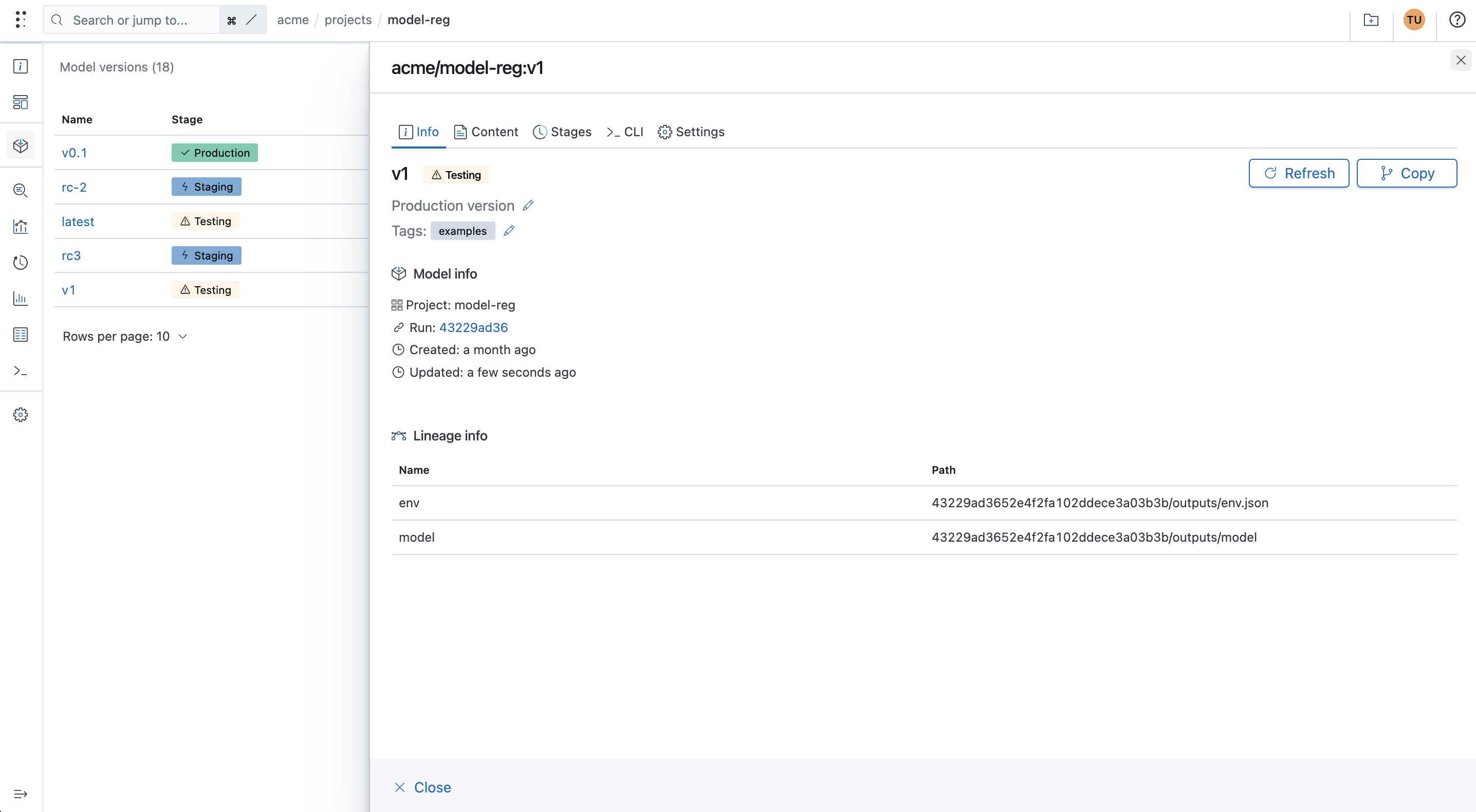
In Polyaxon, you can promote a training run's model to a model version. The run then shows a Promoted badge and a link to the registered model version. The example below links train-v2-0-0 to acme/image-classifier:v2.0.0.

Open that version link to see the model registry entry. Model info → Run links back to the training run, while Lineage info lists the selected artifacts, including the model package, validation predictions and model card. The version's stage is shown alongside its name.
For the classifier, follow classifier-v13 to train-b, then to tickets-v8 and its preparation run. That preparation run should identify the original export and the transformation it performed. If it used a label mapping, tokenizer or split file, those are inputs too.
This gives you places to compare when a result changes. Two runs might use the same raw export but different preparation code. They might use the same prepared data but different training parameters. An evaluation might use a different held-out set. Lineage locates the recorded differences; a controlled comparison is still needed to establish their effect.
The pipeline definition provides another useful view: the steps and their ordering. Execution lineage adds the particular inputs and outputs involved in a particular run. A diagram saying “prepare → train” does not identify which preparation output a retried training job loaded. OpenLineage's object model similarly distinguishes a job definition from its individual executions and their input/output datasets.
Follow it forward to find affected consumers
Now start with the dataset. Suppose the team discovers that the preparation rule behind tickets-v8 assigned one category incorrectly. The useful question is which later work consumed that snapshot.
In the diagram, both train-a and train-b used it. Their model packages belong in the investigation, along with recorded evaluations and services that consumed those packages. A model trained from an independent snapshot needs a separate dependency check; belonging to the same project does not establish that it used the affected data.
The role of the data matters. Incorrect training labels can require a new training run. A correction confined to held-out evaluation labels may allow the team to rescore retained predictions. The label-correction walkthrough explains that second case.
Forward tracing identifies candidates for review. Decide what to rerun from the changed dependency and what each consumer actually used. A lineage record alone does not perform that rerun or update a deployed service.
Inspect the recorded relationships in Polyaxon
Open a run's Info page and find Lineage. The Artifacts tab separates input and output references. Inspect the dataset and model entries, then use Params for the run's inputs and outputs. Upstream, Downstream and Clones expose recorded run relationships, including related operations and restarts or resumes. See the run-lineage documentation.

An existing Polyaxon demonstration screenshot. Select it to inspect the input/output tables at full size; its displayed values are separate from the illustrative diagram.
You can also inspect a run's artifact references from Python using your configured Polyaxon credentials. Replace the project and run UUID with the run you want to investigate:
from polyaxon.client import RunClient

run = RunClient(
    owner="acme",
    project="ticket-classifier",
    run_uuid="YOUR_TRAINING_RUN_UUID",
)

print(run.get_artifacts_lineage(query="is_input: true"))
print(run.get_artifacts_lineage(query="is_input: false"))
run.close()
Each response is a page of references. Use offset and limit to inspect additional entries when needed. The artifact-lineage query reference also supports filtering by name, kind and path.
The record depends on the references your workflow and tracking code supply. Record externally loaded datasets, preprocessing assets and model inputs explicitly where they are otherwise missing. The dataset-versioning guide shows tracking.log_data_ref(...) and the artifact-saving calls. Logging a path or a producer UUID as metadata does not by itself create every upstream/downstream run relationship.
Keep the evidence behind the links
A reference remains useful only while you can interpret it and retrieve the content you need. Retain the source snapshot, preparation output and model package for the period in which their consumers may need investigation or reproduction. A hash can help verify retrieved bytes; it cannot recover a deleted dataset.
Record the transformations at the level your question requires. Run and artifact lineage can identify the dataset used for training. Determining exactly which source row contributed to an aggregate or which field supplied a feature requires finer-grained records from the transformation. Do not infer that detail from a dataset-level arrow.
For one model your team currently uses, follow the path to its training run, prepared dataset and source revision. Verify that you can retrieve those inputs and explain the preparation step. Then follow the prepared dataset forward to its other recorded consumers. The first missing identity or inaccessible artifact tells you where to improve the workflow's record.