Diagnose a Pending GPU Pod across compute and storage
Work through a GPU placement case where available devices, CPU reservations, and volume topology leave no eligible node.
A cluster has seven unreserved GPUs. A new Pod requests two and remains Pending. Adding the available devices across the cluster suggests spare capacity; checking each eligible node reveals why the Pod cannot use it.
We will work through one hypothetical case combining GPU requests, CPU reservations, a bound checkpoint volume, and competing workloads. The goal is to identify a change that makes a specific node eligible.
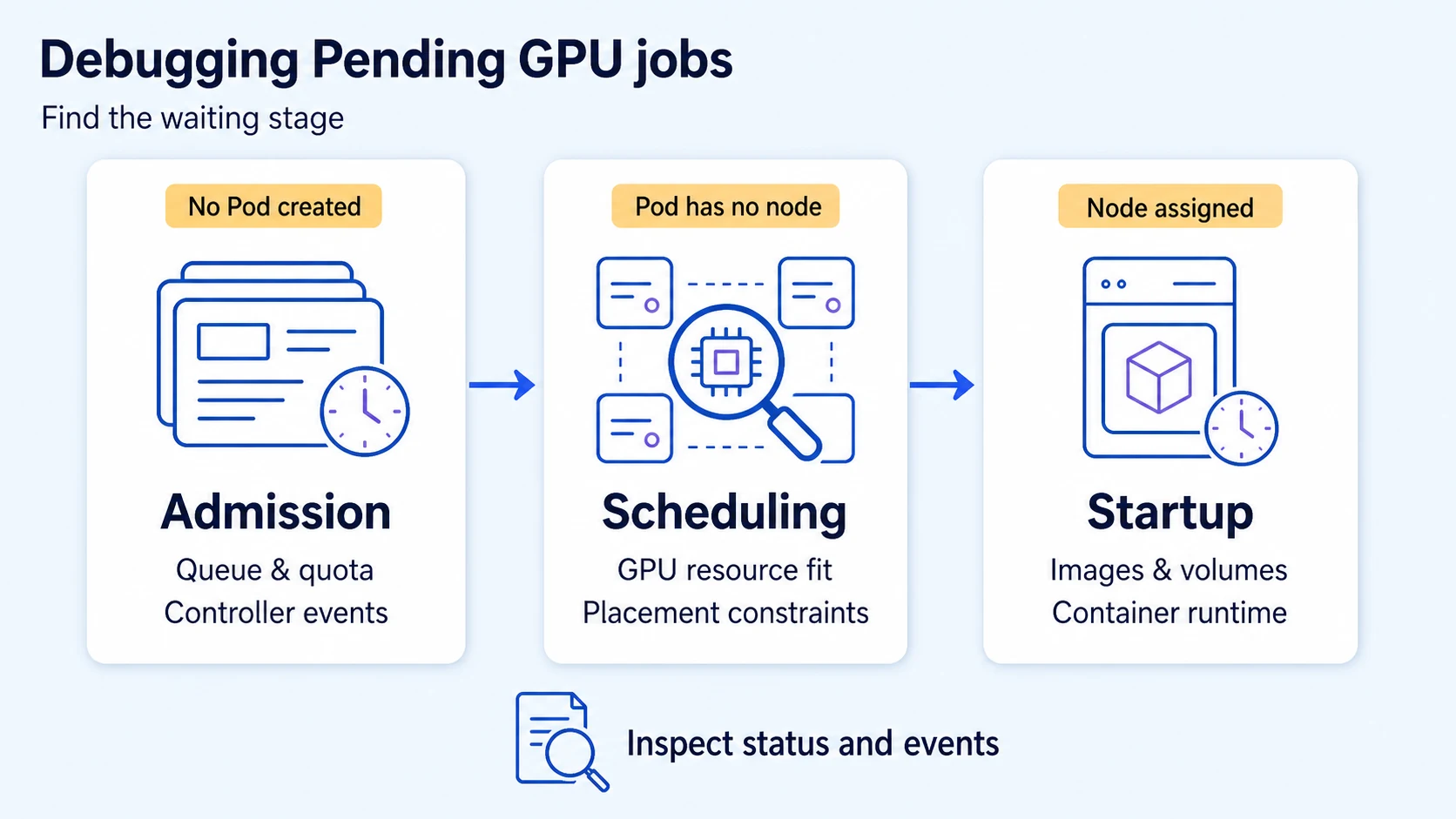
Establish where the Pod is waiting
Start with the rendered Pod and its events. Substitute an existing namespace and Pod; these commands only inspect resources:
NS=ml-workloads
POD=replace-with-your-pod
kubectl -n "$NS" get pod "$POD" -o wide
kubectl -n "$NS" get pod "$POD" -o yaml
kubectl -n "$NS" describe pod "$POD"
kubectl -n "$NS" get events \
  --field-selector "involvedObject.kind=Pod,involvedObject.name=$POD" \
  --sort-by=.metadata.creationTimestamp
If no Pod exists, inspect queue admission and the owning controller first. If a node is already assigned, follow image, volume-attachment, mount, and initializer events. This case starts with an existing Pod whose spec.nodeName is empty, placing the investigation at scheduling. The Pod debugging guide explains that initial distinction.
Capture the Pod UID and observation time. Event records can outlive a Pod with the same name, and sequential commands do not produce an atomic cluster snapshot.
Reconstruct the whole placement request
Our Pod needs two nvidia.com/gpu devices, eight CPUs, and 32Gi of memory on one node. It mounts the existing checkpoint-42 claim. The claim is Bound to a CSI volume whose node affinity permits only zone a.
The four candidate nodes are Ready, advertise the same GPU resource and compatible accelerator labels, and have no additional taint, affinity, or scheduling-gate conflict. Each advertises four GPUs and sixteen CPUs as allocatable. On a1, another trainer reserves twelve CPUs and two GPUs; a2's workloads reserve four CPUs and three GPUs.
The table records what remains after those reservations. Memory has sufficient headroom on every node:
| Node | Zone | Unreserved GPUs | CPU headroom | Memory headroom | Why the new Pod cannot fit |
|---|---|---|---|---|---|
a1 | a | 2 | 4 | 64Gi | Needs 8 CPUs |
a2 | a | 1 | 12 | 64Gi | Needs 2 GPUs |
b1 | b | 2 | 12 | 64Gi | Checkpoint volume requires zone a |
b2 | b | 2 | 8 | 64Gi | Checkpoint volume requires zone a |
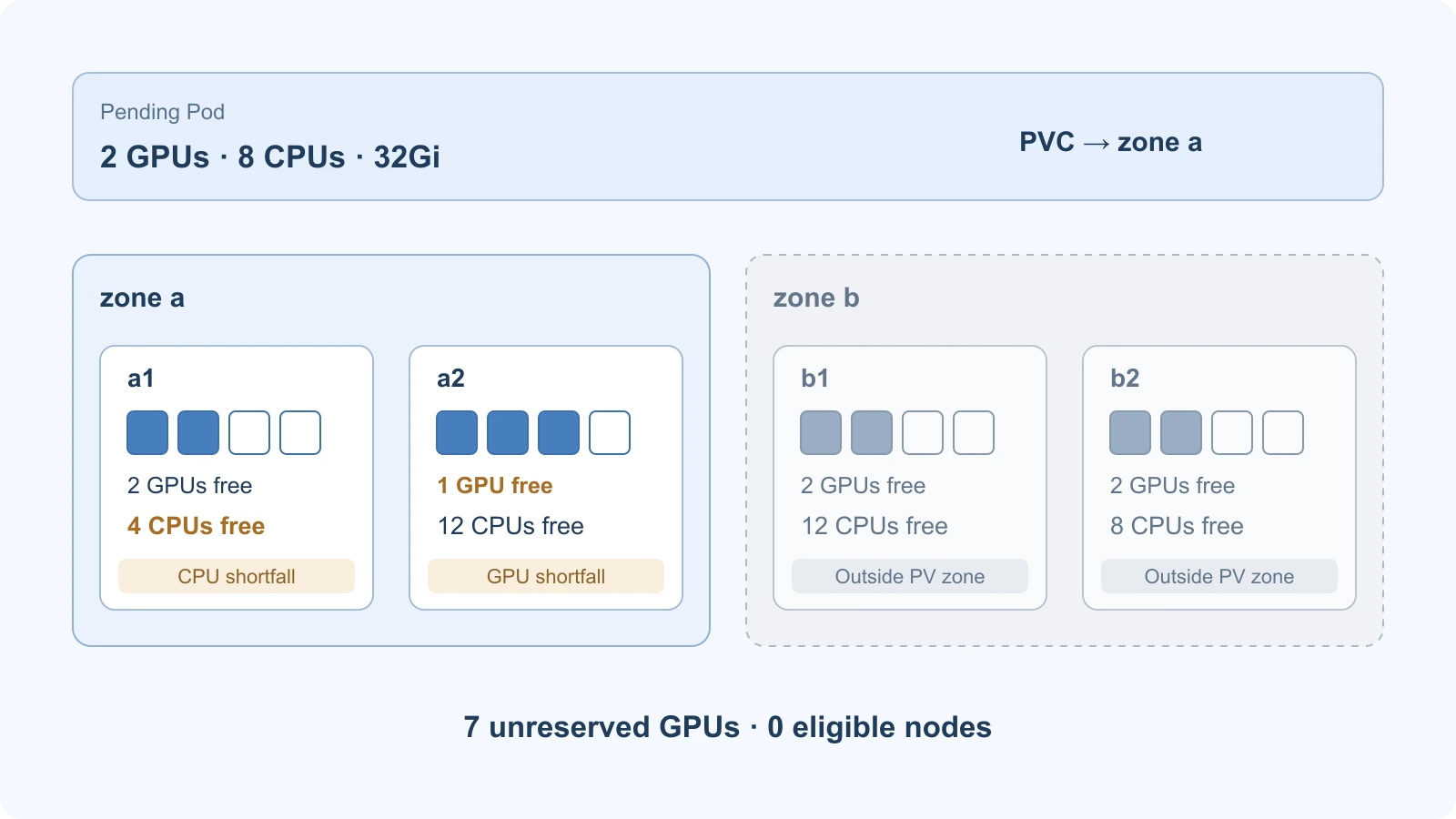
Constructed snapshot. Outlined GPU cells are unreserved; filled cells are reserved by existing Pods. Counts describe placement headroom, not measured GPU utilization.
The Pod cannot combine a1's GPUs with a2's CPUs. It also cannot use the GPUs in zone b with this bound volume. A distributed application could make a different request, but the scheduler cannot split this Pod into workers on its behalf.
Check reservations, not utilization
Kubernetes places workloads against resource requests. Low CPU or GPU activity in a monitoring chart does not release an existing Pod's reservation. Allocatable describes the node's schedulable total, not its current remaining capacity. The resource-management reference explains the request-based placement check.
Inspect the candidate nodes, using your cluster's names in place of the case labels:
kubectl get nodes -L topology.kubernetes.io/zone,accelerator
kubectl describe nodes a1 a2 b1 b2
Use their allocatable resources and the requests of assigned Pods to reconstruct headroom. Account for the effective request of the incoming Pod, including relevant init containers, sidecars, and runtime overhead. Comparing only its main container can underestimate what the scheduler must place.
For the standard device-plugin path, request the resource name the nodes actually advertise. Kubernetes uses a GPU limit as its request when the request is omitted; if both are specified, they must match. See GPU scheduling. DRA, MIG profiles, and shared GPU resources need their own allocation analysis; this case uses whole-device nvidia.com/gpu counts.
Distinguish volume topology from missing capacity
Inspect the affected claim, then its bound PV and StorageClass. Replace the case's claim name and the placeholders with your own resources:
kubectl -n "$NS" get pvc checkpoint-42 -o yaml
kubectl get pv REPLACE_WITH_BOUND_PV -o yaml
kubectl get storageclass REPLACE_WITH_STORAGE_CLASS -o yaml
Check the PV's node affinity against the nodes' zone labels. In this case the claim is already Bound, so the question is whether the existing volume can be used by a candidate node. The PersistentVolume reference describes that node-affinity constraint.
For a new, unbound claim on a compatible CSI driver, WaitForFirstConsumer can defer provisioning or binding until the consumer's scheduling constraints are considered. It does not move this already-bound volume into zone b. The StorageClass reference explains the binding modes.
A Bound claim can block placement through topology before attachment starts. Conversely, after node assignment, FailedAttachVolume or FailedMount points to a different stage. Follow the volume troubleshooting guide for that path.
Find the constraint a proposed fix would remove
The eligible set is the intersection of compute fit and every hard placement constraint. Here, zone a contains the only storage-compatible nodes, and neither has the required CPU and GPU headroom together. Required node selection rules further restrict candidates; a preferred placement score cannot make an ineligible node usable.
Several changes could make this particular request feasible:
| Proposed change | What must become true |
|---|---|
Wait for work on a1 to finish | At least 8 CPUs remain available alongside 2 GPUs |
Release another GPU on a2 | At least 2 GPUs remain available alongside 8 CPUs |
| Add compatible capacity | A new node in zone a satisfies the complete Pod request and volume constraints |
| Use another volume location | A supported data-copy or restore workflow makes the required checkpoint available to an otherwise eligible node |
Those are conditional remedies, not instructions to evict another team's workload. Identify the owning workload and its recovery requirements before rescheduling it. If measurements show excessive CPU requests on a1, its owner can right-size a future workload revision; lowering requests merely to pass admission can create contention later.
Adding a node in zone b leaves the volume constraint unchanged. Raising priority can affect competition for eligible resources, but it does not change where a disk is usable. Editing a PV's node-affinity labels does not relocate the underlying storage.
After an approved change, verify the transition you expected: an eligible node appears, the Pod receives a node assignment, storage becomes usable, and the worker starts. A new Pending Pod with the same unresolved constraints is not progress.
Keep the Polyaxon request reproducible
For Polyaxon workloads, preserve the run UUID, selected compute agent and queue, resolved Pod, claim/PV references, and timestamped node evidence. Queues can govern admission, concurrency, and resource budgets in commercial deployments. Kubernetes still evaluates the admitted Pod against node and storage constraints.
With Polyaxon 2.18 or later, merge a fragment like this into your existing job, retaining its image, command, and any other required settings:
resources:
  gpu: 2
  cpu: "8..8"
  memory: "32Gi..32Gi"
environment:
  nodeSelector:
    accelerator: a100
connections: [training-checkpoints]
The CPU and memory ranges set the worker's requests and limits to the same values. accelerator: a100 is an administrator-defined label in this example. The existing training-checkpoints connection must mount checkpoint-42 in the selected agent's namespace. Volume connections and reusable scheduling presets let platform owners retain those choices centrally.
Inspect the final Pod after presets and helper containers are resolved; its effective requirements can exceed this worker fragment. Save that resolved specification with the claim topology, timestamped node headroom, and selected queue in the incident record.