Docker build caching for ML workloads on Kubernetes
Reduce container build and startup time for ML jobs with reusable dependency layers, persistent build caches, and deliberate image and model caching.
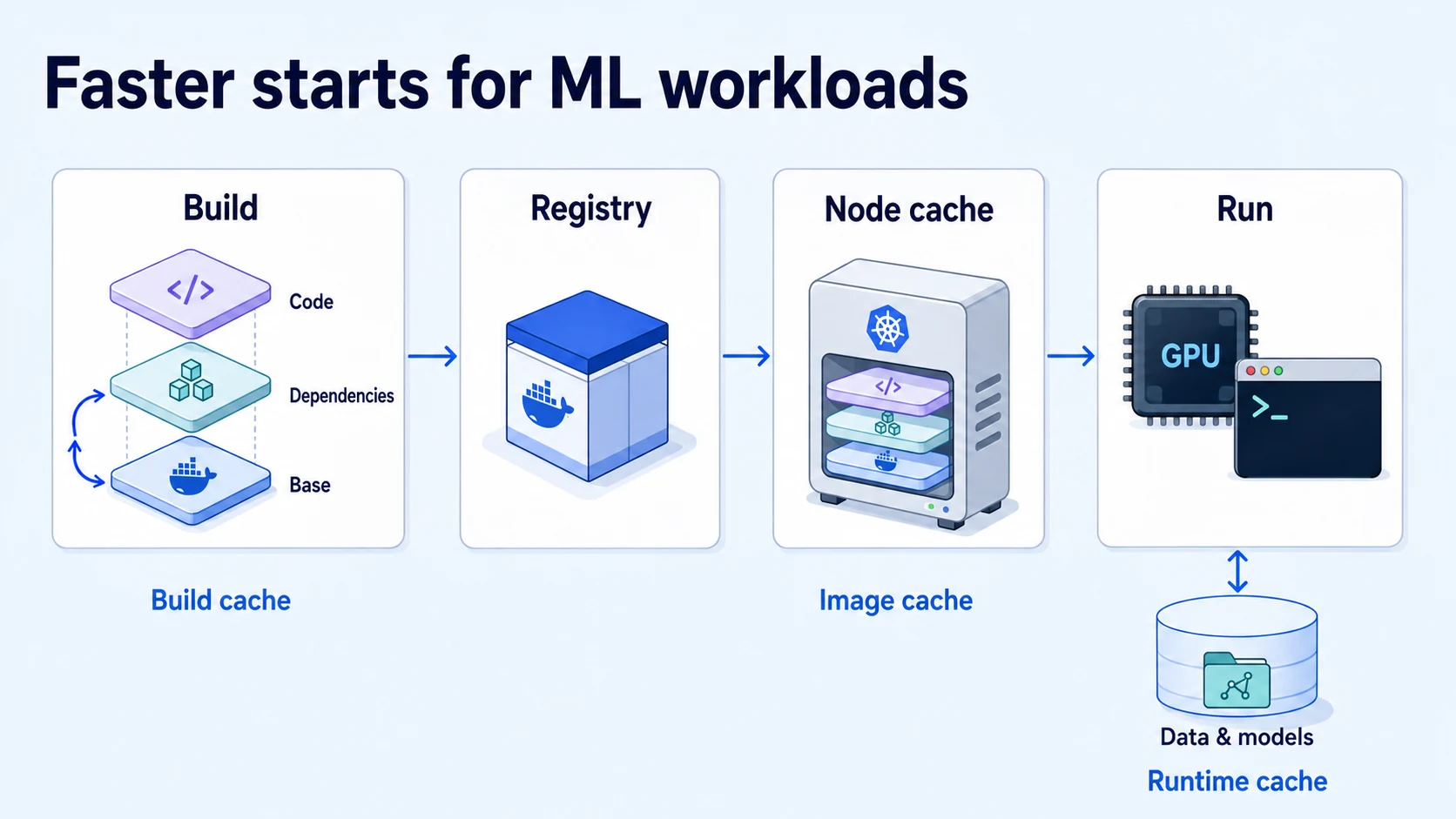
A one-line training change should not require downloading the same Python packages again. Opening another sandbox should not automatically mean rebuilding its environment. Yet both waits can recur when container caches disappear between runs or frequently changing files invalidate expensive build steps.
Polyaxon jobs, services, and sandboxes run in containers on Kubernetes. Their path to useful work includes building an image, publishing it, pulling it onto a node, and preparing code, data, or model weights. Each stage has different reuse rules. Improving the Docker build is valuable, but it addresses only part of that path.
Identify what you want to reuse
Start with the repeated operation and the component that owns its state:
| Reusable state | Where it lives | Work it can avoid |
|---|---|---|
| Build instruction results | Builder storage or an exported build cache | Re-executing an unchanged dependency installation or compilation step |
| Package and compiler caches | A cache directory available to the builder | Re-downloading or rebuilding dependencies when a step must execute |
| Container image layers | The node's container runtime storage | Downloading image content already present on that node |
| Data and model files | A configured runtime cache or mounted storage | Re-fetching inputs that are already available |
| Completed operation outputs | Polyaxon's run cache and artifact storage | Re-executing an eligible operation with matching cache inputs |
These states have independent lifetimes. A new builder may have no package cache; a newly provisioned GPU node may have no images; a replacement sandbox may have an empty filesystem. Record which state survives each of those events before relying on a warm result.
Put stable dependencies before changing code
Suppose a training project contains a Python package named training and a fully pinned, hash-checked requirements.lock. With BuildKit, its Dockerfile can separate dependency installation from application changes:
# syntax=docker/dockerfile:1
ARG BASE_IMAGE=python:3.11-slim
FROM ${BASE_IMAGE}

WORKDIR /app

COPY requirements.lock ./requirements.lock
RUN --mount=type=cache,target=/root/.cache/pip \
    python -m pip install --require-hashes -r requirements.lock

COPY training/ ./training/

CMD ["python", "-m", "training.main"]
The example assumes the lock file includes every dependency and its permitted hashes. The Python base suits CPU work; for GPU training, supply a tested framework/CUDA base compatible with your cluster. Pin the chosen base by digest for a reproducible environment.
Changing training/main.py now leaves the dependency inputs untouched. Changing the lock file reruns installation. Putting COPY . . before installation would make unrelated source edits part of that earlier dependency chain. Docker documents these cache invalidation rules.
Keep generated files outside the build context with a project-specific .dockerignore:
.git
.venv
**/__pycache__
.ipynb_checkpoints
data/
checkpoints/
outputs/
.cache/
Adjust those directories to your project. A notebook checkpoint or locally downloaded dataset should not increase the context transferred to the builder. Docker's cache optimization guide explains context filtering and layer ordering.
Preserve the cache that a rebuild actually needs
The cache mount in the Dockerfile helps when installation runs again. Installed packages become part of the image; the mounted download cache remains builder state. Do not combine this example with pip --no-cache-dir, which disables the package cache you are trying to reuse. Pip's caching documentation covers its HTTP and wheel caches, including cases where a cached wheel may be unsuitable for a changed build environment.
An ephemeral builder needs an explicit persistence strategy. For instruction results, Buildx can import and export a registry cache. With an authenticated registry and a builder that supports this backend, adapt these references to your own repositories:
BUILD_IMAGE=registry.example.com/ml/training:revision-abc123
BUILD_CACHE=registry.example.com/ml/training-cache:main

docker buildx build \
  --progress=plain \
  --cache-from "type=registry,ref=$BUILD_CACHE" \
  --cache-to "type=registry,ref=$BUILD_CACHE,mode=max" \
  --tag "$BUILD_IMAGE" \
  --push .
The cache reference is separate from the runnable image. mode=max exports intermediate build results as well as results used in the final image. Check the registry cache backend requirements for your selected Buildx driver.
Verify cache mounts separately. Importing an instruction cache into a fresh builder does not establish that its pip cache directory has been restored. Test a dependency change after replacing the builder; that is when a missing package cache becomes visible.
Choose cache references per image family and platform where appropriate. Give concurrent branch builds separate write destinations, and let trusted builds update the shared baseline. Set storage limits and retention around how often the environment is reused. A cache that takes longer to transfer than the work it saves is a poor fit for that build.
Measure startup on nodes that have no cached image
Finishing the build does not put the image on every Kubernetes node. A training sweep can start quickly on existing workers and slowly on newly added capacity because those nodes still need the image content.
Kubernetes delegates image pulling to the node's container runtime. imagePullPolicy: Always can reuse locally cached layers after contacting the registry; it does not necessarily download every byte again. A digest identifies the intended image independently of mutable tags. See the Kubernetes image pull policy documentation.
Measure scheduling delay, image pulling, initialization, and application readiness separately. Increasing GPU capacity will not repair an unavailable registry or an invalid image credential. For workloads that have not started, use the Pending GPU job debugging guide.
Remove development tools from a serving image when they are unnecessary, but keep the tools researchers need in a sandbox image. Consider registry placement, node disk capacity, and frequently reused base layers. Pre-pulling selected images may help predictable workloads; its storage and transfer costs should be included in the comparison.
Give model and data caches their own lifecycle
Baking model weights into an image creates a single distributable artifact, but every weight update changes that image and every cold node must obtain the added content. Downloading weights during initialization keeps environment updates separate, but shifts work into startup. Choose based on update frequency, artifact size, access requirements, and storage available near the workload.
For Hugging Face workloads, configure HF_HUB_CACHE or an explicit cache_dir on storage that persists for the intended reuse period. The Hub cache stores downloaded files and revisions. Pin the model revision separately: the cache is an optimization, not the record of which model a run should use.
For S3 or GCS datasets, record object versions or a dataset manifest. Define who may read cached inputs, how concurrent downloads complete, and when files expire. A directory left inside a disposable container is not a persistence strategy. Keep reusable inputs separate from the artifacts store that preserves run outputs.
Connect the build to Polyaxon execution
You can build images in your existing CI system and reference the published image in a Polyaxon component. Polyaxon also supports an automatic build process: the main operation waits for its build dependency, then uses the resulting image. The build specification also describes reusing one build across a matrix of runs.
Configure the chosen builder's cache storage and the appropriate registry connection. BuildKit syntax and flags in this article apply to a BuildKit builder; other build components have their own cache configuration.
Polyaxon's operation cache serves another purpose: reusing completed outputs for eligible matching operations. Its cache settings do not configure Docker layer storage. Include meaningful code, environment, and input versions when deciding whether an operation can reuse previous results.
For an interactive sandbox, a stable dependency image plus an explicit Git revision can make source edits inexpensive. When dependencies change, rebuild that environment. When preparing a repeatable training job, record both the environment image and the code version, as described in moving from a notebook to a repeatable job.
Benchmark the changes your team makes
Compare an unchanged build, a source edit, a dependency edit, a base-image update, and a fresh builder. Then launch the resulting image on both a warm node and a node with no cached image. Repeat runtime initialization with and without cached model or data files.
For each case, retain the build log and record cache import time, executed steps, export/push time, image-pull time, initialization time, and time to the first training batch or usable sandbox. The target is a shorter path to useful work across normal development and recovery, with enough evidence to explain which cache produced the improvement.
For the downloads that remain, continue with mapping the network dependencies of ML jobs.