Fix PyTorch DataLoader bus errors on Kubernetes
Inspect /dev/shm, size DataLoader prefetching, and configure shared memory for PyTorch jobs on Kubernetes and Polyaxon.
A PyTorch job starts, launches its DataLoader workers, then fails with Unexpected bus error encountered in worker. The GPU may still have plenty of free memory: the exhausted resource can be /dev/shm, the host-memory filesystem used to share CPU tensors between processes.
PyTorch's data-loading guide identifies insufficient shared memory as a common cause. A bus error alone does not prove it, though. Check the mount while the loader is active and distinguish its capacity from the container's memory limit before changing either.
Polyaxon enables its shared-memory plugin by default, so its training jobs already have a memory-backed /dev/shm mount. The checks below help you distinguish mount capacity from excessive prefetching or total host-memory use.

Where the batches live
With multiprocessing enabled, DataLoader workers read samples and prepare batches. For ordinary CPU tensors, PyTorch shares tensor storage with the receiving process; its default tensor collation allocates shared storage inside workers. Those batches occupy host memory before the training process transfers them to a GPU.
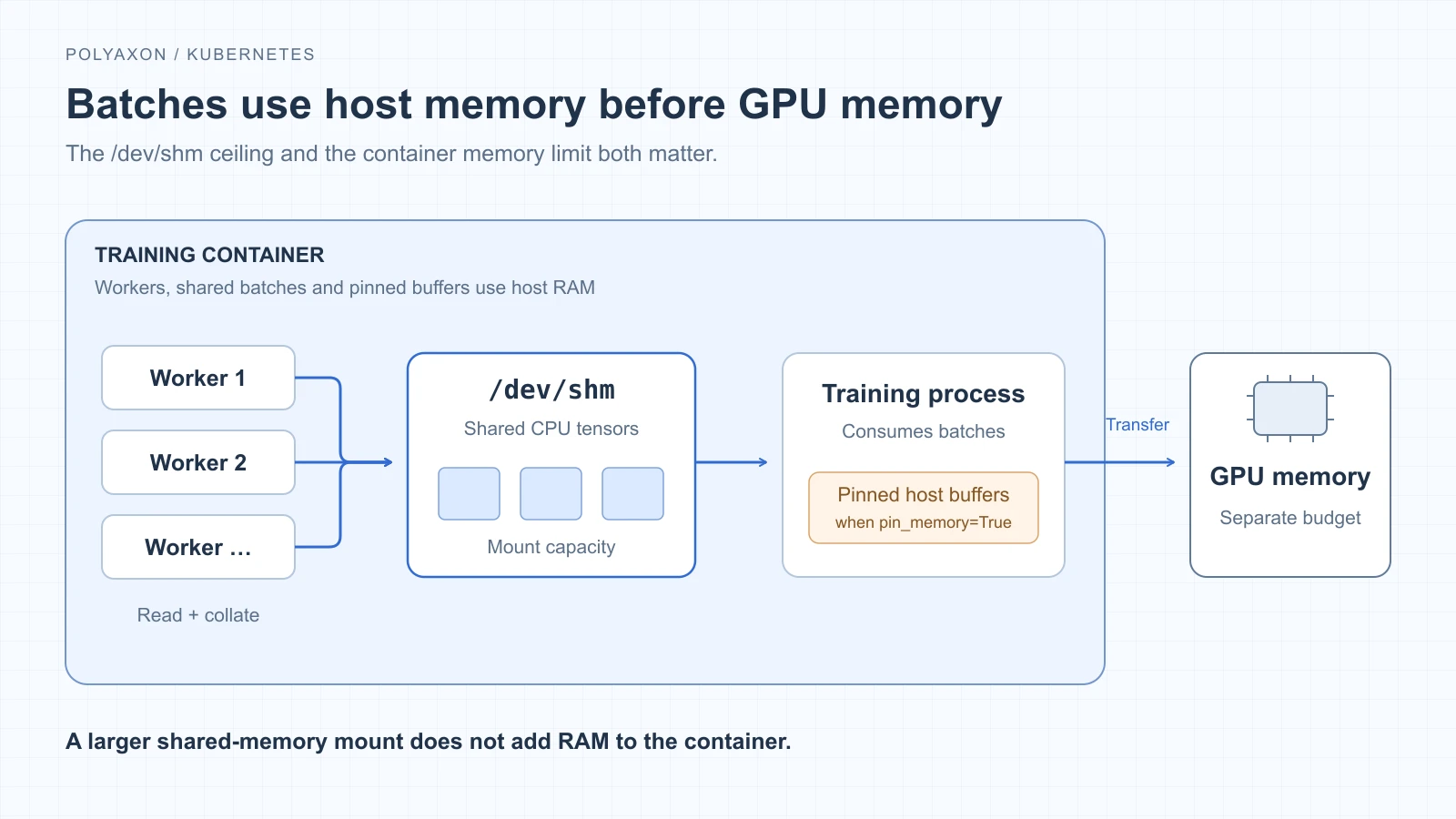
The shared-memory mount has its own capacity, but its contents also count toward host-memory usage. GPU memory is a separate budget.
pin_memory=True prepares page-locked host buffers for device transfers. It does not enlarge /dev/shm. Account for those buffers alongside worker memory and shared batches. PyTorch pinned-memory guide.
Inspect the training container
Replace the context, namespace, Pod and container names below. Run the first command while the failing workload is still running; it requires df in the image:
kubectl --context YOUR_CLUSTER -n YOUR_NAMESPACE exec YOUR_POD -c YOUR_TRAINER -- df -h /dev/shm
kubectl --context YOUR_CLUSTER -n YOUR_NAMESPACE get pod YOUR_POD -o yaml
kubectl --context YOUR_CLUSTER -n YOUR_NAMESPACE describe pod YOUR_POD
kubectl --context YOUR_CLUSTER -n YOUR_NAMESPACE logs YOUR_POD -c YOUR_TRAINER --tail=100
In the Pod specification, follow the trainer's /dev/shm mount to its volume. Check emptyDir.medium, sizeLimit, and the trainer's memory request and limit. If the container restarted, retrieve its previous logs with --previous too.
| Evidence | Next action |
|---|---|
/dev/shm fills as workers prepare batches | Reduce the queued batch payload or increase the mount's capacity within the host-memory budget |
Container termination reports OOMKilled | Investigate total host-memory use, including workers and tmpfs; enlarging the mount may worsen it |
| Neither explains the failure | Inspect the worker traceback, data files and native decoding code; SIGBUS is not unique to shared-memory exhaustion |
A snapshot after workers exit can miss the peak. Inspect during loading, and use historical memory metrics for an OOM investigation.
Reduce the number of batches waiting
Start with num_workers=0 in the existing loader to get errors in the main process. Omit prefetch_factor and disable persistent_workers for that diagnostic run. If it succeeds, retry with a small worker count and prefetch_factor=1, then increase only when loading throughput benefits. A successful single-process run narrows the problem; it does not establish its cause.
For a batching DataLoader, prefetch_factor is the number of batches loaded ahead per worker. A useful first estimate of queued tensor payload is:
workers × prefetch factor × bytes per collated batchFor example, 64 float32 RGB images at 224 × 224 occupy about 36.75 MiB per batch. Four workers with a prefetch factor of two represent about 294 MiB of tensor payload. This is arithmetic for an illustrative batch shape, not measured peak usage or a recommended mount size.
Allow room for batches being consumed, variable shapes and other allocations. With multiple training processes in one container, each process can have its own loader; include all of them. Changing worker count or prefetching preserves the training batch size, making those useful first adjustments before changing optimization behavior. DataLoader prefetch semantics.
Give Kubernetes an explicit shared-memory mount
For a native Kubernetes workload, merge this fragment into the training Pod's spec, retaining its image, command, other mounts and resource settings:
volumes:
  - name: training-shm
    emptyDir:
      medium: Memory
      sizeLimit: 1Gi
containers:
  - name: trainer
    volumeMounts:
      - name: training-shm
        mountPath: /dev/shm
The 1Gi is an example ceiling. Choose it from the workload's observed needs and leave room in the container's memory budget for the rest of training. This memory-backed emptyDir replaces the container runtime's /dev/shm mount.
sizeLimit neither reserves RAM nor adds RAM to the container. Used tmpfs pages count toward memory consumption, so a process can hit its memory limit before the filesystem fills. Increasing ephemeral-storage does not increase this RAM-backed capacity. Kubernetes memory accounting.
Polyaxon already mounts shared memory
Polyaxon's shared-memory plugin is enabled by default. It mounts a memory-backed volume at /dev/shm, so ordinary training jobs do not need extra YAML to enable it. Inspect the actual Pod if a preset or workload configuration has changed that default.
You can make that default explicit, or restore a disabled plugin, with this top-level setting in your simplified Polyaxonfile:
plugins:
  shm: true
The plugin handles the volume and mount without setting an explicit sizeLimit. It does not increase the container's memory limit: shared batches still consume host memory alongside the workers and training process.
To control the mount's capacity yourself, disable the plugin and define the volume with a sizeLimit. Merge this alternative into your simplified Polyaxonfile, retaining the container's image, command, resources and any other mounts:
plugins:
  shm: false
volumes:
  - name: training-shm
    emptyDir:
      medium: Memory
      sizeLimit: 1Gi
container:
  volumeMounts:
    - name: training-shm
      mountPath: /dev/shm
Use one approach at a time: shm: false prevents the automatic mount from overlapping your custom /dev/shm mount. The example 1Gi ceiling does not reserve or add RAM; choose it alongside the container's memory budget and the loader's observed usage.
Keep worker count, prefetch factor and batch size with the run's parameters. Once the job completes reliably, compare a few configurations using the same data and image, watching host-memory peaks and examples processed per second. The PyTorch profiling walkthrough can help determine whether more loading workers actually keep the GPU busier.