Manage many Polyaxon runs from Python
Select a run cohort, save its UUIDs for review, and apply a ProjectClient bulk action to that explicit inventory without rerunning a changing query.
You have a group of evaluation runs to mark for review. Selecting them repeatedly by a query is convenient, but its results can change between inspection and action. A new run may finish, a tag may change, or a teammate may archive an item.
Use Polyaxon's ProjectClient to discover the cohort once, save its run UUIDs, and apply the bulk action to that saved inventory. The query explains why you selected the runs; the UUID list defines what the action targets.
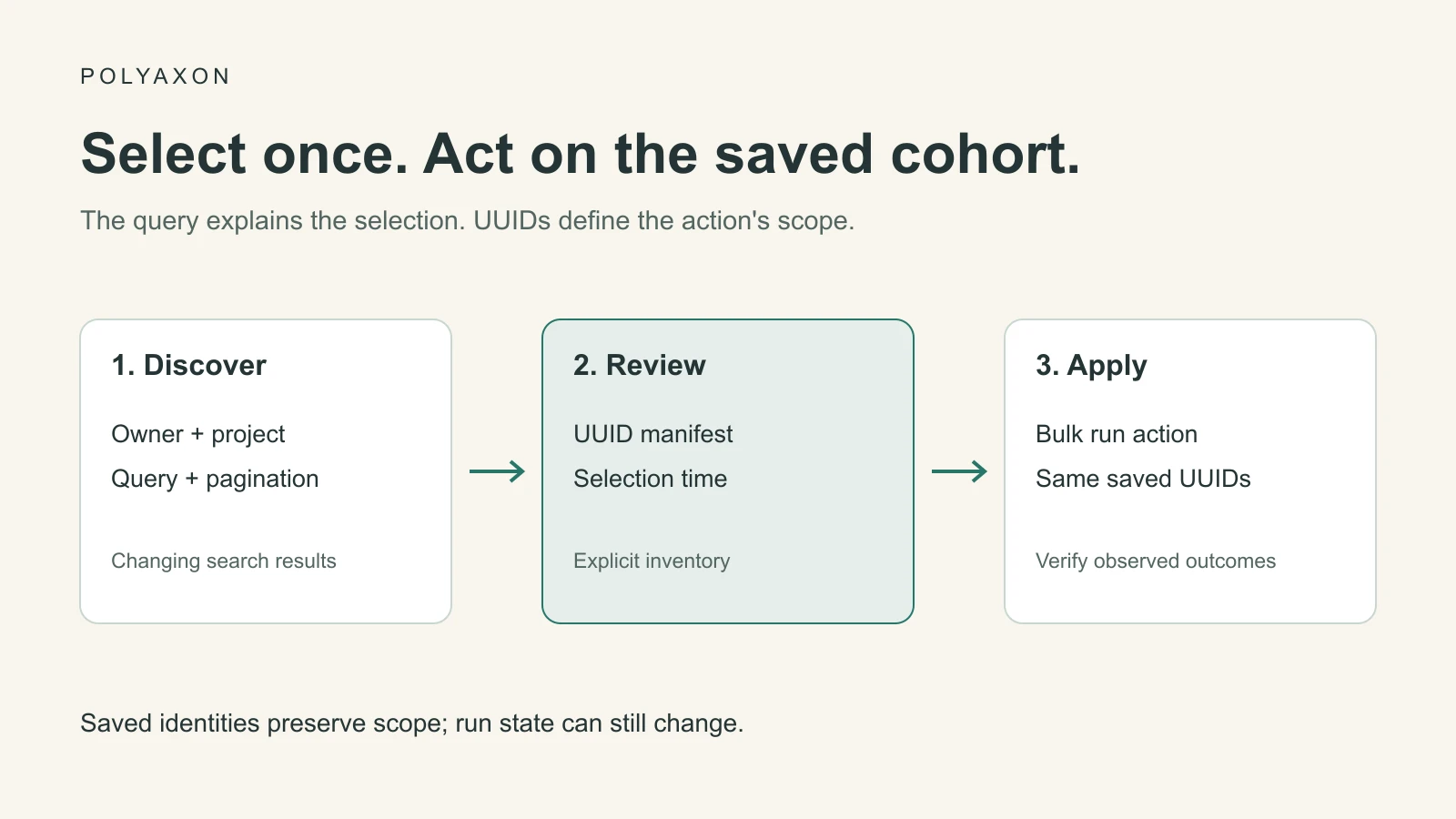
Polyaxon v2.12 added multi-run operations to ProjectClient. They let an existing Python workflow tag, bookmark, approve, stop, archive, restore, or transfer selected runs without issuing each operation through the UI.
Choose the cohort and the action separately
Start with an explicit organization and project. Then use a run query to select a meaningful cohort: a particular evaluation batch, component revision, or set of completed experiments.
The example uses status:succeeded. In a busy project, narrow this to the batch you intend to review. A successful process status does not mean a candidate passed its quality criteria; examine its metrics and artifacts before drawing that conclusion.
| Method | Purpose |
|---|---|
list_runs | Discover matching runs with pagination |
tag_runs | Apply tags to explicit run UUIDs |
bookmark_runs | Bookmark selected runs |
archive_runs / restore_runs | Manage visibility of retained runs |
approve_runs / stop_runs | Change execution lifecycle for selected runs |
transfer_runs | Move selected runs to another project under the same owner |
The project client reference documents the individual methods. Their shared UUID-based interface does not make their effects interchangeable. A review tag is metadata; stopping work changes execution, and deleting runs is a separate operation from archiving them.
Save a reviewable inventory
You need a configured Polyaxon Python client supporting the v2.12 project methods, access to the project, and permission for the action you choose. Save this as select-runs.py, replacing the owner and project. It reads matching runs in pages of 50 and refuses a selection larger than 200 so this small example cannot silently expand into a project-wide action.
import json
from datetime import datetime, timezone
from pathlib import Path

from polyaxon.client import ProjectClient

OWNER = "YOUR_ORG"
PROJECT = "YOUR_PROJECT"
QUERY = "status:succeeded"
OUTPUT = Path("run-selection.json")

if OUTPUT.exists():
    raise FileExistsError("Use a new filename or review the existing selection")

client = ProjectClient(
    owner=OWNER, project=PROJECT, manual_exceptions_handling=True,
)
selected = {}
offset = 0
try:
    while True:
        page = client.list_runs(
            query=QUERY, sort="created_at", limit=50, offset=offset,
        )
        rows = page.results or []
        if not rows:
            break
        for run in rows:
            selected[run.uuid] = {
                "uuid": run.uuid, "name": run.name, "status": run.status,
            }
        if len(selected) > 200:
            raise ValueError("Narrow the query before selecting more than 200 runs")
        if not page.next:
            break
        offset += len(rows)
finally:
    client.close()

manifest = {
    "owner": OWNER,
    "project": PROJECT,
    "query": QUERY,
    "selected_at": datetime.now(timezone.utc).isoformat(),
    "runs": list(selected.values()),
}
OUTPUT.write_text(json.dumps(manifest, indent=2) + "\n")
print(json.dumps(manifest, indent=2))
Run python select-runs.py and inspect the resulting file. The SDK returns a paginated response whose results contain the runs; a single default page is not the full selection.
Pagination is not a database snapshot. While the script reads pages, records can change or move into and out of the query. UUID deduplication prevents duplicate entries but cannot prove that no matching run was missed. For an exact experiment cohort, use the UUID inventory saved by its submitting workflow. For discovery, narrow the time and batch scope and review the resulting manifest before applying an action.
Apply a tag to those UUIDs
Save this as tag-selected-runs.py beside the manifest. It uses the saved identities and does not rerun the selection query. The example applies one review tag in a single bulk call.
import json
from pathlib import Path

from polyaxon.client import ProjectClient

manifest = json.loads(Path("run-selection.json").read_text())
uuids = [row["uuid"] for row in manifest["runs"]]
if not uuids or len(uuids) != len(set(uuids)) or len(uuids) > 200:
    raise ValueError("Expected 1–200 unique run UUIDs")

client = ProjectClient(
    owner=manifest["owner"],
    project=manifest["project"],
    manual_exceptions_handling=True,
)
try:
    client.tag_runs(uuids=uuids, tags=["review-sep22"])
finally:
    client.close()
print("Bulk tag request completed; inspect the selected runs to confirm the result")
Run python tag-selected-runs.py when the saved cohort is the one you intend to mark. Treat the manifest as operator-controlled input: its owner, project, and UUIDs determine the action's scope. These scripts are source-reviewed examples; no bulk action was executed while preparing this article.
Verify the result and handle changes
Refresh the selected run records after the call and confirm the intended metadata or state. A successful request is not an application-level receipt proving that every selected run achieved a desired end state. Record errors and reconcile against the same UUID inventory before retrying.
For lifecycle actions, recheck the conditions that matter immediately before acting. A run that was queued during selection may now be running; permissions or project ownership may have changed. Saved identities protect the cohort boundary, but they do not lock run state.
For a larger inventory, split the UUIDs into deliberate batches and retain a receipt for each request and its subsequent verification. Avoid blindly replaying an entire batch after an uncertain response. The right retry policy depends on the action, its current state, and whether the earlier request took effect.
Reuse the inventory for the next workflow
The same UUID manifest can drive async status monitoring or artifact collection. This keeps a review, its results, and later administrative actions attached to the same selected cohort.
Keep the selection query, selection time, manifest, action, and observed outcomes together. That gives a teammate a concrete answer to “which runs did this workflow manage?” even after the original query returns a different set.