Run ML workloads on your existing Kubernetes cluster
Plan a Polyaxon deployment on an existing Kubernetes cluster, covering GPUs, storage, identity, networking, workload ownership, and recovery.
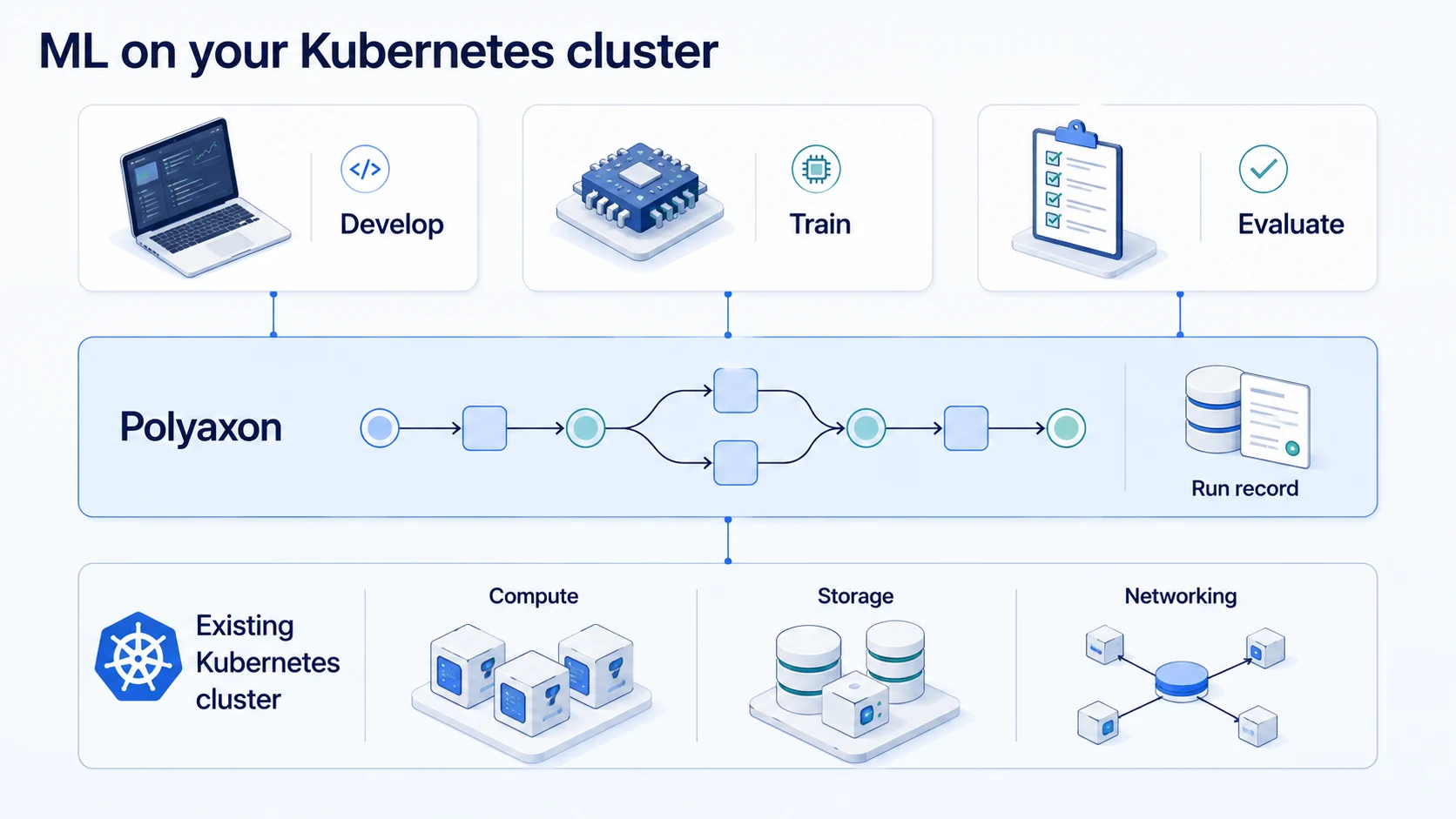
An existing Kubernetes cluster can provide the compute, storage, and networking foundation for ML workloads. Adding Polyaxon gives teams a way to define jobs, track experiments, and organize artifacts on that foundation. A useful rollout starts by agreeing how the two layers fit together.
For example, a platform team may already operate GPU nodes, private container registries, and object storage. The ML team needs to submit a training run, inspect its results, and repeat it with different parameters. The integration should make that path straightforward while preserving the platform team's resource and access policies.
Choose the deployment boundary
Polyaxon documents self-managed platform deployments for Community Edition and Enterprise. Polyaxon Cloud and Enterprise can also use Agents installed on compute clusters. An Agent manages operations for its configured queues and can have its own storage and connection configuration.
Choose the deployment model based on where the control plane, workload execution, and stored artifacts need to live. Check the features available in your edition before designing a rollout around organization-wide queues or multiple compute clusters.
Keep the initial scope small: one team, one namespace or other agreed execution boundary, one artifact store, and one representative workload. A second cluster adds value only after the first path has clear ownership and can be reproduced.
Make ownership explicit
The following is a suggested division of responsibilities to adapt to your organization:
| Area | Platform team | ML team |
|---|---|---|
| Compute | Node pools, drivers, resource advertising, maintenance | Resource requests and measured workload requirements |
| Storage | Provisioning, access policies, durability, backups | Dataset references, output layout, retention requirements |
| Identity | Service accounts, authentication, credential delivery | Required data and service access for each job |
| Networking | DNS, ingress, egress, policy enforcement | External endpoints and services the workload uses |
| Execution | Polyaxon deployment and supported runtimes | Components, training code, parameters, checkpoints |
| Recovery | Infrastructure restoration and operational support | Application restart behavior and result validation |
Use this agreement when debugging. A failed model import, a denied storage request, and a Pod with no matching GPU node should lead to different owners and evidence.
Verify GPU access before submitting training
For device-plugin-based NVIDIA scheduling, Kubernetes needs working node drivers and the corresponding device plugin. The plugin advertises an extended resource such as nvidia.com/gpu. A GPU limit can supply the request implicitly; if both request and limit are present, they must match. See the Kubernetes GPU scheduling documentation.
An administrator can inspect the advertised resources with:
kubectl get nodes \
  -o custom-columns='NAME:.metadata.name,GPU:.status.allocatable.nvidia\.com/gpu'
An advertised GPU is only the first check. Run a small workload in the intended namespace using the actual training image, placement constraints, and service account. Verify that the framework can access the accelerator. If the cluster uses a different resource name, MIG, or Dynamic Resource Allocation, use the corresponding resource configuration instead of assuming the generic device-plugin path.
Read the GPU sharing comparison before treating every advertised GPU resource as equivalent. Memory and isolation requirements affect whether a workload belongs on shared capacity or a dedicated device.
Connect durable data and artifact storage
Configure a Polyaxon artifact store that fits the workload's lifetime. Check what remains available after a Pod is deleted, a node is replaced, or the cluster is restored. A path on one node is a different storage contract from durable shared storage.
Use connections to expose the required data, repository, and registry access to operations. Test read access to inputs and write access to outputs separately. A job that can download its dataset may still be unable to upload its final checkpoint.
Measure startup and transfer time with a representative dataset. Place data caches deliberately, including their eviction and access rules. A cache should reduce repeated transfers without becoming the only surviving copy of a required artifact.
Test the access boundary
A namespace organizes resources and scopes several policies, but it does not establish complete workload isolation by itself. Configure RBAC, network access, and storage permissions together, and verify that the networking implementation enforces the policies you apply. The Kubernetes multi-tenancy guide explains these separate controls.
Test with the identity the job actually uses. Confirm that it can reach its approved inputs and required services, and that it cannot read another team's protected dataset. Include image pulls and artifact upload paths in the test; these can use different credentials from the training process.
Accept the deployment with a complete workflow
Use a small workload with a known input and a verifiable output. Check the whole path before inviting more teams:
- Submit the component and confirm its requested resources and destination.
- Inspect startup logs and verify that the application sees its data and accelerator.
- Record a metric and save an artifact that another authorized user can retrieve.
- Interrupt the workload and confirm the documented retry or checkpoint behavior.
- Run a failing case and verify that its status and evidence remain visible.
- Remove the finished workload resources and confirm that retained artifacts still exist.
Keep the configuration and observed results with the deployment record. This becomes a practical check after changes to images, drivers, storage, or cluster policy.
When a later job waits, use the Pending-job debugging guide to separate admission, scheduling, and startup. The Kubernetes for AI learning path covers the underlying workload and resource concepts needed to expand the deployment.