GPU sharing on Kubernetes: MIG vs. time-slicing
Compare NVIDIA MIG and GPU time-slicing on Kubernetes, including memory isolation, resource names, scheduling behavior, and workload fit.
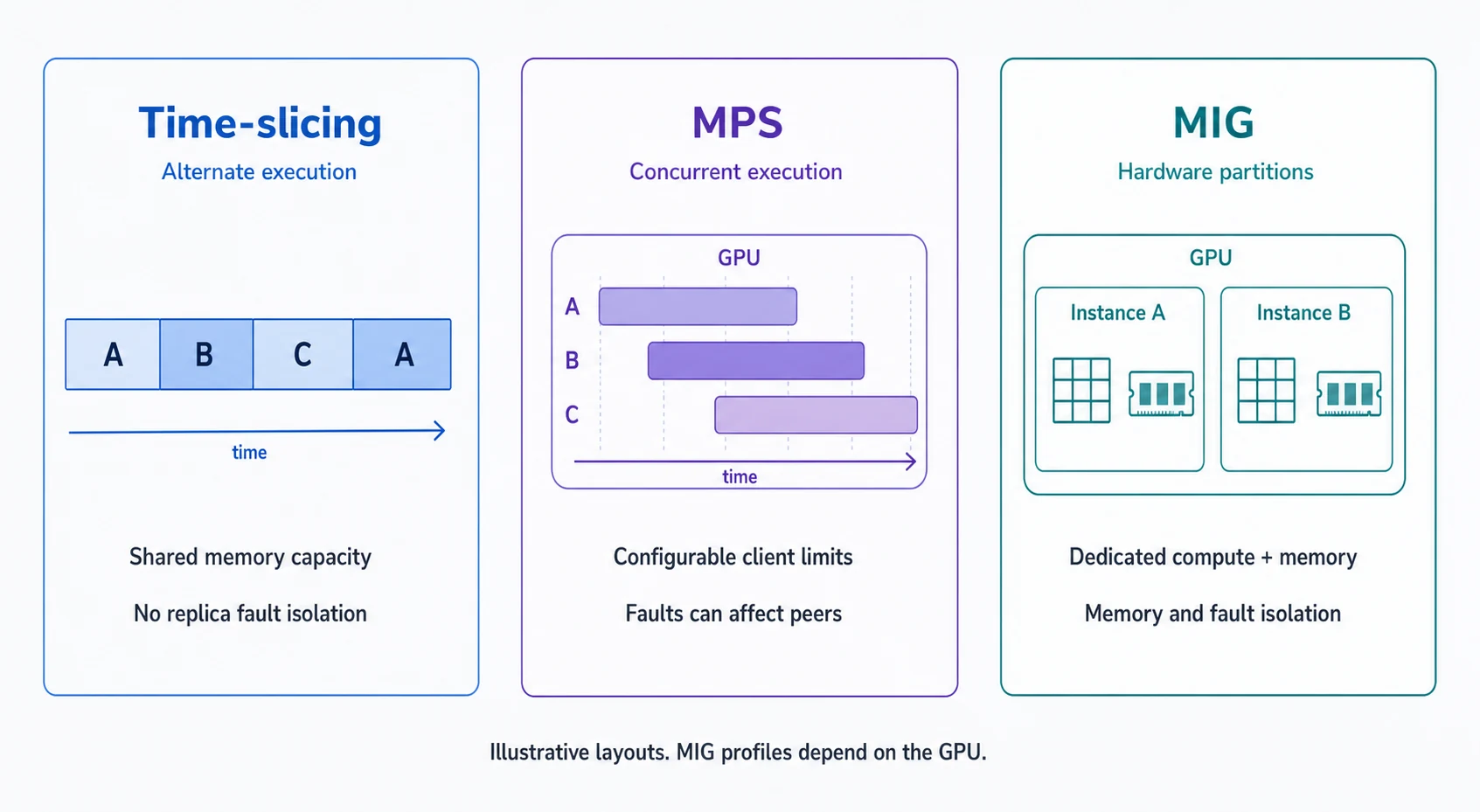
MIG and time-slicing let several workloads use GPU capacity, but they provide different resource guarantees. Choose between them using memory requirements, interference tolerance, and workload behavior before deciding how many jobs to admit.
NVIDIA's MIG architecture divides supported GPUs into hardware instances with dedicated resources. Time-slicing in the GPU Operator exposes shared access through the device plugin; its replicas do not provide separate GPU memory or fault isolation.
Compare the resource contract
| Question | MIG | Time-slicing |
|---|---|---|
| What does a workload receive? | A configured GPU instance | Access to a shared device or instance |
| Is GPU memory partitioned? | Yes, according to the instance profile | No partition between sharing replicas |
| Is hardware support required? | A MIG-capable GPU and supported configuration | Depends on the supported GPU/operator setup; MIG capability is not required |
| Can any fraction be requested? | No; select available profiles | No; request advertised shared resource units |
| What determines application fit? | Instance memory and compute capacity | Combined memory demand and interference |
| What should be measured? | Throughput within each chosen profile | Throughput, latency, memory pressure, and fairness under co-load |
A MIG instance is still part of a larger host and cluster. Hardware partitioning does not replace account permissions, network policy, or container/runtime security. Also distinguish full-GPU allocation from sharing: an unshared device may be the right choice when a workload needs its full memory or stable performance.
Make shared access visible in scheduling
The resource name matters. With the NVIDIA device plugin, time-slicing can expose a .shared resource name when renameByDefault is enabled. A request for multiple replicas does not guarantee proportionally more compute. The failRequestsGreaterThanOne option can reject that misleading request pattern.
This is an illustrative device-plugin configuration, not a complete cluster installation:
version: v1
sharing:
  timeSlicing:
    renameByDefault: true
    failRequestsGreaterThanOne: true
    resources:
      - name: nvidia.com/gpu
        replicas: 4
An administrator must connect this configuration to the installed operator/device plugin and intended nodes. Validate the resulting advertised resource before changing workloads. A corresponding container resource fragment would be:
resources:
  limits:
    nvidia.com/gpu.shared: "1"
The four replicas are admission units, not four new physical GPUs or four guaranteed quarter-memory allocations. Label queues and presets so users understand which resource contract they are selecting.
Select MIG profiles from actual workload requirements
For MIG, measure model weights, activation memory, batch behavior, and peak allocation before selecting a profile. A model that barely fits at startup may fail during a longer request or larger evaluation batch.
Profile names and availability depend on the GPU and configuration. Inspect the cluster's advertised resources instead of copying a profile name from another GPU generation. NVIDIA's GPU Operator MIG guide documents configuration and resource exposure. Treat repartitioning as an operational change that may disrupt workloads; plan it with the cluster operator.
Keep workload parameters fixed when comparing profiles. If a smaller profile requires a smaller batch, report that change alongside throughput and completion time. It may still be a good capacity choice, but the comparison is no longer only about partition size.
Test sharing under realistic co-load
Run each candidate workload alone, then with the mix of neighboring jobs you expect. Include peak-memory behavior and overlapping bursts, not just average utilization from quiet periods.
For an interactive notebook pool, measure time to complete a representative operation and what happens when several users run it together. For batch evaluation, measure completed cases per hour, error rate, and total GPU time. For inference, include tail latency at the intended concurrency.
Do not infer per-workload efficiency from device-wide utilization alone. Attribute application throughput and elapsed time to runs, and document limitations in GPU metric attribution for the sharing mode you use. The GPU metrics guide explains why activity and useful work should be read together.
Choose a pool policy before increasing replicas
Use measured memory headroom and acceptable interference to set admission limits. Keep workloads with incompatible requirements in separate pools. A latency-sensitive endpoint and an unpredictable development notebook may both run successfully alone and still be poor neighbors.
In Polyaxon, expose the selected resources through sandbox resource configurations and the corresponding job presets or queues. Record the sharing mode and profile with each benchmark run so results remain interpretable after the cluster configuration changes.
If a workload cannot start, use the Pending GPU debugging guide. For the broader scheduling workflow, follow the GPU orchestration path.