Run persistent Dask and Ray clusters on Polyaxon
Launch Dask or Ray clusters with Polyaxonfiles, submit repeated work, and control worker capacity, durable outputs, and cluster lifetimes.
A feature-engineering session may need several passes over partitioned data. A batch-inference experiment may submit several applications to the same worker pool. A persistent cluster lets that compute environment stay available while the individual clients and applications change.
Polyaxon supports both Dask and Ray cluster runtimes. You describe the scheduler or head, workers, images, and lifetime in a Polyaxonfile, then submit work through the framework's client. This gives a team a repeatable way to provision distributed compute alongside its notebooks, training jobs, and evaluation workflows.
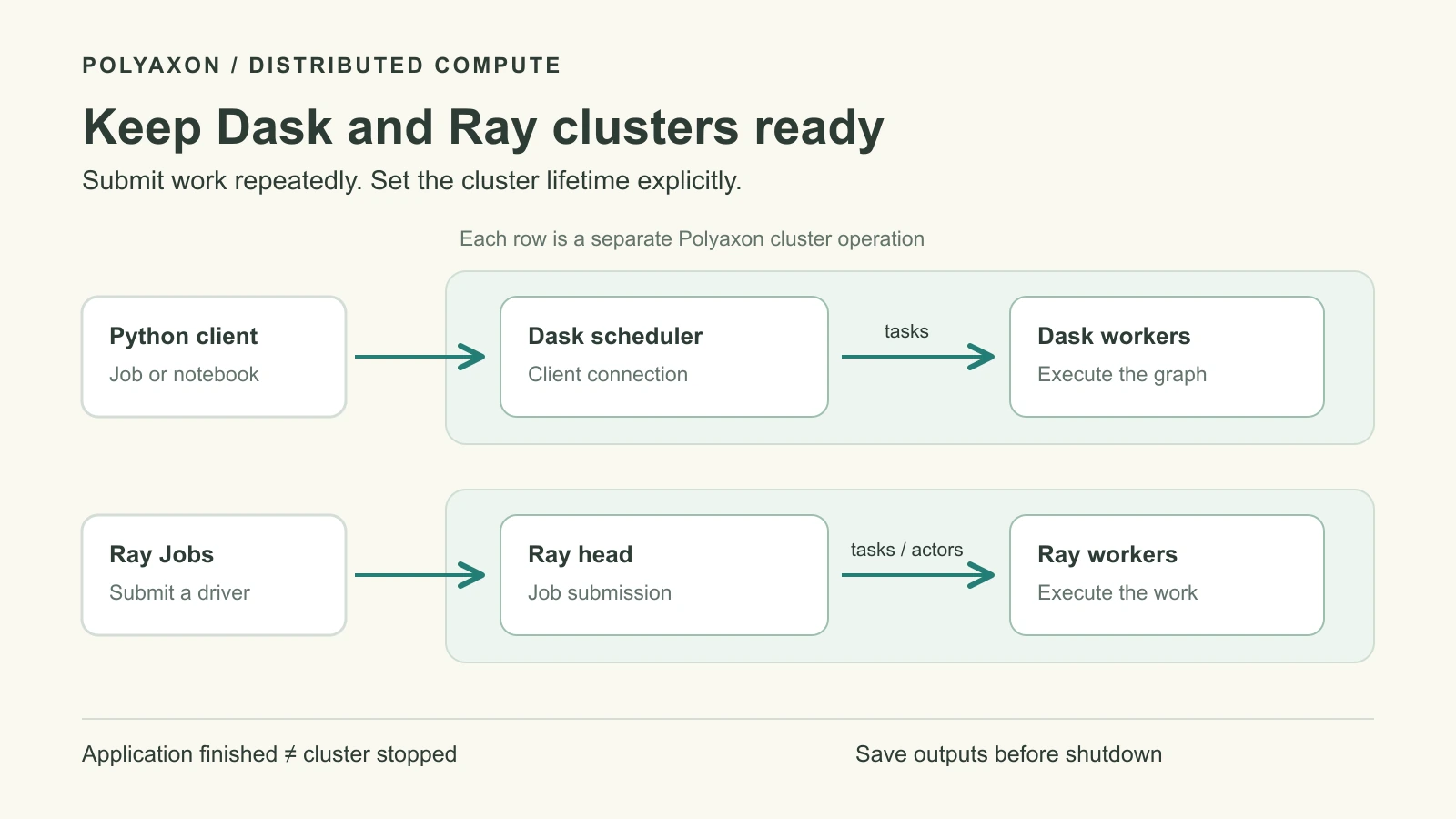
The two paths in the diagram are independent clusters. Polyaxon manages each cluster operation's configuration and lifecycle; the Dask Kubernetes Operator or KubeRay reconciles its Kubernetes resources; Dask or Ray schedules the application work inside it.
Choose the runtime your application uses
| Application pattern | Useful starting point | How work reaches the cluster |
|---|---|---|
| Existing Dask DataFrame, array, delayed, or futures computation | Dask scheduler and workers | A Python Client connects to the scheduler |
| Existing Ray tasks, actors, or Ray library application | Ray head and worker groups | Ray Jobs submits a driver that creates tasks and actors |
| Several experiments during a bounded development session | Either runtime, according to the application | Reuse the cluster across submissions and track each result separately |
Start with the framework already used by the application. Moving a computation between Dask and Ray changes its execution model and dependencies; the examples here demonstrate how to operate both, not a performance ranking.
Polyaxon introduced persistent Dask and Ray clusters as beta capabilities in v2.12. Use the current DaskCluster and RayCluster integration guides to confirm compatibility with your installation. The examples below are source-reviewed configurations, not measured deployments.
Prepare the operators and images
The Kubernetes cluster needs the relevant operator and custom resource definitions installed. An administrator must also enable each integration in the Polyaxon CE or Agent configuration managing the target namespace:
operators:
  daskcluster: true
  raycluster: true
Enable the runtimes you intend to use. This setting does not install the upstream operators. You also need a configured Polyaxon CLI, an authorized project, and network access from clients to their cluster endpoints.
Choose images with the application dependencies already installed. Keep Dask, distributed, and Python versions compatible across clients, scheduler, and workers. For Ray, align the image's Ray version with rayVersion and the submission environment. Use image digests for repeatable sessions; the image inputs below deliberately have no mutable default.
Launch a Dask scheduler and workers
Save this as dask-cluster.yaml. It creates a scheduler and two fixed CPU workers, with a two-hour operation timeout as a backstop for an interactive session.
version: 1.1
kind: component
name: persistent-dask-session

inputs:
  - name: image
    type: str

termination:
  timeout: 7200

run:
  kind: daskcluster
  scheduler:
    container:
      image: "{{ image }}"
      resources:
        requests:
          cpu: "1"
          memory: "1Gi"
        limits:
          cpu: "1"
          memory: "2Gi"
  worker:
    replicas: 2
    container:
      image: "{{ image }}"
      resources:
        requests:
          cpu: "2"
          memory: "4Gi"
        limits:
          cpu: "2"
          memory: "4Gi"
These resource values illustrate the configuration; size them for your partitions, graph, and concurrent work. The Polyaxon Dask specification handles the scheduler and worker structure, and the upstream operator creates the corresponding resources.
Set DASK_IMAGE to your prepared image digest and submit the component:
: "${DASK_IMAGE:?Set a prepared Dask image digest}"
polyaxon run -p YOUR_PROJECT -f dask-cluster.yaml -P image="$DASK_IMAGE"
Record the returned cluster run UUID. Inspect its replicas and wait for the scheduler and workers to become ready. An authorized operator can identify the generated scheduler Service through Kubernetes:
kubectl -n YOUR_NAMESPACE get daskclusters
kubectl -n YOUR_NAMESPACE get services
Select the resources belonging to this Polyaxon operation. The Dask operator documentation describes the scheduler Service and its TCP port, 8786. Pass its actual reachable address to the client; a Polyaxon dashboard URL is not a Dask scheduler address.
Run a separate Dask client operation
Save the following as dask-client.yaml. It uses the same image as the cluster and sends two small batches to the scheduler. The calculation summarizes synthetic partition values; it requires no dataset download or custom Python file.
version: 1.1
kind: component
name: summarize-with-dask

inputs:
  - name: image
    type: str
  - name: scheduler_address
    type: str
  - name: cluster_run
    type: str

termination:
  timeout: 600

run:
  kind: job
  container:
    image: "{{ image }}"
    env:
      - name: DASK_SCHEDULER_ADDRESS
        value: "{{ scheduler_address }}"
      - name: CLUSTER_RUN_UUID
        value: "{{ cluster_run }}"
    command: [python, -u, -c]
    args:
      - |
        import json
        import os
        from dask.distributed import Client

        def summarize(values):
            return {"count": len(values), "total": sum(values)}

        batches = {
            "first": [[1, 2, 3], [4, 5, 6]],
            "second": [[7, 8], [9, 10, 11]],
        }
        with Client(os.environ["DASK_SCHEDULER_ADDRESS"]) as client:
            client.wait_for_workers(2, timeout=60)
            for batch, partitions in batches.items():
                results = client.gather(client.map(summarize, partitions))
                print(json.dumps({
                    "cluster_run": os.environ["CLUSTER_RUN_UUID"],
                    "batch": batch,
                    "results": results,
                }))
    resources:
      requests:
        cpu: "500m"
        memory: "512Mi"
      limits:
        cpu: "1"
        memory: "1Gi"
Run this client on infrastructure that can reach the scheduler and worker network. If your organization uses several agents, choose the appropriate agent and queue with --queue YOUR_AGENT/YOUR_QUEUE; the queue must exist and be accessible to you. Running the client in a different Kubernetes cluster does not create network connectivity automatically.
polyaxon run -p YOUR_PROJECT -f dask-client.yaml \
  -P image="$DASK_IMAGE" \
  -P scheduler_address=tcp://YOUR_SCHEDULER_SERVICE.YOUR_NAMESPACE.svc.cluster.local:8786 \
  -P cluster_run=YOUR_DASK_CLUSTER_RUN_UUID
The Dask Client submits the functions and gathers their small summaries. Closing this client disconnects it from the externally managed scheduler; the cluster remains available for another client operation. For real data, keep large partitions on workers or durable storage and gather only the results the driver needs.
Polyaxon records the client job separately from the cluster operation. The explicit cluster_run input makes their relationship inspectable. If you submit from an existing notebook instead, use the same address with Client; individual Dask tasks do not automatically become separate Polyaxon runs.
Launch the equivalent Ray cluster shape
Save this as ray-cluster.yaml. The head coordinates two CPU workers. Omitting entrypoint leaves application submission to Ray Jobs, so completing an application does not define the cluster's lifetime.
version: 1.1
kind: component
name: persistent-ray-session

inputs:
  - name: image
    type: str
  - name: ray_version
    type: str

termination:
  timeout: 7200

plugins:
  shm: true

run:
  kind: raycluster
  rayVersion: "{{ ray_version }}"
  enableInTreeAutoscaling: false
  head:
    rayStartParams:
      dashboard-host: "0.0.0.0"
      num-cpus: "0"
    container:
      image: "{{ image }}"
      resources:
        requests:
          cpu: "1"
          memory: "2Gi"
        limits:
          cpu: "1"
          memory: "2Gi"
  workers:
    cpu-workers:
      replicas: 2
      minReplicas: 2
      maxReplicas: 2
      container:
        image: "{{ image }}"
        resources:
          requests:
            cpu: "2"
            memory: "4Gi"
          limits:
            cpu: "2"
            memory: "4Gi"
The head reserves Kubernetes resources while advertising zero logical Ray CPUs for ordinary tasks. Worker resources provide the task capacity. See the Ray replica fields and KubeRay configuration guide for worker groups and placement.
: "${RAY_IMAGE:?Set a prepared Ray image digest}"
: "${RAY_VERSION:?Set the Ray version installed in that image}"
polyaxon run -p YOUR_PROJECT -f ray-cluster.yaml \
  -P image="$RAY_IMAGE" -P ray_version="$RAY_VERSION"
Record this cluster's run UUID separately. After its head and workers are ready, identify the associated head Service. An authorized Kubernetes user can forward the Ray Jobs HTTP endpoint locally:
kubectl -n YOUR_NAMESPACE get services
kubectl -n YOUR_NAMESPACE port-forward --address 127.0.0.1 \
  service/YOUR_RAY_HEAD_SERVICE 8265:8265
Keep that forwarding session open. Create ray-work/summarize.py containing:
import json

import ray

ray.init(address="auto")

@ray.remote(num_cpus=1)
def summarize(values):
    return {"count": len(values), "total": sum(values)}

partitions = [[1, 2, 3], [4, 5, 6]]
results = ray.get([summarize.remote(values) for values in partitions])
print(json.dumps(results))
ray.shutdown()
From another terminal with a compatible Ray CLI, submit the application:
ray job submit --address http://127.0.0.1:8265 \
  --working-dir ray-work -- python summarize.py
Ray Jobs uploads the working directory and starts the driver on the cluster. address="auto" is evaluated there, not on your laptop. Retain the returned Ray Job ID with the Polyaxon cluster run UUID. Submit another application to reuse the workers; ray.shutdown() disconnects the driver without stopping the cluster.
For per-application evidence and cancellation, continue with our persistent Ray submission walkthrough. An externally submitted Ray Job does not automatically create a Polyaxon child run; use a tracked submit-and-monitor job when each application needs its own Polyaxon record.
Set capacity at the right layer
Both examples use fixed workers to make the initial deployment easy to inspect. Worker autoscaling is a separate choice:
| Runtime | Polyaxonfile controls | What remains to be provisioned |
|---|---|---|
| Dask | Top-level minReplicas and maxReplicas under run create a DaskAutoscaler | Kubernetes nodes and enough memory/storage for each worker |
| Ray | enableInTreeAutoscaling: true, with bounds on each worker group | Nodes matching each group's resource requests and placement rules |
Worker scaling does not guarantee that Kubernetes can place the resulting Pods. Use Polyaxon scheduling presets to share placement settings, and select the intended agent and queue for the cluster operation. Size the scheduler/head separately from workers.
For GPU applications, use a compatible CUDA image and add nvidia.com/gpu limits to the workers that need accelerators. The framework must also understand the task requirement: Ray tasks can declare num_gpus, while Dask GPU workloads need appropriate worker configuration and resource annotations. Allocating a GPU to a Pod does not automatically convert CPU code into GPU code. See Ray resources and Dask worker resources.
Dask workers may spill data, pause, or restart under memory pressure; worker memory management explains those thresholds. Plan local scratch capacity as well as RAM. For either runtime, write valuable outputs to durable storage through appropriately scoped Polyaxon connections. Mount or inject the connection on every replica that needs it; a driver's local filesystem is not automatically shared with workers.
Stop the cluster when the session ends
Keep three lifetimes distinct: the application, the workers, and the whole cluster. A successful client job says its submitted work finished. It does not mean the scheduler/head and worker Pods have released their resources.
Before shutdown, finish or cancel active applications and save required results. Then stop the specific Polyaxon cluster operation you created:
polyaxon ops stop -p YOUR_PROJECT -uid YOUR_CLUSTER_RUN_UUIDRepeat for each cluster you launched, inspect termination, and close any port-forward. Polyaxon's shared termination specification supplies the absolute timeout used in both examples. That timeout bounds the operation's lifetime; it is not an idle-task detector and can interrupt unfinished work.
For a reusable team setup, retain the cluster Polyaxonfile, image digest, framework version, client submission identity, input revision, and durable output location together. This lets another session recreate the compute environment and explain which work ran on it, even after the cluster is gone.