Start runs without a Polyaxonfile
Try container images, package versions and environment changes from the Polyaxon CLI, or start a sandbox without writing a Polyaxonfile.
Start a Python version check, try a package update, or open a sandbox directly from your terminal. Since Polyaxon 2.18, polyaxon run accepts the image, command, environment variables and resources inline.
The examples use a configured, authenticated CLI and a Polyaxon deployment supporting 2.18. Replace acme/demo with an existing project you can run workloads in.
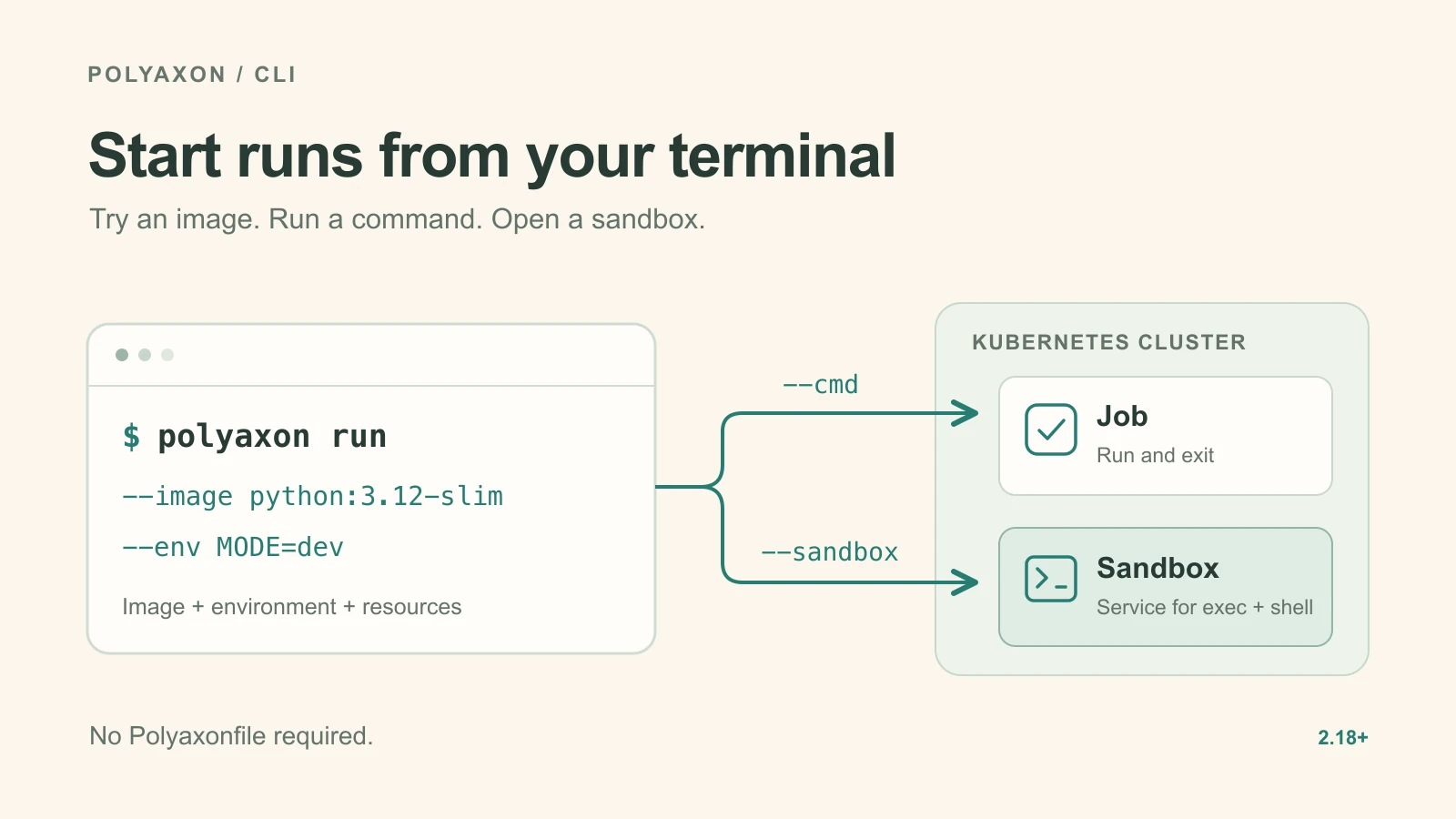
Try an image
Check which Python version an image provides:
polyaxon run -p acme/demo \
  --image python:3.12-slim \
  --cmd 'python -V' \
  --logs
Polyaxon schedules a job, streams its logs, and records its status. The job exits after printing the version. Change the image to python:3.13-slim and submit again to check that environment; each submission creates a separate run.
Try a dependency or environment change
Install a package at startup and print the resulting package versions:
polyaxon run -p acme/demo \
  --image python:3.12-slim \
  --env PACKAGE_SPEC=rich \
  --cmd 'python -m pip install "$PACKAGE_SPEC"' \
  --cmd 'python -m pip freeze' \
  --logs
Change PACKAGE_SPEC to a version constraint, such as rich==13.9.4, to try a particular release. You can repeat --env for other environment variables. The single quotes around the command leave $PACKAGE_SPEC for the remote shell to expand.
Repeated --cmd options run in one /bin/sh script with set -e: if installation fails, the package listing does not run. The image needs that shell and access to the package index. The install changes this run's container; it does not rebuild the image.
Try changes to an existing job
If you already have a job in train.yaml, pass it explicitly and override just the settings you want to try. Replace the example registry address with your candidate training image, containing the dependencies that job needs:
polyaxon run -p acme/demo -f train.yaml \
  --image registry.example.com/team/training:candidate \
  --env LOG_LEVEL=debug \
  --cpu 1..2 \
  --memory 2Gi..4Gi \
  --logs
Inline options apply after the files. This submits a new run with the overrides and leaves train.yaml unchanged.
Keep -f when overriding a file. With --image and no explicit source, Polyaxon defines the run inline and skips the directory's default Polyaxonfile. A bare polyaxon run --image … therefore starts a new inline workload, even inside an initialized project containing a Polyaxonfile.
The same command can select resources and a compute queue:
| Option | What it selects |
|---|---|
--cpu 500m..1 | A half-CPU request and a one-CPU limit. |
--memory 512Mi..1Gi | A 512 MiB request and a 1 GiB limit. |
--gpu 1 | One NVIDIA GPU; use a compatible image and a cluster with GPU capacity. |
-q agent-name/queue-name | A queue on a particular compute agent, which connects Polyaxon to a Kubernetes cluster. Replace both names with your own. |
--port 8080 | A container port; an inline definition without an existing runtime becomes a service. Its command must start the application. |
Quick start a sandbox
For an environment you can keep using between commands, start a sandbox service:
polyaxon run -p acme/demo --sandbox --image python:3.12-slimYour deployment must support sandbox access. Wait for the run to reach running, then copy its UUID into your terminal:
RUN_UUID=PASTE_RUN_UUID_HERE

polyaxon sandbox ping -p acme/demo -uid "$RUN_UUID"
polyaxon sandbox exec -p acme/demo -uid "$RUN_UUID" -- python -V
ping checks the endpoint; it does not wait for startup. Now try a package inside that same running container:
polyaxon sandbox exec -p acme/demo -uid "$RUN_UUID" \
  --stream -- python -m pip install rich
Or open an interactive shell:
polyaxon sandbox shell -p acme/demo -uid "$RUN_UUID"These commands operate inside the existing service. Package changes remain local to that container; a replacement starts from its image and declared setup. To try a different base image, submit another polyaxon run --sandbox --image ….
Exiting the shell leaves the service running. Stop it when you finish:
polyaxon ops stop -p acme/demo -uid "$RUN_UUID"When an experiment becomes something you want to repeat or share, put the image and startup commands into a short Polyaxonfile or your team's preset. The run CLI reference lists the inline options; the sandbox CLI reference covers file transfers, background commands and terminal access.