Define jobs and services with simpler Polyaxonfiles
Define jobs and services with top-level container, cmd, env, resources, and ports in Polyaxon 2.18, while keeping existing Polyaxonfiles supported.
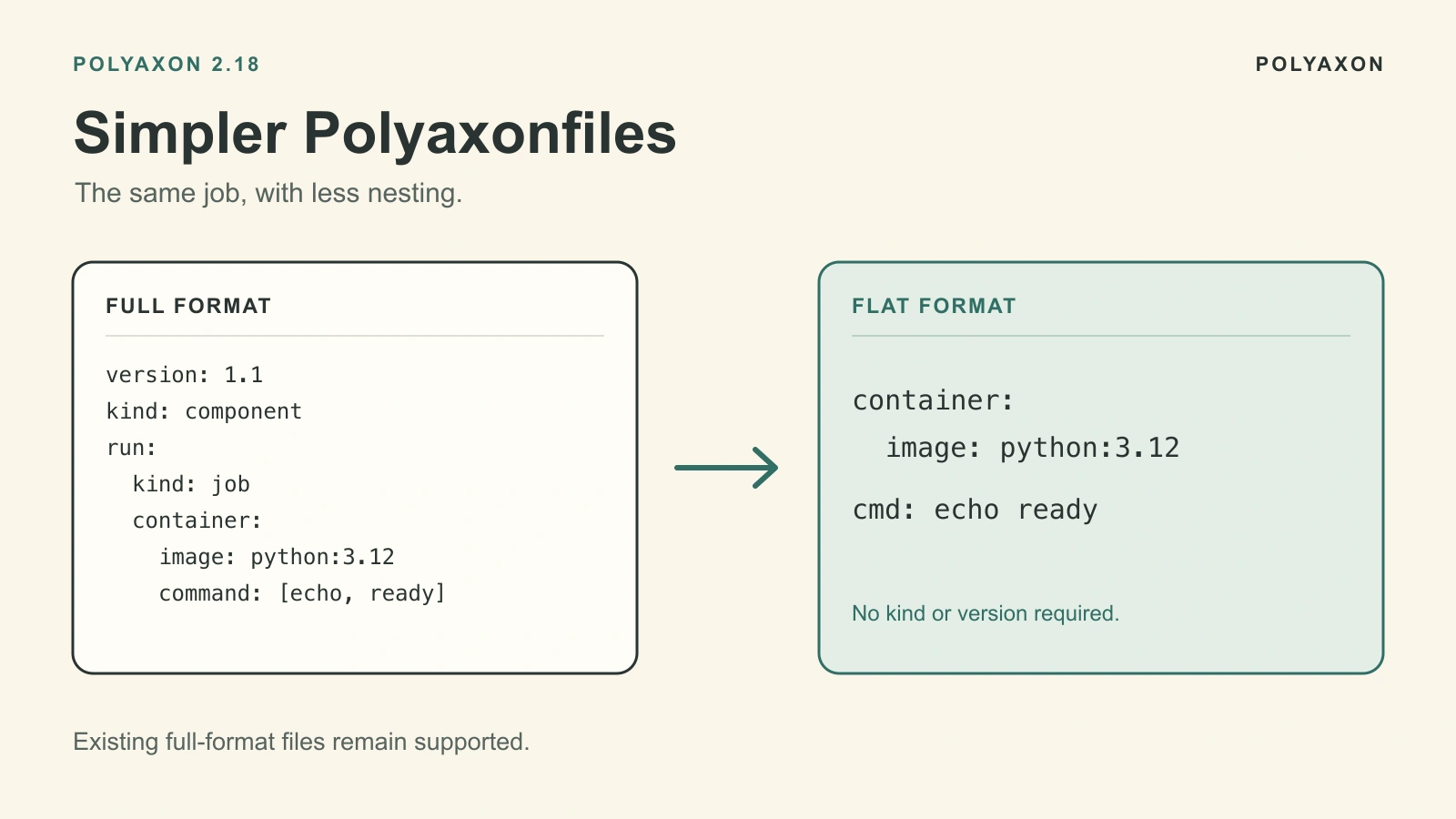
An everyday job often comes down to an image, a command, environment variables, and resources. Polyaxon 2.18 lets you put those fields at the top level of a Polyaxonfile. You can define a job without the surrounding run structure, or declare ports for a service, while keeping the file available for reuse and version control.
Use this format for a training script, an evaluation job, or a small report server. Existing full-format Polyaxonfiles remain supported, so you can simplify one workload at a time.
The examples below require Polyaxon CLI and server 2.18 or later, an existing project you can run workloads in, and a compute cluster that can pull python:3.12-slim. The Python code uses only the standard library.
Start with a familiar job
This job summarizes three illustrative evaluation scores. The numbers demonstrate the configuration; they are not benchmark results. In the full format, the image, environment variables, resources, and command live under run.container:
version: 1.1
kind: component
name: summarize-scores

run:
  kind: job
  container:
    image: python:3.12-slim
    env:
      - name: SCORES
        value: "0.81,0.84,0.86"
    resources:
      requests:
        cpu: "250m"
        memory: "128Mi"
      limits:
        cpu: "1"
        memory: "256Mi"
    command: ["/bin/sh", "-c"]
    args:
      - |
        set -e
        python - <<'PY'
        import os
        from statistics import mean

        scores = [float(value) for value in os.environ["SCORES"].split(",")]
        print(f"mean_score={mean(scores):.3f}")
        PY
The workload runs one Python process, prints a summary to its logs, and exits. Printing the value does not register a tracked metric; use Polyaxon's tracking APIs when you want metrics available for comparison.
Move execution fields to the top level
Save the equivalent flat definition as summarize-scores.yaml:
name: summarize-scores

container:
  image: python:3.12-slim

env:
  SCORES: "0.81,0.84,0.86"

resources:
  cpu: "250m..1"
  memory: "128Mi..256Mi"

cmd: |
  python - <<'PY'
  import os
  from statistics import mean

  scores = [float(value) for value in os.environ["SCORES"].split(",")]
  print(f"mean_score={mean(scores):.3f}")
  PY
The image, Python code, environment value, and resource requests and limits are the same. Polyaxon infers a job from these execution fields when no native runtime or ports is supplied. This standalone definition needs neither a top-level kind nor version.
Submit it with the usual file-based command, replacing my-project with your project:
polyaxon run -p my-project -f summarize-scores.yamlOpen the resulting run's logs to see the summary. Your real workload can use the same structure with an image that contains its dependencies and code, or with mounted files.
Read the shortcuts precisely
cmd accepts a string or a list of command strings. Polyaxon runs them in one /bin/sh script with set -e, so the image must include that shell. A list is a sequence of shell commands, not an argument array; use container.command and container.args when you need the native container invocation directly.
env maps names to string values. Quote numbers and booleans, such as WORKERS: "2" or DEBUG: "false".
For CPU and memory, MIN..MAX expresses a request and limit. In this example, "250m..1" requests a quarter of a CPU and sets a one-CPU limit; "128Mi..256Mi" requests 128 MiB and sets a 256 MiB limit. A scalar sets only the request. Keep your cluster's admission rules and available capacity in mind when choosing these values.
For an NVIDIA GPU workload, add gpu: 1 to resources for an exact count of one GPU. The image and application must support the GPU, and the selected compute cluster must have compatible GPU nodes. Adding the resource does not make CPU-only code use it.
Declare ports for a service
For a standalone flat definition, declaring ports selects a service. The command still needs to start a process listening on the declared port. This example creates a small report page and serves it on port 8080:
name: preview-report

container:
  image: python:3.12-slim

ports: [8080]

resources:
  cpu: "100m..500m"
  memory: "64Mi..128Mi"

cmd:
  - mkdir -p /tmp/report
  - printf '<h1>Evaluation report preview</h1>\n' > /tmp/report/index.html
  - python -m http.server 8080 --bind 0.0.0.0 --directory /tmp/report
Python's file server expects paths relative to /. For browser access through Polyaxon's service proxy, append this native runtime configuration to the same file:
run:
  kind: service
  rewritePath: true
Root execution shortcuts can accompany a native run section. Here, rewritePath removes Polyaxon's service URL prefix before forwarding requests to the application. See the service specification for routing options.
Save the combined file as preview-report.yaml, submit it with polyaxon run -p my-project -f preview-report.yaml, and open the service from the run page. This is a lightweight report preview; stop the run when you finish with it. For a notebook or inference API, use its own image, startup command, and routing configuration.
Keep the full format where you need it
The run section remains available for complete native runtime definitions, including distributed workloads. You can retain existing files and adopt root execution shortcuts for the jobs and services where they make the definition easier to read.
Polyaxon 2.18 also makes version optional. Keep version: 1.1 and compatible full-format syntax when targeting older CLI or server versions. The Polyaxonfile specification and 2.18 compatibility notes describe that boundary.
For shorter parameter values and default-driven optional inputs, see Write shorter Polyaxonfiles. To try the workload format, start with the small job above, then bring over the image, command, environment, and resources from one of your existing jobs.