Diagnose NCCL timeouts in Kubernetes training
Find the first failed or stalled training rank, preserve Kubernetes evidence, and use PyTorch collective diagnostics in Polyaxon.
A distributed training job stops with an NCCL watchdog timeout. The error appears on several ranks, so it is tempting to start changing network settings. First, read the other ranks' logs: one may have failed earlier with a CUDA out-of-memory error, a DataLoader exception, or a disconnected node.
The surviving ranks can report the timeout because their peer never reaches the next collective. Finding that earlier failure gives you a much better starting point than the final error printed by the launcher.
Find the first failed rank
In the illustrative case below, rank 2 exits after a CUDA memory error. Ranks 0, 1, and 3 reach a collective that requires rank 2 and eventually time out. Increasing their deadline would leave them waiting longer for a process that has already exited.
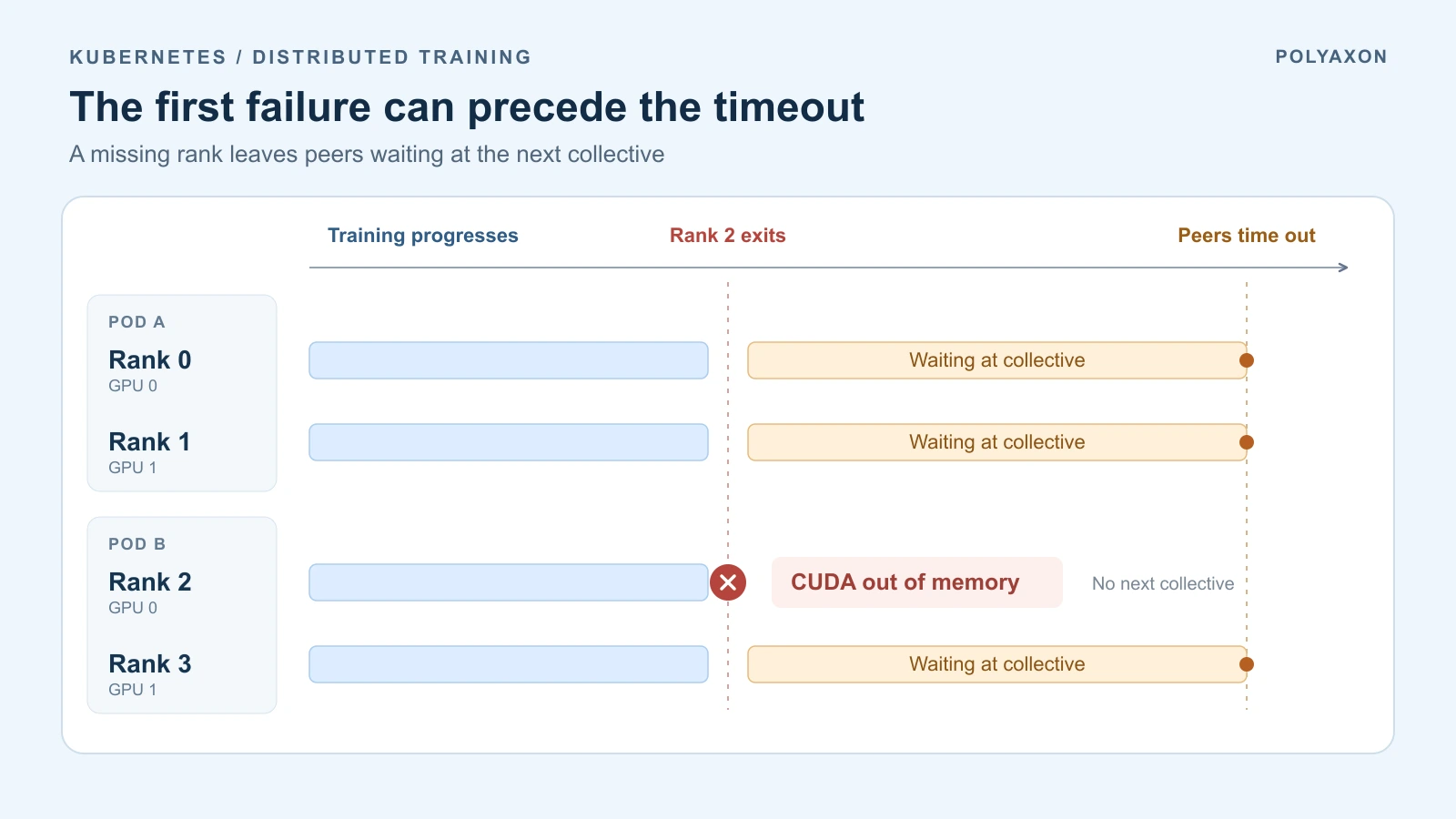
Illustrative event order, with no measured durations. A launcher may terminate peers sooner; the exact shutdown behavior depends on the job.
Start with a map of global rank, local GPU, Pod, node, and attempt. A Pod can contain several training processes, and its Running phase does not establish that every rank is healthy. Kubernetes reports container state; the launcher and application logs identify individual rank failures. Pod lifecycle reference.
For one affected Pod, capture the following before a controller removes it. Replace the example context, namespace, Pod, and training-container names:
CTX=training-cluster
NS=polyaxon
POD=training-worker-0
CONTAINER=pytorch

kubectl --context "$CTX" -n "$NS" get pods -o wide
kubectl --context "$CTX" -n "$NS" get pod "$POD" -o yaml > "$POD.yaml"
kubectl --context "$CTX" -n "$NS" describe pod "$POD" > "$POD.describe.txt"
kubectl --context "$CTX" -n "$NS" logs "$POD" -c "$CONTAINER" \
  --timestamps > "$POD.log"
Repeat the capture for every Pod in the same training attempt. Keep the rendered workload specification, image digest, PyTorch/NCCL versions, and launcher command with those logs. Application log lines should include rank and step so several processes writing into one container's output remain distinguishable.
If the training container restarted within the same Pod, also request its previous instance:
kubectl --context "$CTX" -n "$NS" logs "$POD" -c "$CONTAINER" \
  --previous --timestamps > "$POD.previous.log"
--previous retrieves the preceding container instance when available; it cannot recover logs from a deleted Pod. Compare timestamps across ranks, allowing for clock skew and buffered output. Look for the first exception, termination, or loss of progress, then follow what happened to its peers. kubectl logs reference.
Use the failure stage to choose the next check
| Evidence | What to investigate |
|---|---|
| Some ranks never finish rendezvous or process-group initialization | Confirm the expected ranks started, their world-size settings agree, and the rendezvous address and port are reachable from their Pods. |
| A rank exits before the others time out | Read its exception and container termination state. A CUDA OOM concerns GPU memory; Kubernetes OOMKilled records a host-memory kill. Exit code 137 alone does not establish the cause. |
| Ranks reach different collective calls | Check conditional branches, tensor shapes and dtypes, collective order, and whether every rank processes the expected number of batches. |
| One rank stops progressing before its next collective | Inspect data reads, preprocessing, checkpoint writes, and CPU contention on that rank's Pod and node. |
| NCCL logs show interface or fabric errors | Identify the selected transport and interfaces, then investigate connectivity and fabric health between the affected nodes. |
PyTorch's launcher reference defines rank and rendezvous settings, and its distributed debugging documentation describes collective consistency checks. Kubernetes documents host-memory limits and OOM termination; NVIDIA's networking guide covers interface selection and fabric diagnostics.
For a worker crash, use the existing DataLoader shared-memory guide when the earlier error is a bus error. For a slow input pipeline, check the CPU thread budget before adding more workers.
Enable diagnostics on every rank in Polyaxon
For a short reproduction, merge this into your existing Polyaxonfile. Keep its distributed runtime, image, launcher, GPU requests, queue, and other environment entries:
env:
  PYTHONUNBUFFERED: "1"
  NCCL_DEBUG: "INFO"
  NCCL_DEBUG_SUBSYS: "INIT,NET,COLL"
  TORCH_CPP_LOG_LEVEL: "INFO"
  TORCH_DISTRIBUTED_DEBUG: "DETAIL"
The simplified root-level env format is available in Polyaxon 2.18. It applies the settings to the runtime's main containers, including the master and workers of a PyTorchJob. Check the rendered Pods if a replica has additional overrides; every participating training process needs the diagnostics.
NCCL's INFO logging exposes initialization and transport details; the subsystem filter also includes collective logging. TORCH_DISTRIBUTED_DEBUG=DETAIL adds PyTorch consistency checks that can reveal incompatible collective calls. It adds overhead, so remove it after diagnosis. NCCL logging, PyTorch debug settings.
Keep this reproduction as a separate Polyaxon run with the original configuration available for comparison. Use its logs and linked Kubernetes workload to correlate the error with the actual Pods and nodes; a run's final status alone does not identify the first failed rank.
Preserve the collective history
PyTorch's Flight Recorder keeps a bounded history of collective events. Enable it before process-group initialization to investigate which operations ranks reached when the job stalled.
For this fragment, first configure a writable PVC connection named training-diagnostics that mounts persistent storage at /diagnostics on every training Pod. The storage must support concurrent mounts from those nodes. Create the writable directory /diagnostics/incident-01 there. Use a fresh directory for each attempt so restarted ranks cannot overwrite earlier traces. Then merge these additional fields into the same workload:
connections: [training-diagnostics]
env:
  TORCH_NCCL_TRACE_BUFFER_SIZE: "2000"
  TORCH_NCCL_DUMP_ON_TIMEOUT: "1"
  TORCH_NCCL_DEBUG_INFO_TEMP_FILE: "/diagnostics/incident-01/nccl_trace_rank_"
The buffer must be nonzero for timeout dumps. The filename prefix produces separate rank files. PyTorch 2.15 also accepts TORCH_FR_DUMP_TEMP_FILE; the older name above remains supported. See the ProcessGroupNCCL settings and trace-writer implementation.
Copy the completed files from one attempt into a local incident-01 directory. With that PyTorch release's Flight Recorder analyzer and its dependencies installed, inspect them with:
torchfrtrace --prefix "nccl_trace_rank_" ./incident-01/Compare collective sequence, participating ranks, and the last completed operations. Missing files are possible: a process killed abruptly cannot reliably dump its buffer. Persistent storage preserves files that were written. Flight Recorder tutorial.
Fix what prevented progress
If one rank exhausted GPU memory, reduce its batch or activation memory, or use a GPU with sufficient VRAM. If a collective sits inside a rank-0-only branch, move participation to all required ranks and keep only the printing or reporting conditional. If a loader exhausts its input on one rank, make batch participation consistent or use the training algorithm's supported uneven-input handling.
When the evidence points to the network, inspect the interface selected by NCCL and test the affected node pair. An interface being up does not guarantee it is reachable from the other node. The NCCL and RCCL validation walkthrough provides a separate communication test; use the same nodes and relevant transport settings when narrowing a training failure.
A longer timeout is useful when an otherwise correct operation legitimately needs more time. Establish that from progress and timing evidence first. An exited rank, a mismatched collective, or an unreachable peer needs a different change.