Budget PyTorch CPU threads on Kubernetes
Set PyTorch CPU threads, DataLoader workers, and native-library thread counts together within a Kubernetes container's CPU budget.
Adding DataLoader workers can leave a training job slower. Workers, CPU tensor operations, and image-processing libraries all compete for the training container's CPU time. More parallel work helps only while the container can keep up.
After checking DataLoader shared memory, look at how much CPU parallelism the job creates. PyTorch's multiprocessing guidance describes the contention that appears when processes each try to use too many CPU threads.
Start from the container's CPU budget
A CPU limit of 4 normally gives the container a CPU-time budget enforced through throttling. It does not reserve four dedicated cores or limit the process to four threads. Read the training container's effective request and limit in its Pod specification. The CPU limits overview explains the underlying controls.
Do not choose worker counts from os.cpu_count() alone: Python reports logical CPUs, which can exceed the container's quota. CPU affinity and quota are also different constraints. Python CPU-count reference, Kubernetes CPU enforcement.
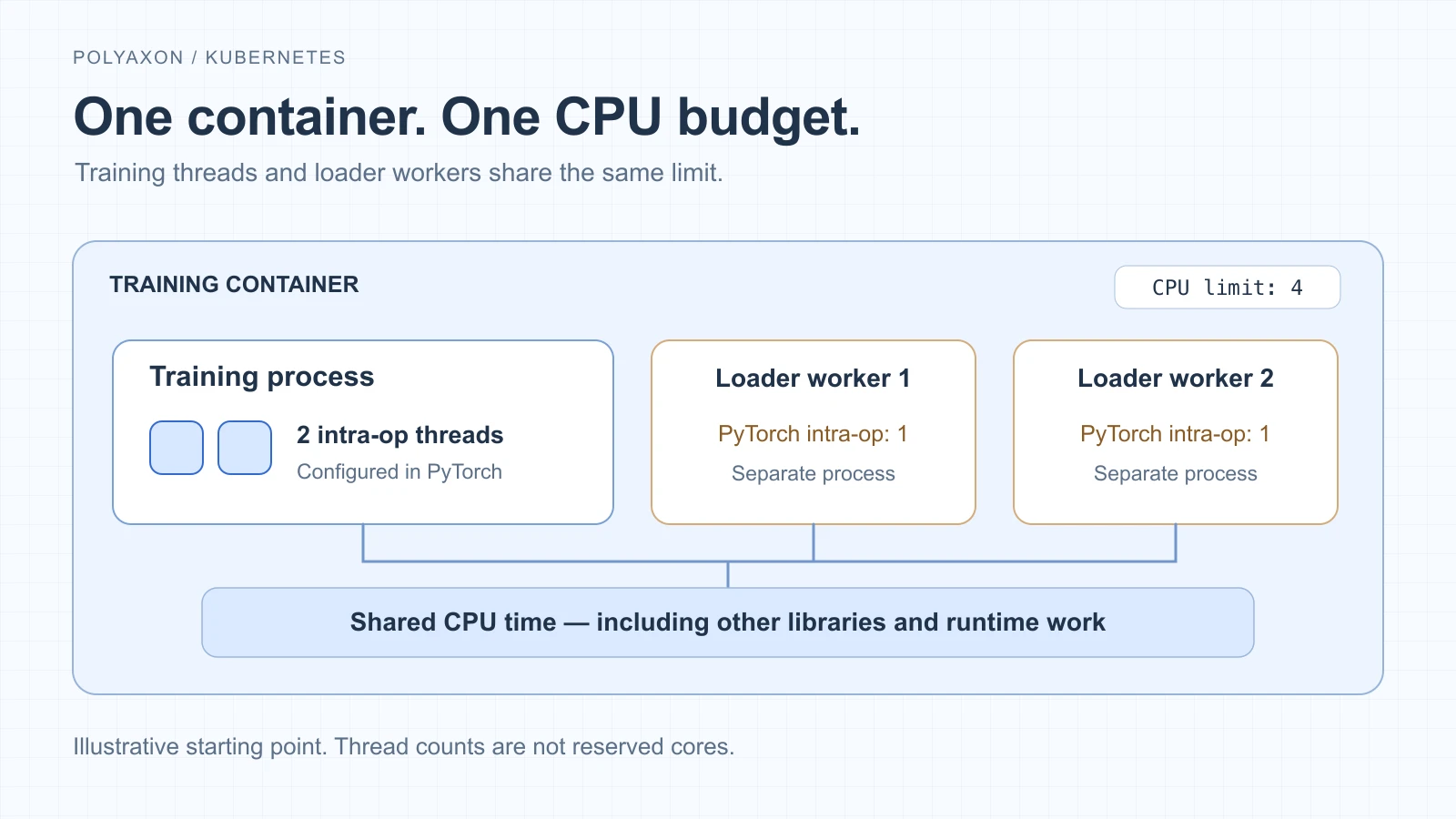
An illustrative starting point for one training rank. Thread counts are not reserved cores.
Set the workload and application together
For a single-GPU training process, start with two PyTorch intra-op threads and two loader workers under a four-CPU limit. These are values to compare with your existing configuration, not an optimum.
In Polyaxon, merge these fields into your existing Polyaxonfile, retaining its image, training command, GPU and memory settings. This uses the simplified format available in Polyaxon 2.18:
resources:
  cpu: "2..4"
env:
  OMP_NUM_THREADS: "2"
  MKL_NUM_THREADS: "2"
The range requests two CPUs and limits the container to four. It does not guarantee four CPUs under contention. Keep any other resources and env entries when merging. See resource scheduling for how Polyaxon places workloads.
At the start of your training entry point, before model or tensor work, set the CPU parallelism used within PyTorch operations:
import torch

torch.set_num_threads(2)
Call this in each training process. PyTorch requires set_num_threads before eager, JIT, or autograd work. It controls intra-op parallelism, not every thread in the process. In your existing DataLoader, set num_workers=2 while retaining the dataset, batch size, and other options.
Standard multiprocessing DataLoader workers already call torch.set_num_threads(1) during startup. They do not each inherit a two-thread PyTorch compute budget from this example unless your initialization overrides that behavior. Worker implementation.
The environment settings address OpenMP and MKL; MKL_NUM_THREADS takes precedence over OMP_NUM_THREADS for MKL. They are not a universal cap on native-library pools. For example, OpenCV has its own setNumThreads control. Inspect the libraries used by your transforms when workers still create unexpected CPU load. PyTorch threading variables, OpenCV threading controls.
Count every local training process
Four training ranks, each constructing a loader with two workers, create eight loader processes. If those ranks share one container, they share its CPU budget too. If they run in separate containers, inspect each container's limits. Revisit the settings when changing the number of GPUs or ranks rather than copying a single-process configuration unchanged.
Keep the setting that improves training
Compare a short, representative training segment with the same image, data, transforms, batch size, and GPU. Change worker count and intra-op threads separately. Record examples per second, time waiting for batches, CPU use, and CPU throttling.
If more workers increase throttling without improving throughput, reduce concurrency or revisit the CPU allocation. If CPU use is low while loading stalls, inspect storage and decoding before adding threads. Keep the chosen settings with the Polyaxon run so the comparison is reproducible. The PyTorch profiling walkthrough shows how to examine where training time goes.