Run background commands in Polyaxon sandboxes
Start a background process, save its execution ID, reconnect to status and logs, and distinguish command limits from the lifetime of a Polyaxon sandbox.
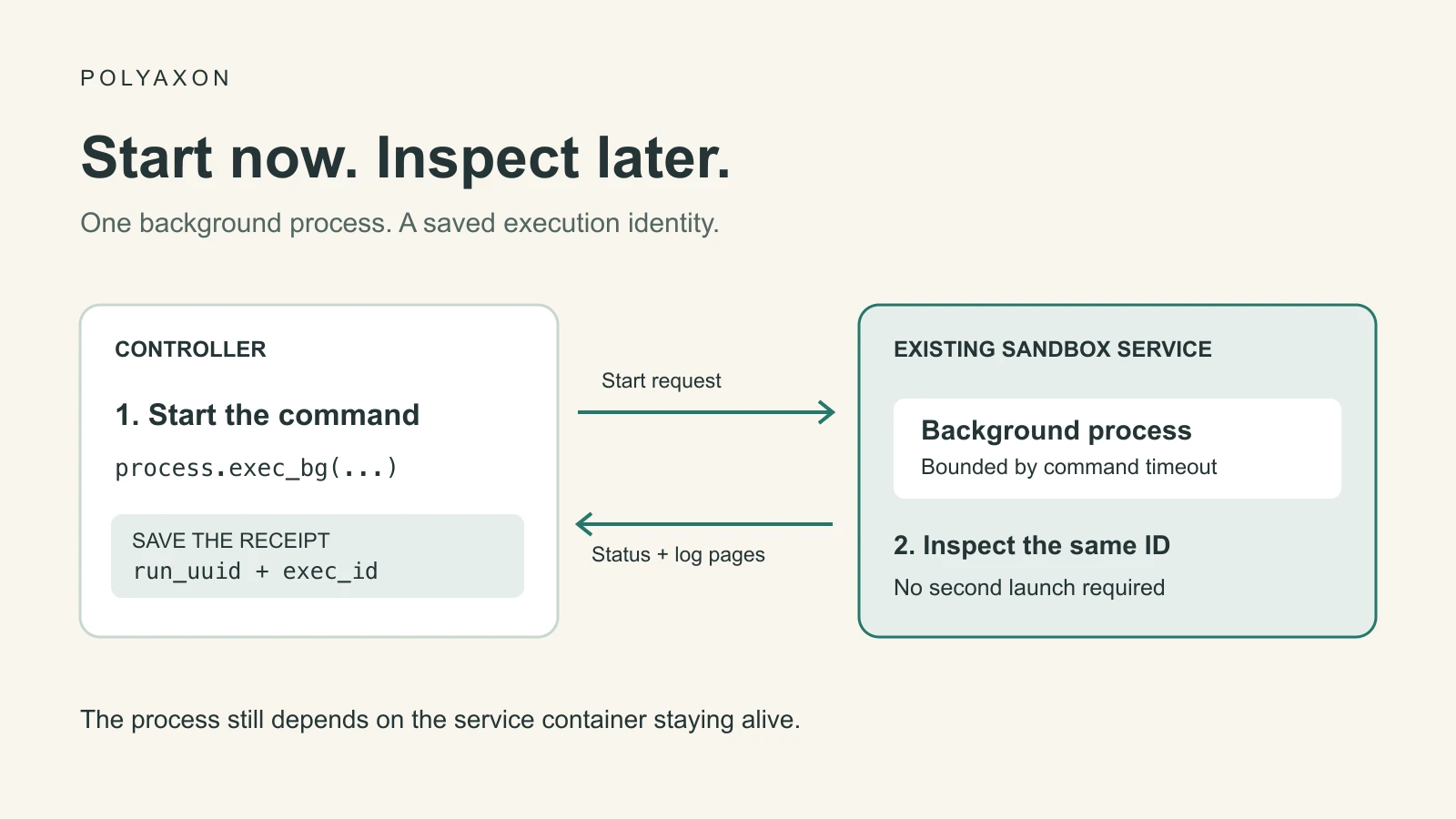
A dataset inspection, a compiler invocation, or a small evaluation can take longer than the request that starts it. In a Polyaxon sandbox, you can start that command in the background, retain its execution ID, and inspect the same process from a later controller session.
This is useful when an agent needs to do other work while a command runs, when a notebook launches a preprocessing step, or when a developer wants to disconnect from a long diagnostic command. The process runs inside the existing service container, using its installed packages, mounted files, and allocated compute.
Polyaxon v2.16 introduced the sandbox runtime and background execution support. This walkthrough focuses on the process lifecycle after a workspace is ready. Follow Set up a Polyaxon code execution workspace first if you need to create one.
Choose how to receive the result
The process API offers three useful interfaces:
| Interface | What the caller receives | Suitable use |
|---|---|---|
process.exec | Buffered result after completion | A short inspection or version check |
process.exec_stream | Incremental stdout, stderr, and completion events | Watch progress while keeping the request open |
process.exec_bg | An execution handle before completion | Save the identity and inspect the command later |
For an interactive terminal, use the PTY workflow. Background execution is a process-control interface: it does not provide a terminal session or create a separately scheduled Polyaxon job.
Start one bounded command
You need an authenticated Polyaxon Python client and access to an existing, running service with plugins.sandbox enabled. The service image must contain python; the demonstration uses only its standard library. Replace the owner, project, and run UUID below with the identity of that service. Keep its configured lifetime long enough for the command to finish.
Save this as start-background.py on your controller machine. It launches ten progress messages, approximately one second apart, with a 30-second server-side execution limit. It writes the process identity to a local receipt before closing the client.
import json
from pathlib import Path
from uuid import uuid4

from polyaxon.client import SandboxClient

target = {
    "owner": "YOUR_ORG",
    "project": "YOUR_PROJECT",
    "run_uuid": "YOUR_RUNNING_SERVICE_UUID",
}
receipt_path = Path("background-exec.json")
if receipt_path.exists():
    raise FileExistsError("Inspect the existing receipt before starting another command")

tag = "progress-" + uuid4().hex
print("Submission tag:", tag, flush=True)
client = SandboxClient(**target)
try:
    client.ping()
    bg = client.process.exec_bg(
        command=[
            "python", "-u", "-c",
            "import time\n"
            "for step in range(10):\n"
            "    print(f'step={step}', flush=True)\n"
            "    time.sleep(1)\n",
        ],
        timeout_ms=30_000,
        tag=tag,
    )
    receipt = {**target, "exec_id": bg.id, "tag": tag}
    print("Execution receipt:", json.dumps(receipt), flush=True)
    receipt_path.write_text(json.dumps(receipt, indent=2) + "\n")
finally:
    client.close()
Run it with python start-background.py. The saved exec_id identifies the command; run_uuid identifies its service. Retain both. A new command in the same service receives a different execution ID.
python -u and flushed writes make progress available promptly. A streaming client cannot display text that the application is still buffering. The expected messages are step=0 through step=9; these describe the example, not a measured execution result.
The local receipt is a teaching convenience for one controller. In an application, store this identity in durable task state. There is still a gap between submitting the command and saving its receipt: if a response is lost, inspect client.process.list(tag=tag) in the same service before deciding whether to submit again. A tag is a search label, not an idempotency guarantee.
Inspect the same execution later
Save the following as inspect-background.py beside the receipt. Each invocation reads status and up to 64 KiB from each log stream. It never launches another command.
import json
from pathlib import Path

from polyaxon.client import SandboxClient

receipt = json.loads(Path("background-exec.json").read_text())
client = SandboxClient(
    owner=receipt["owner"],
    project=receipt["project"],
    run_uuid=receipt["run_uuid"],
)
try:
    status = client.process.get(id=receipt["exec_id"])
    print("State:", status.state, "Exit code:", status.exit_code)
    for stream in ("stdout", "stderr"):
        page = client.process.logs(
            id=receipt["exec_id"],
            stream=stream,
            offset=0,
            max_bytes=65_536,
        )
        print(f"--- {stream} ---")
        print(page.data or "", end="")
        print("\nNext byte offset:", page.next_offset, "EOF:", page.eof)
finally:
    client.close()
Run python inspect-background.py while the process runs, or after it finishes while its record remains available. This small example deliberately rereads from offset zero. For a persistent log reader, save a separate cursor for stdout and stderr and pass the returned next_offset on the next request. Offsets count bytes, so use the server's cursor rather than the length of a decoded string.
If you still hold the original handle, bg.iter_stdout(timeout=20, interval=0.5) follows incremental output, and bg.wait(timeout=20) returns a terminal status. These are observation helpers; the timeout limits how long the caller waits. It does not cancel the process.
Inspect both state and exit code. exited with exit code zero is different from timed_out, failed_to_start, signaled, or orphaned. Successful process execution also does not prove that an evaluation passed its quality threshold; read the application's result artifact for that decision.
Keep the three lifetimes separate
| Limit | What it controls | What to do when it ends |
|---|---|---|
| Client wait or request timeout | How long the controller observes a response | Inspect the known execution before retrying work |
timeout_ms on the command | Server-side execution limit in milliseconds | Inspect terminal status and any partial outputs |
| Service timeout, culling, or manual stop | The container environment hosting the process | Preserve needed outputs before ending the workspace |
A detached process is still inside that service. It is not a durable job that survives Pod replacement, and its execution record should not be treated as an independent archive. For training or evaluation work that needs separate scheduling, retries, resource allocation, and a run record, submit a Polyaxon operation. Use background commands for work that belongs inside the current workspace.
If a command is no longer needed, send client.process.signal(id=exec_id, signal="SIGTERM") through a client targeting the same service, then inspect its status. Sending a signal is not proof that the process has already exited. Follow your application's termination policy before using a stronger signal.
Deleting an execution record with process.delete removes its record and captured logs; treat it as cleanup after confirming termination and retaining evidence. It is not the cancellation step.
Preserve results before ending the workspace
Captured output is useful during an investigation. Durable results belong in a file or artifact workflow: retrieve files through the sandbox filesystem API, save outputs on an appropriately configured persistent connection, or record them with Polyaxon artifact tracking. Logging code needs the client, credentials, and artifact configuration appropriate to the run.
The example attaches to an existing service and intentionally leaves that shared environment running. Stop a disposable service when its work is complete, after saving anything you need. Service lifetime controls provide the backstop; the controller still owns the decision to preserve results, terminate a command, or end the workspace.