What is GPU orchestration?
Understand how GPU orchestration connects workflows, queues, resource placement, and recovery across shared ML infrastructure.
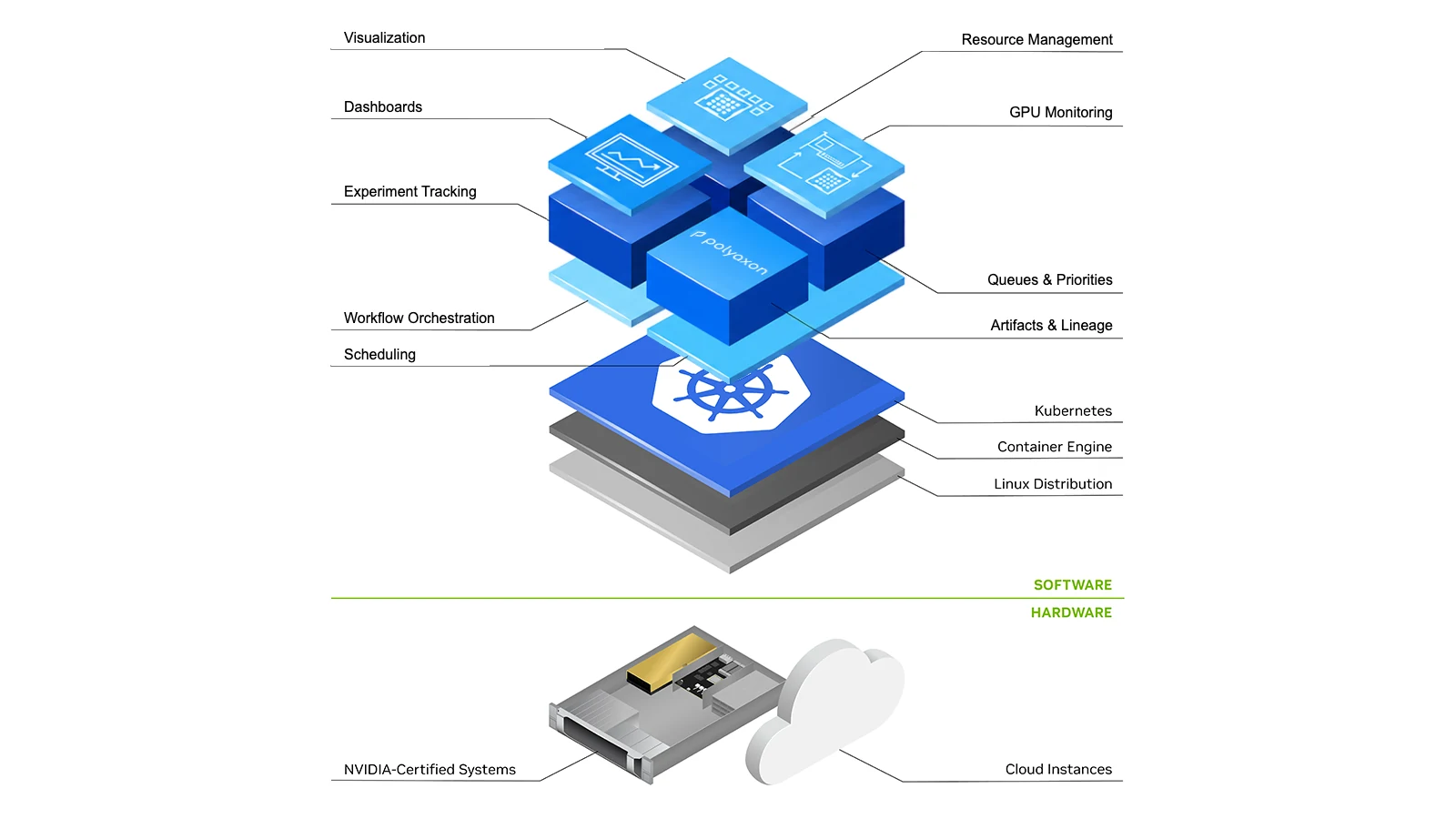
A training pipeline needs more than a free GPU. Its dataset must be available, its dependencies must have completed, its workers must fit on suitable machines, and its outputs must survive a failed attempt. Meanwhile, another team may need the same capacity for an interactive session or a production service.
GPU orchestration coordinates that entire lifecycle. Scheduling is one part of it: deciding which work can run and where. Orchestration also manages the dependencies, configuration, execution state, and recovery that make a resource allocation useful.
The distinction matters when a job is slow to start. Increasing queue priority will not fix an unavailable dataset, and changing the pod scheduler will not repair a workflow dependency that never completed.
GPU orchestration versus GPU scheduling
GPU orchestration turns a workload definition into a managed execution. GPU scheduling makes resource-allocation decisions within that execution path.
Different components answer different questions:
| Layer | Decision | Example |
|---|---|---|
| Workflow orchestration | Is this operation ready to run? | Start training after a data-validation step succeeds |
| Queue admission | May this workload consume resources now? | Hold a sweep until its queue has quota |
| Pod placement | Which eligible nodes should run its pods? | Place workers on nodes with the required GPU and network characteristics |
| Device allocation | Which device or supported device partition is assigned? | Allocate an advertised GPU resource to a container |
| Application runtime | How does the application use those resources? | Run distributed workers and synchronize their training steps |
| Recovery and cleanup | What happens after interruption or completion? | Retry safely, restore a checkpoint, and release resources |
These are responsibilities, not a requirement to install six separate products. A platform may cover several of them. What matters is knowing which component owns each decision and where to look when work stops progressing.
Why allocated GPUs can still be unproductive
Consider a hypothetical pipeline with three stages: CPU preprocessing, GPU training, and CPU evaluation. Giving every stage the same GPU-enabled runtime reserves accelerators for work that does not need them. Separating stage-specific resource requirements can release that capacity without changing the model.
A second workload might genuinely need four GPUs but spend much of its runtime waiting for data. It has an application or storage bottleneck, not necessarily a placement problem.
A third may need four GPUs on one node while the cluster has four free GPUs spread across four nodes. Aggregate capacity exists, but the requested shape does not fit.
Treat these as separate cases. GPU utilization metrics help distinguish allocation, device activity, and useful throughput. Orchestration gives those measurements the context of a run, stage, owner, and resource request.
Start with an explicit workload contract
A useful workload definition records more than a GPU count:
- The code and container image to execute.
- Inputs, data locations, and required credentials.
- CPU, host-memory, GPU-memory, and accelerator requirements.
- Node eligibility and any locality constraints.
- Dependencies and the condition that makes the operation ready.
- Timeout, retry, checkpoint, and output-handling behavior.
- Ownership, queue, and priority policy.
Keep hard requirements separate from preferences. A minimum GPU-memory requirement can determine whether a workload runs at all. A preference for a particular node pool may simply express a cost or performance choice.
With the conventional Kubernetes device-plugin model, GPUs are exposed as extended resources. GPU limits must be whole numbers, and requests must match limits when both are specified. A fractional allocation needs a supported sharing or partitioning mechanism; setting nvidia.com/gpu to 0.5 is not a portable way to request half a GPU. See the Kubernetes GPU scheduling guide.
Keep workflow concurrency separate from cluster capacity
Suppose a search generates 200 independent trials. That does not mean the cluster should receive 200 active GPU requests immediately.
Workflow concurrency controls how much work the search releases at once. Queue policy controls how that work competes with other projects. The pod scheduler still has to find eligible nodes for admitted work.
In Polyaxon, concurrency management distinguishes organization, queue, and pipeline limits. Queue management adds the organizational context of who can run which work and how much can be active.
A concurrency limit is not a utilization target. Ten small tasks and ten distributed jobs can consume very different resources. Use resource-aware limits where available, and inspect the actual request shape rather than assuming each operation represents one GPU.
Coordinate recovery with resource policy
Preemption is useful only when the consequences are understood. Evicting a worker can discard progress, invalidate a distributed run, or leave a partial output behind. A scheduler does not automatically make the application checkpoint-safe.
Before marking work as interruptible, test whether it can save state, restore it in a new process, and avoid publishing incomplete artifacts as final results. Include optimizer state, progress counters, and other state required by the application rather than assuming model weights alone are sufficient.
Also distinguish retry from resume. A retry may start the operation again from the beginning. A resume requires usable persisted state and an execution path that restores it. Polyaxon's resume and restart guidance is the relevant product reference; the training application remains responsible for its checkpoint semantics.
Where Polyaxon fits
Polyaxon combines reusable workload definitions with execution management, run tracking, and Kubernetes resource configuration. Its environment specification exposes scheduling controls such as node selectors, tolerations, labels, and scheduler selection. Resource scheduling defines the requested resources for the operation.
Commercial queues and agents add routing and policy across namespaces or clusters. Those controls do not erase the responsibilities of the underlying scheduler, device plugin, or workload controller.
For example, selecting KAI Scheduler through a workload environment is different from installing KAI and configuring its queues. Likewise, passing a Kueue label is useful only when it reaches an object that the installed Kueue integration manages. The scheduler comparison explains these integration boundaries.
Measure the complete path to a result
Record when work becomes ready, when it leaves the orchestration queue, when cluster admission completes, when all required workers become ready, and when useful computation begins. These timestamps separate policy delay from placement, startup, and application delay.
Judge improvements using completed work at the required quality, queue-time distributions, retry overhead, and resource-hours per result. A fuller cluster is not necessarily a better cluster if important work finishes later or repeatedly loses progress.
Start with the lifecycle and its bottleneck. Then choose the scheduling or application change that addresses it. For a practical sequence, continue with how to improve GPU utilization.